

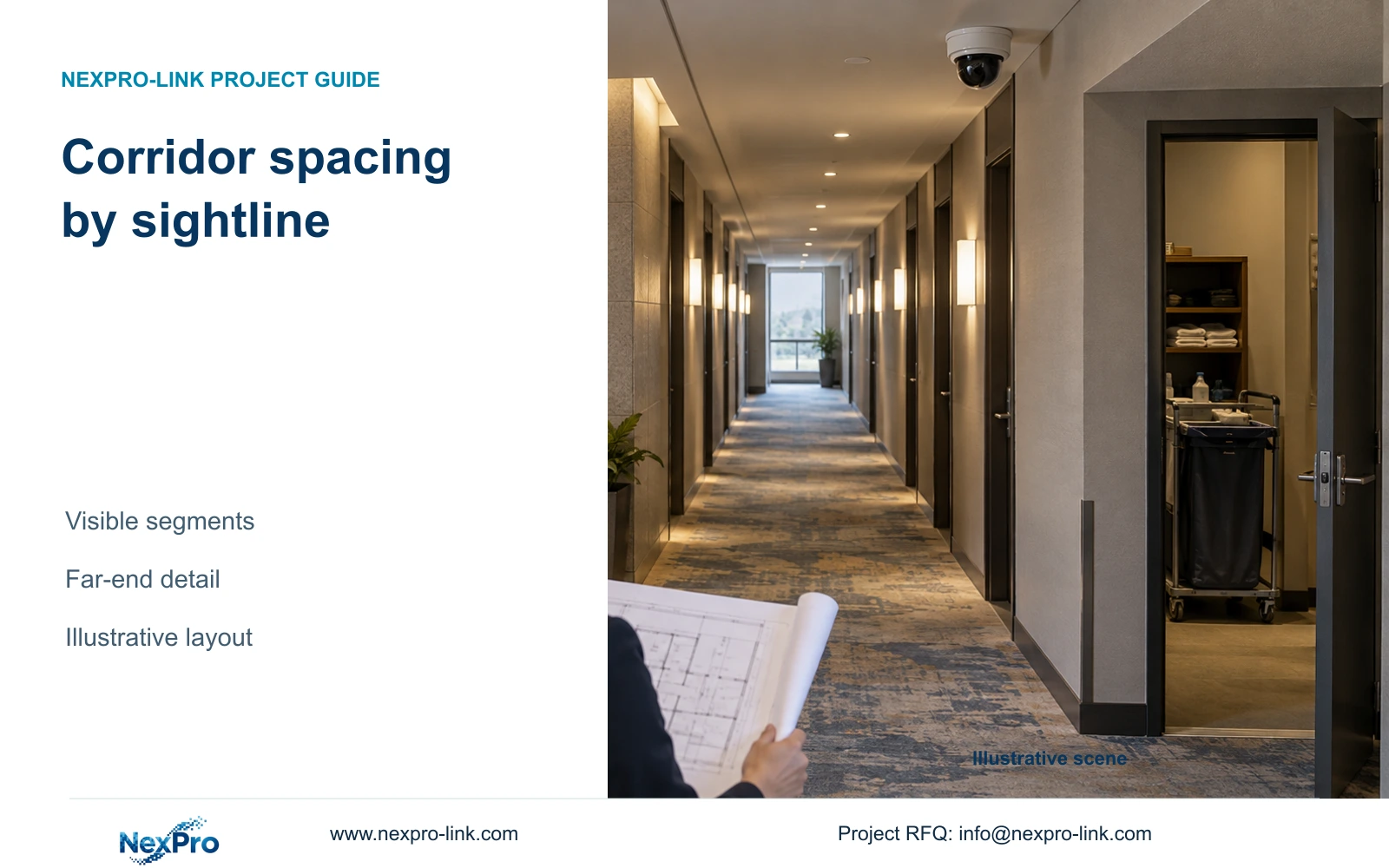
Divide a long hotel corridor into visible task segments before setting camera spacing. Door recesses, far-end detail and open-door privacy can change the layout.
Section 01
Divide the corridor into sightline segments
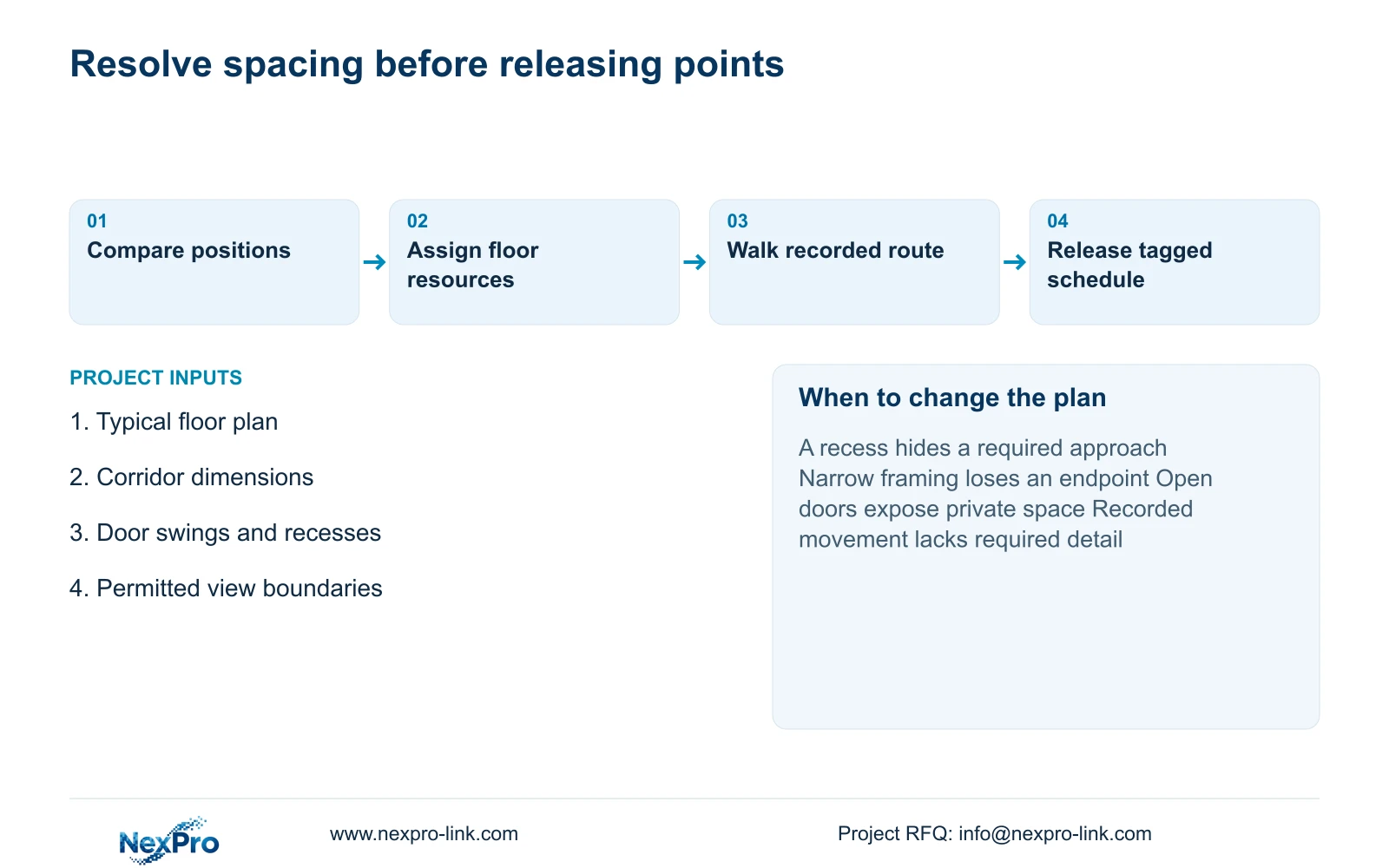
Set camera spacing from the public-route tasks that remain visible between obstructions. Use a fixed interval only for an early sketch. If a bend, door recess or required endpoint breaks the view, revise the position or add a separate view before releasing the installation schedule.
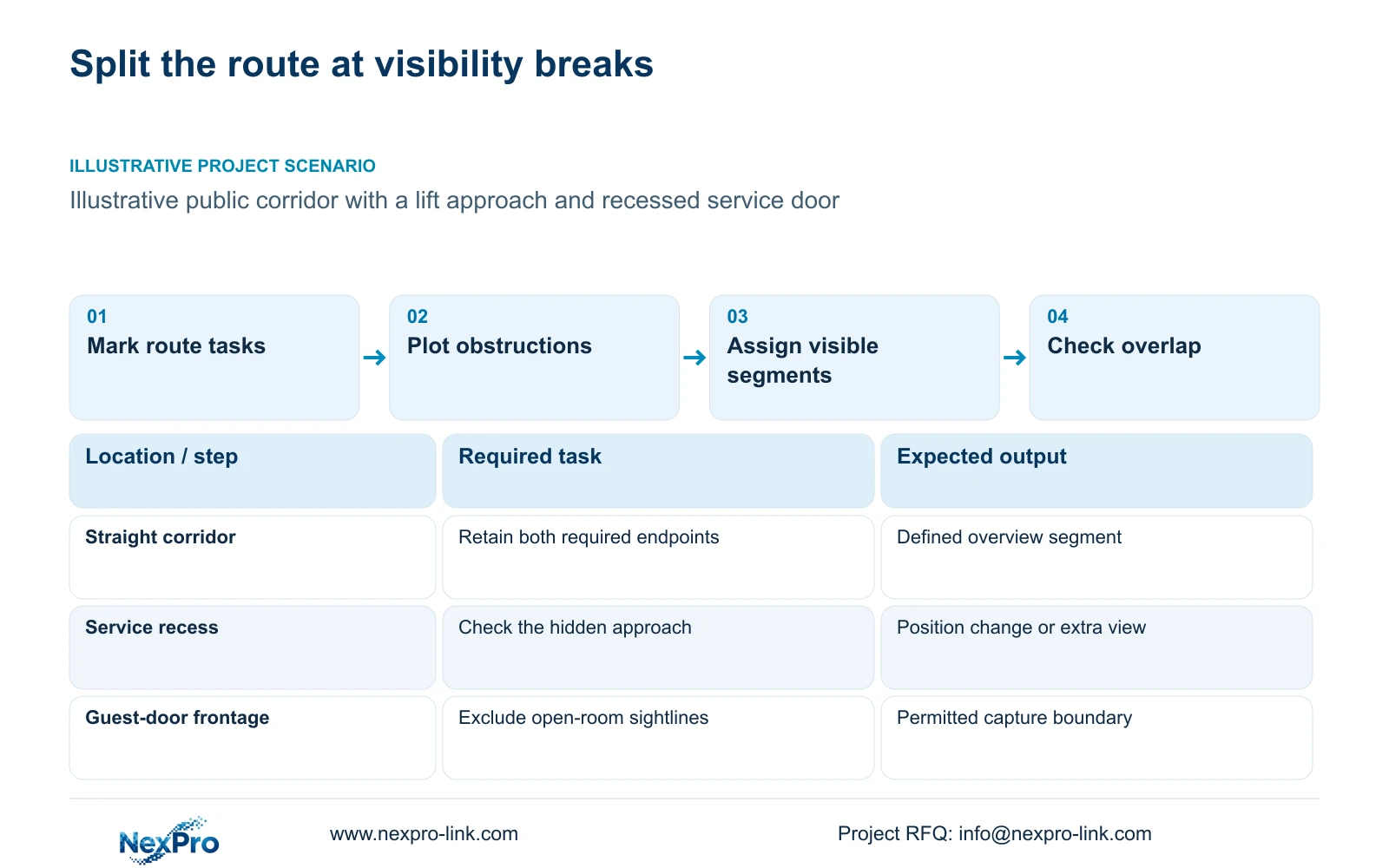
On the floor plan, mark where people enter the corridor, approach the lifts and pass service doors. Give each task a start and end boundary. A straight length may support one overview, while a recessed doorway may require a different angle even when it lies close to an existing camera. Guest-room count supplies no reliable spacing rule.
Separate overview tasks from detail tasks. An overview can establish movement along a route; a detail view must preserve the information needed at an agreed location. Combine these duties only where the proposed framing supports both. The schedule should explain why each view exists, allowing the buyer to challenge an extra camera without silently removing a required observation.
| Required task | Given information | Decision still needed |
|---|---|---|
| Follow movement toward lifts | Straight public corridor on plan | Visible start and end of the route |
| Observe a service-door approach | Door recessed from corridor wall | Position that sees the approach |
| Exclude open-room interiors | Guest doors face the route | Permitted framing and exclusions |
Section 02
Map doors and recesses
Add door swings and recess depth to the sightline drawing. A closed-door plan can conceal two different problems: the leaf may obstruct a required public view when open, or the opening may expose an unnecessary private view. These conditions need different corrections.
Use the door schedule to identify guest doors, staff doors and relevant public-route connections. For this camera decision, handing and normal operating position help establish the obstruction. Lock body, credential method and power arrangement remain separate access-system inputs. A battery-operated room lock does not become a PoE or rack UPS load because its door appears on the CCTV plan.
Compare the existing position with a location that looks along the corridor without looking through guest openings. Narrower framing may resolve excessive capture, but it can also remove a service-door approach. Record both effects. If access events are requested alongside video, identify the actual controller and software interface; a combined equipment order does not establish PMS integration.
| Condition | Position unchanged | Position revised | Effect on task |
|---|---|---|---|
| Recessed service door | Approach may remain hidden | Angle reaches the recess | Public approach becomes assessable |
| Open guest door | Interior may enter the view | Framing excludes the opening | Privacy boundary is retained |
Section 03
Calculate far-end detail
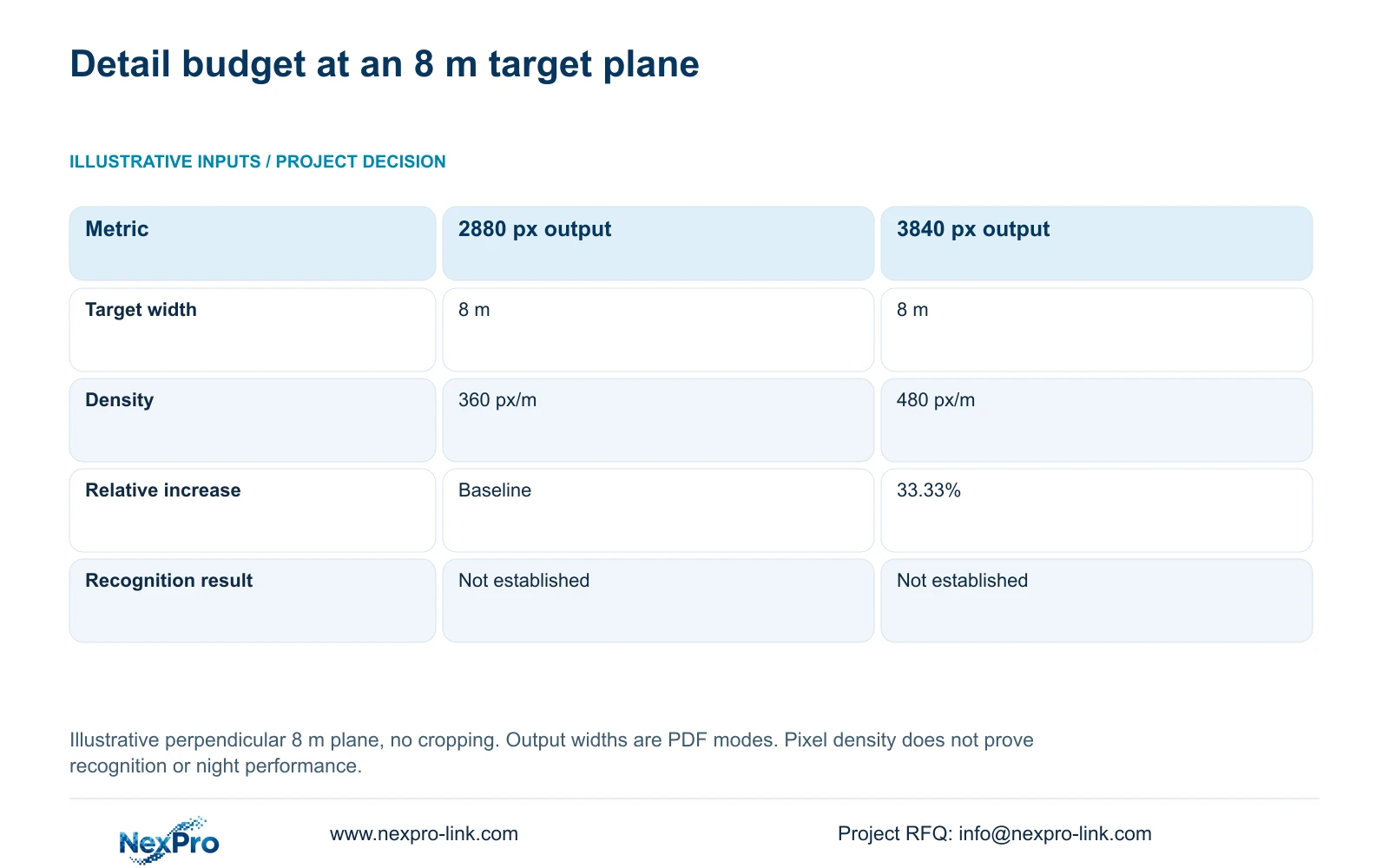
Calculate detail at the target plane that matters to the task. The illustrative comparison below uses an 8 m target-plane width, not an 8 m camera interval or corridor length. Horizontal outputs of 2880 and 3840 pixels come from the supplied DM2812M product PDF. The geometry assumes a perpendicular plane with no cropping.
Planning pixel density equals horizontal output pixels divided by target-plane width in metres. Thus 2880 ÷ 8 gives 360 px/m, while 3840 ÷ 8 gives 480 px/m. The second geometric budget is 33.33% higher. Neither result establishes recognition, night performance or an acceptable shutter setting.
NexPro-DM2812M55-5MP-DIC-AI lists a 2880×1620 main-stream mode; NexPro-DM2812M88-8MP-DIC-AI lists 3840×2160 at 25 fps. Both have a documented 2.8-12 mm lens range. That range does not supply an exact field of view for the proposed mounting position. Use the comparison to assess a visible target, then confirm framing and recorded movement under the relevant lighting.
| Metric / condition | Documented 2880 px output | Documented 3840 px output |
|---|---|---|
| Output width (px) | 2880 | 3840 |
| Same target width (m) | 8 | 8 |
| Planning pixel density (px/m) | 360 | 480 |
| Increase relative to A | Baseline | 33.33% |
| What is not proven | Recognition / night performance | Recognition / night performance |
Section 04
Compare opposing and intermediate views
Compare an opposing view with an intermediate position against the same route tasks. An opposing camera may provide a useful direction of observation where one view mainly records people moving away. An intermediate position may shorten the detail distance or see past a recess. Neither arrangement earns acceptance solely from camera count.
First test whether adjusting location or optical framing preserves the required overview and improves the difficult target. If narrowing the view loses an endpoint, retain an overview and assess a separate detail view. Increasing resolution can improve the pixel budget for visible content; it cannot recover content behind a wall or door leaf.
Consider maintenance access when choosing between otherwise workable positions. A location above a difficult ceiling detail may require a different access arrangement from an accessible corridor position. Include that installation scope in the comparison. Door-state checks and representative movement should remain identical between alternatives so the buyer can see which change resolves the original gap.
Section 05
Count floor network resources
Convert accepted views into tagged endpoints before calculating floor resources. Each added position needs an assigned switch port, a complete cable route and a supported recording profile. Check storage and recorder input from the selected streams, and calculate PoE demand from actual peak device power. Resolution alone supplies neither bitrate nor maximum watts.
NexPro SW-POE1618G is a 16-PoE-port, two-uplink inquiry candidate. Its supplied public record has conflicting access-port speed descriptions and no numerical total PoE budget. Those gaps prevent declaring it suitable from port count alone. Obtain a configuration response covering speed, per-port capability and simultaneous output power.
Price the resource change separately from the camera change. Reusing available infrastructure is reasonable only when cable reach, power and recorder capacity remain sufficient. The independent CASE03 reference has 48 views and its own system assumptions; its hotel totals must not be treated as the resources required by this corridor comparison.
| Retained outcome | Extra scope | Worth buying when | Counter-condition |
|---|---|---|---|
| Endpoint detail | Intermediate camera and link | Existing framing cannot retain detail | Relocation meets both tasks |
| Opposing movement view | Second stream and recording capacity | Direction limits the required observation | Accepted task needs overview only |
| Recording through an outage | Protected floor network power | Floor node is on the required path | Continuity task excludes that node |
Section 06
Confirm the route in a walk test
Use a repeatable walk route through the agreed endpoints, lift approach and service-door recess. Review recorded footage at the required points, including relevant open-door states and lighting conditions. A clear live preview does not establish that movement, retrieval and export satisfy the hotel task.
Record the camera tag, model, firmware and stream settings with the observations. Where a task fails, identify the missing view or detail and repeat the same route after the adjustment. Results from one representative segment support that segment and those conditions; they do not establish that every floor has identical geometry.
Release task-based spacing when the required segments remain visible and private openings stay outside the accepted capture boundary. Change the layout if door operation, lighting or the recorded walk exposes a gap. For a scoped proposal, send one typical floor plan, corridor dimensions and permitted coverage to info@nexpro-link.com. NexPro-Link can support model matching and BOQ coordination; local installation and acceptance responsibilities should be stated in the proposal.
Section 07
Buyer questions
Can the same camera spacing be repeated on every guest floor? Only where the task boundaries, door positions and installation conditions genuinely repeat. Mark exceptions such as different lift approaches or service recesses in the floor schedule instead of copying a typical-floor quantity unchanged.
Does the Dome series name establish vandal resistance? No. The supplied DM2812M PDF does not establish an IK10 rating from the housing name. If impact resistance is a purchase requirement, request model-specific evidence before accepting the candidate.
What should a first corridor quotation include? Request tagged views, model and lens candidates, assigned floor resources and the unresolved detail conditions. State the destination and any mandatory operator brand requirements. Guest footage and access passwords are unnecessary for the initial inquiry.
Engineering references
These sources support the general planning principles. Always use the selected product's current datasheet and applicable project standards for final design.


