After the accepted expansion, check new recording growth and the oldest accessible footage for the affected groups. Compare them with the revised estimate and configuration, noting that full-window observation may remain incomplete.
Section 01
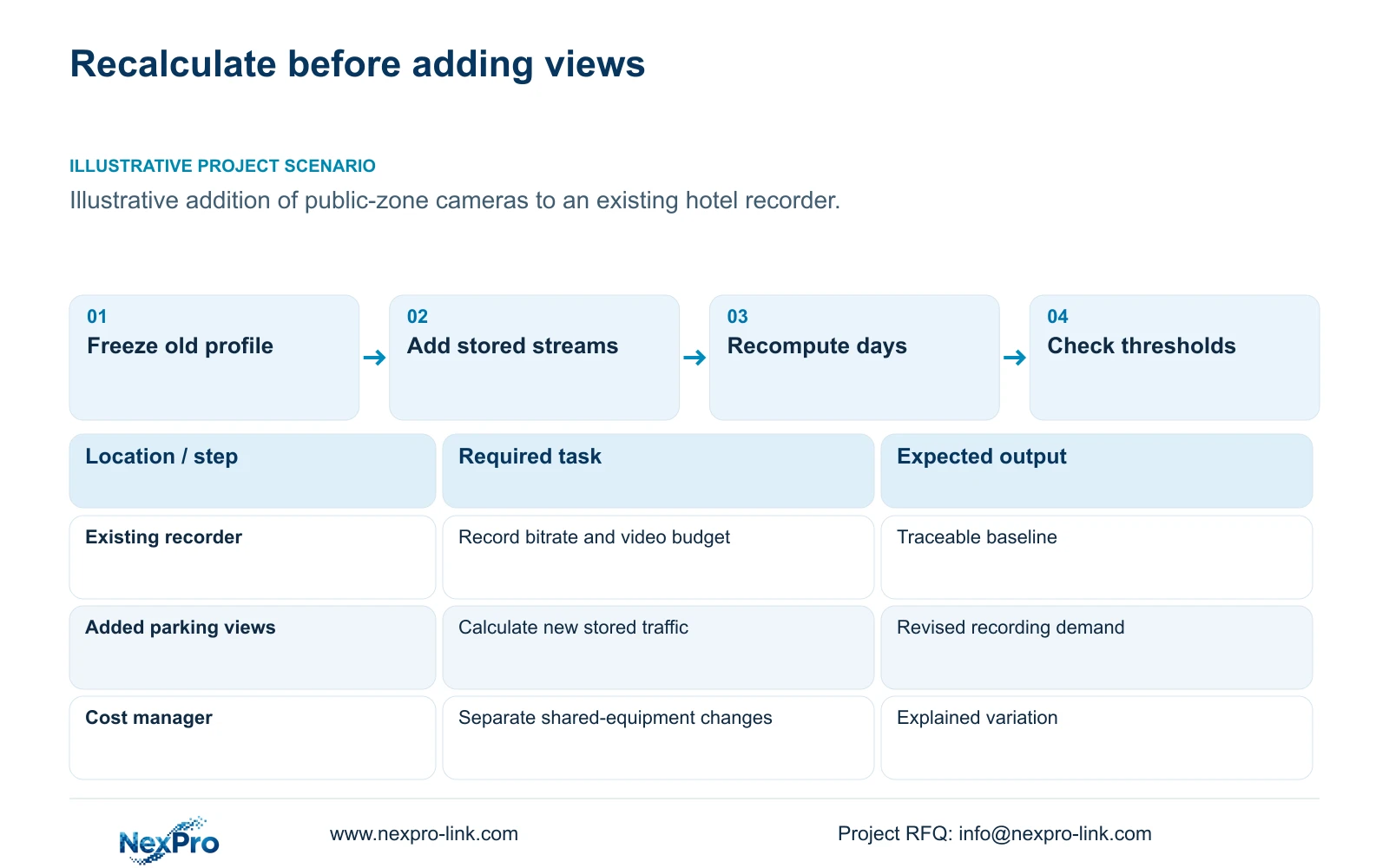
Freeze the existing recording profile
After the accepted expansion, check new recording growth and the oldest accessible footage for the affected groups. Compare them with the revised estimate and configuration, noting that full-window observation may remain incomplete. Investigate a mismatch before declaring retention restored; successful disk installation alone does not verify the promised history.
Recalculate retained days before approving additional cameras. At fixed video capacity and unchanged recording hours, retention falls in proportion to the increase in total stored bitrate. Add supported disk capacity when that restores the approved history within existing recorder limits. Change to a qualified grouped policy or recorder expansion when disk additions cannot preserve the requirement. Do not reduce necessary image detail to hide the shortage.
Keep a dated baseline showing camera groups, stored stream rates, recording schedules and approved retention. Record the disk arrangement, usable capacity and any space reserve separately. The old quotation also needs a clear scope boundary so the cost manager can distinguish equipment additions from changed specifications or newly included support.
The separate hotel reference assumes 32 cameras at 4 Mbps each, continuous recording and a 30-day target. Those are teaching inputs, not values inferred from megapixels. Use actual configuration records for a live expansion. An existing '30 days' statement needs an associated bitrate and capacity basis before it can serve as the starting point for a variation.
| Required task | Given information | Decision still needed |
|---|---|---|
| Preserve recording history | Old camera and stream schedule | Revised data rate and usable budget |
| Reuse existing equipment | Recorder and disk identities | Supported remaining capacity |
| Explain the variation | Original quantities and scope | Quantity, specification and shared changes |
Section 02
Add the new stream load by camera group
Calculate added recording traffic from the new cameras' stored profiles. For an explicitly illustrative extension of the 32-camera reference, eight additional cameras at the same assumed 4 Mbps add 32 Mbps. The old 128 Mbps becomes 160 Mbps. This 40-camera engineering scenario is separate from the 32-to-36 quantity example used later to explain costs.
If the added views use different rates or recording hours, calculate their data separately. A parking detail view and a public-route overview need not produce the same stored load. Preserve the selected image task and document the bitrate assumption or measurement. An unsupported fixed saving from an encoding label cannot substitute for this step.
Check dependencies while calculating the streams. Additional channels may require more PoE ports or output power and can change the protected AC load. Network traffic belongs on the links that actually carry it. These thresholds can create shared-resource costs even when each camera appears to be a small unit-price addition.
Section 03
Recompute retained days at fixed video capacity
Use retained days = video budget in decimal TB divided by daily video TB. For continuous recording, daily video TB = aggregate Mbps × 0.0108. In the illustrative 128-to-160 Mbps extension, a fixed budget that exactly held 30 days at the old rate would hold 30 × 128 ÷ 160 = 24 days. This ratio assumes unchanged hours and the same capacity boundary.
Do not describe every 32-camera system as falling to 24 days. The complete reference has an assumed 48.64 TB video budget after formatting and reserve, which differs from a budget sized exactly to its 30-day requirement. Recalculate from the actual available budget. Keeping those boundaries visible prevents an illustrative ratio from becoming a misleading project prediction.
Calculate required usable space by dividing the new video payload by 0.80 when the project retains a 20% free-space target. Apply array losses and formatting separately. A hot spare remains outside active video space. Compare the revised demand with the supported disk arrangement before pricing a remedy; the cost table below explains a variation method and supplies no retention result.
Section 04
Check thresholds and explain their commercial effect
Review channel count, input bandwidth, image modes, disk positions and drive limits independently. NexPro-NVR4449-4K lists 49 channels, 320 Mbps input and four SATA positions with 18 TB per disk. Its summary lists 49 × 5MP or 9 × 4K; spare channels do not establish every mixed resolution mode. NexPro-NVR2232-4K has conflicting 2 × 8 TB and 2 × 18 TB fields, which must not be resolved by selecting the larger value.
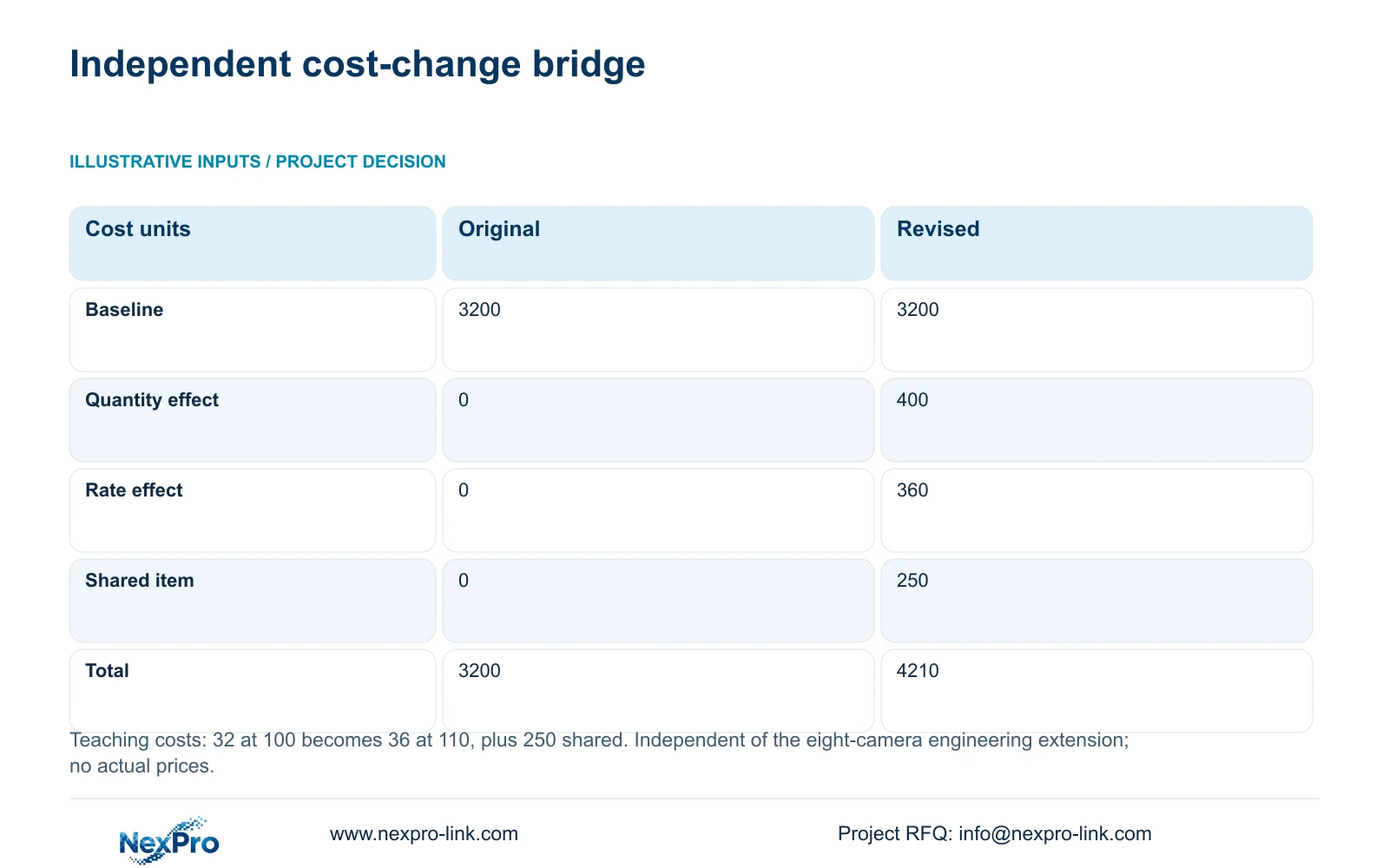
Use a fixed sequence to explain price changes. The independent teaching example starts with 32 items at 100 cost units and revises to 36 at 110, plus a 250-unit shared item. Original cost is 32 × 100 = 3200. Quantity adds (36 minus 32) × 100 = 400; the revised rate adds 36 × (110 minus 100) = 360.
The final 4210 is therefore 1010 units above the baseline. These figures are not prices, an eight-camera extension or the cost of the reference hotel. The method helps a buyer see whether a storage remedy adds quantity, changes specification or crosses a shared-equipment threshold.
| Metric | Original: 32 at 100 | Revised: 36 at 110 |
|---|---|---|
| Original total | 3200 | 3200 |
| Quantity effect | 0 | 400 |
| Rate/specification effect | 0 | 360 |
| Shared-resource change | 0 | 250 |
| Final teaching total | 3200 | 4210 |
Section 05
Compare disks, grouped policies and recorder expansion
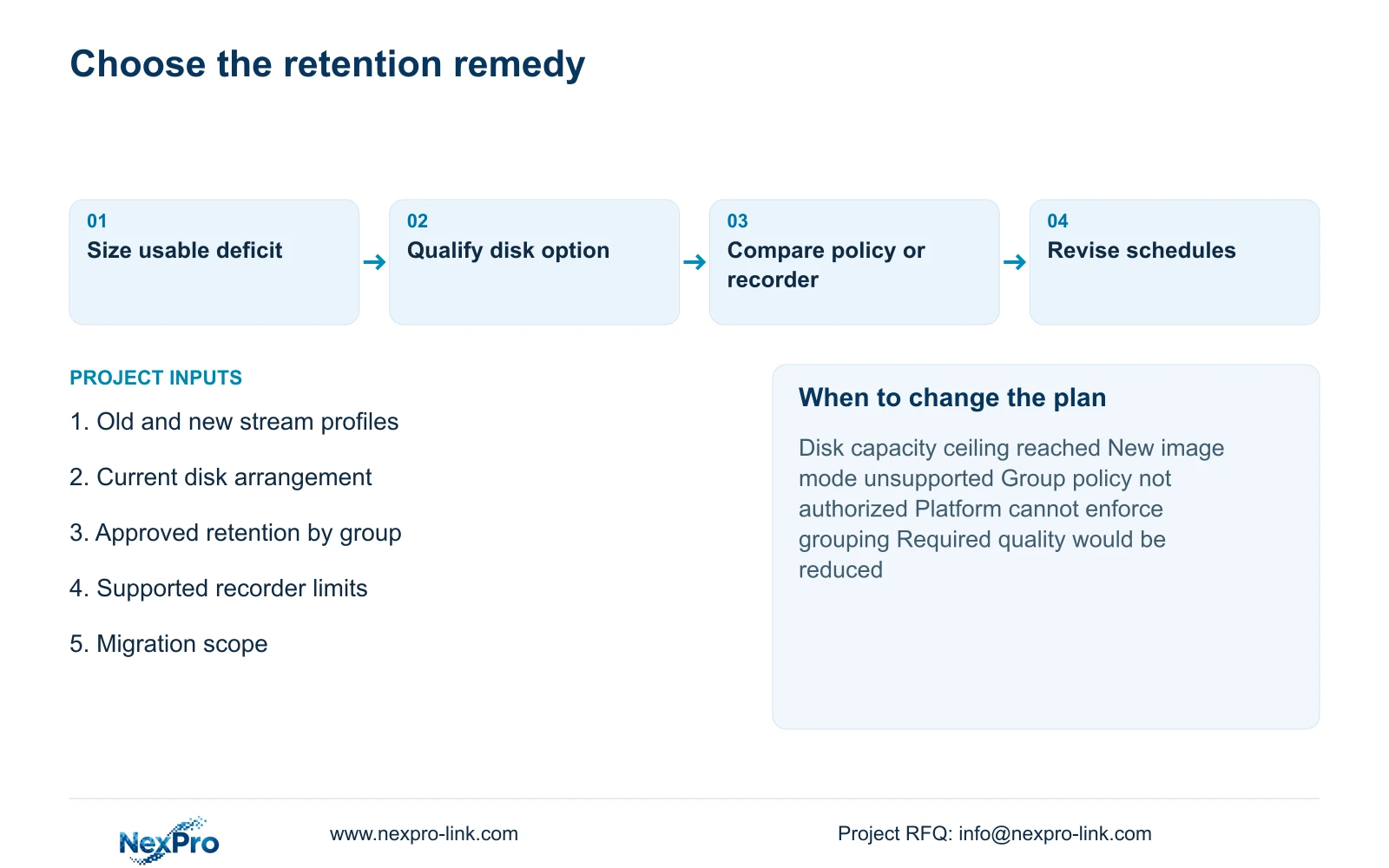
Adding or replacing supported disks is the first candidate when the existing recorder has a suitable arrangement and sufficient recording capability. Include the migration work and treatment of existing footage. A physically larger drive is useful only when its capacity and configuration are supported and its resulting video budget closes the retention gap.
A grouped recording policy can be considered when different zones have approved different retention needs. Calculate each group separately and confirm the recorder implements the intended policy. This option is unsuitable when the required history applies equally to all cameras or when the platform cannot enforce the grouping. Any changed policy belongs to the hotel's authorized decision.
Recorder expansion addresses limits that disks alone cannot solve, including channel or supported-mode constraints. It adds retrieval paths and maintenance duties that should be included in the comparison. Keep the same necessary recording outcome across remedies, then compare complete equipment and service scope.
| Remedy | Worth considering when | Change condition |
|---|---|---|
| Supported disk increase | Recorder remains suitable | Disk or usable-capacity ceiling reached |
| Approved group policies | Zone purposes justify different history | Policy uniform or grouping unsupported |
| Recorder expansion | Existing limits block the new task | Additional operation and service scope unacceptable |
Section 06
Issue revised camera and disk schedules together
Update the camera schedule with the added positions and recording profiles, and update the disk schedule with active capacity, spare roles and reserve assumptions. Preserve the earlier revision. Identify reusable material, cancelled items and remaining site work so the quotation cannot charge the same resource twice.
Separate supply, arrival, installation and a usable recording system in the programme. A capacity calculation does not authorize a purchase or establish delivery dates. If a recorder replacement is required, include preservation of authorized events and verification of the new recording profile in the project work.
Recommend supported disk expansion when it meets the revised retention and hardware limits. Switch remedies when those limits or approved policies prevent it. Send old and new camera schedules, recorded rates, disk layout and required retention to info@nexpro-link.com. NexPro-Link can assist with BOQ reconciliation and model matching; the proposal should name local migration work and supply responsibilities.
| Situation | Required record | Decision boundary |
|---|---|---|
| Expansion begins | New writes and usable configuration | Confirm capture, not yet full retention |
| Oldest footage checked | Accessible date by group | Record observed history and incomplete window |
| Estimate and history disagree | Rates, schedule and disk evidence | Investigate inputs before claiming restoration |
Section 07
Buyer questions
Can eight cameras shorten history without causing an NVR alarm? They can increase the data written while remaining within channel and input limits. Recalculate the available days and verify actual retrieval; acceptable hardware status does not establish the retention target.
Does the 4210-unit example price the eight-camera expansion? No. It is an independent 32-to-36 teaching variation that separates quantity, rate and shared-resource effects. The eight-camera storage change needs its own quantities and scope-matched quotation.
Can reducing bitrate avoid buying storage? Only if the revised recorded quality still satisfies the approved observation task. Do not lower necessary detail solely to make the capacity calculation fit.
Engineering references
These sources support the general planning principles. Always use the selected product's current datasheet and applicable project standards for final design.