

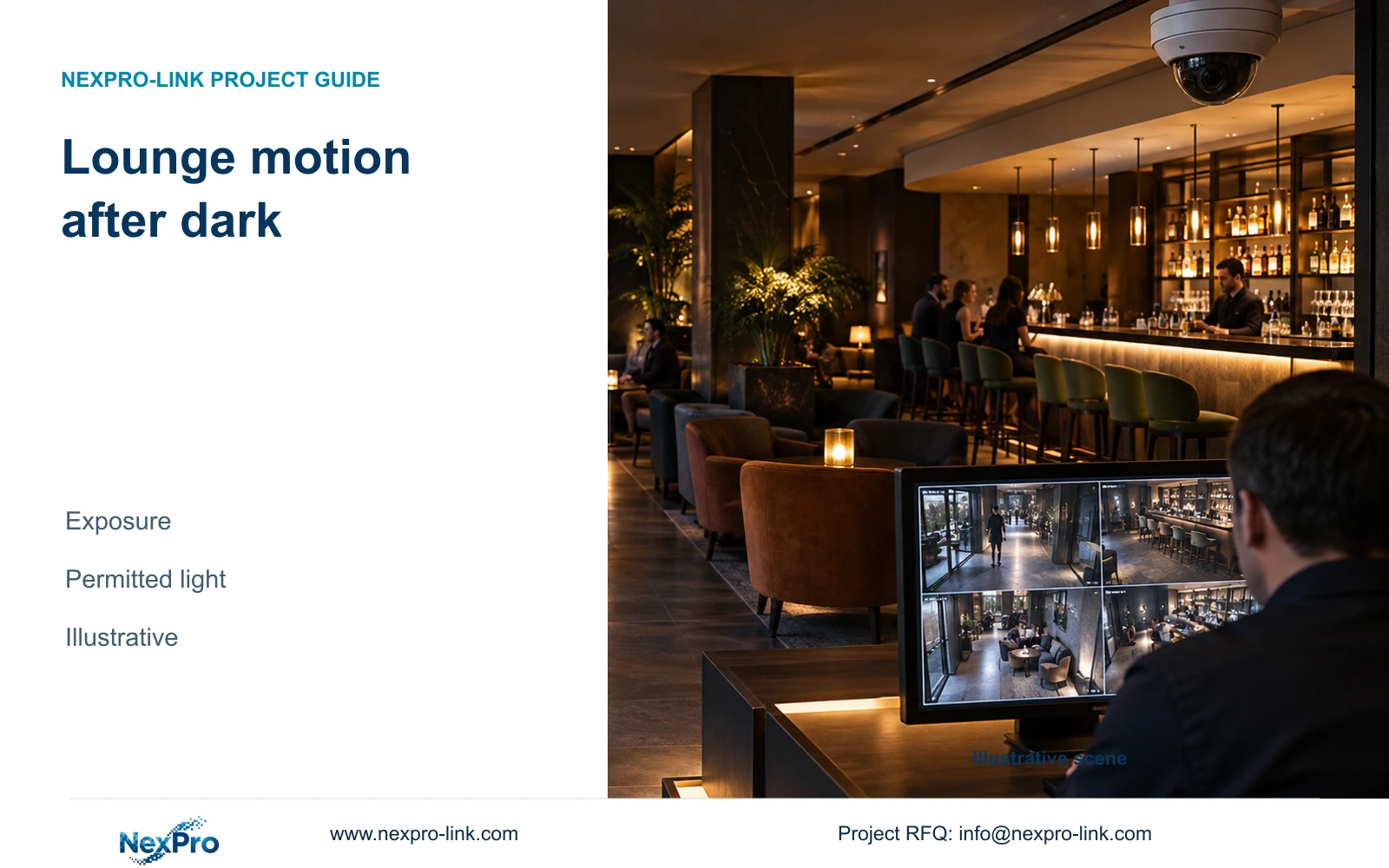
Record each permitted lighting scene with the moving action it must preserve. When dimming or decorative lighting changes, retest that action and the affected recording profile rather than copying corridor settings.
Section 01
Choose the incident action that must remain visible
Record each permitted lighting scene with the moving action it must preserve. When dimming or decorative lighting changes, retest that action and the affected recording profile rather than copying corridor settings. Retain an untested scene as open. Do not increase disturbing visible illumination without the hotel's operating approval.
Select the night recording profile that preserves the required moving action under the lounge's permitted lighting. Use a shorter exposure when recorded movement loses useful detail, provided the resulting image still has adequate illumination and acceptable noise. If that balance cannot be achieved, revise the light or camera position before accepting the profile.
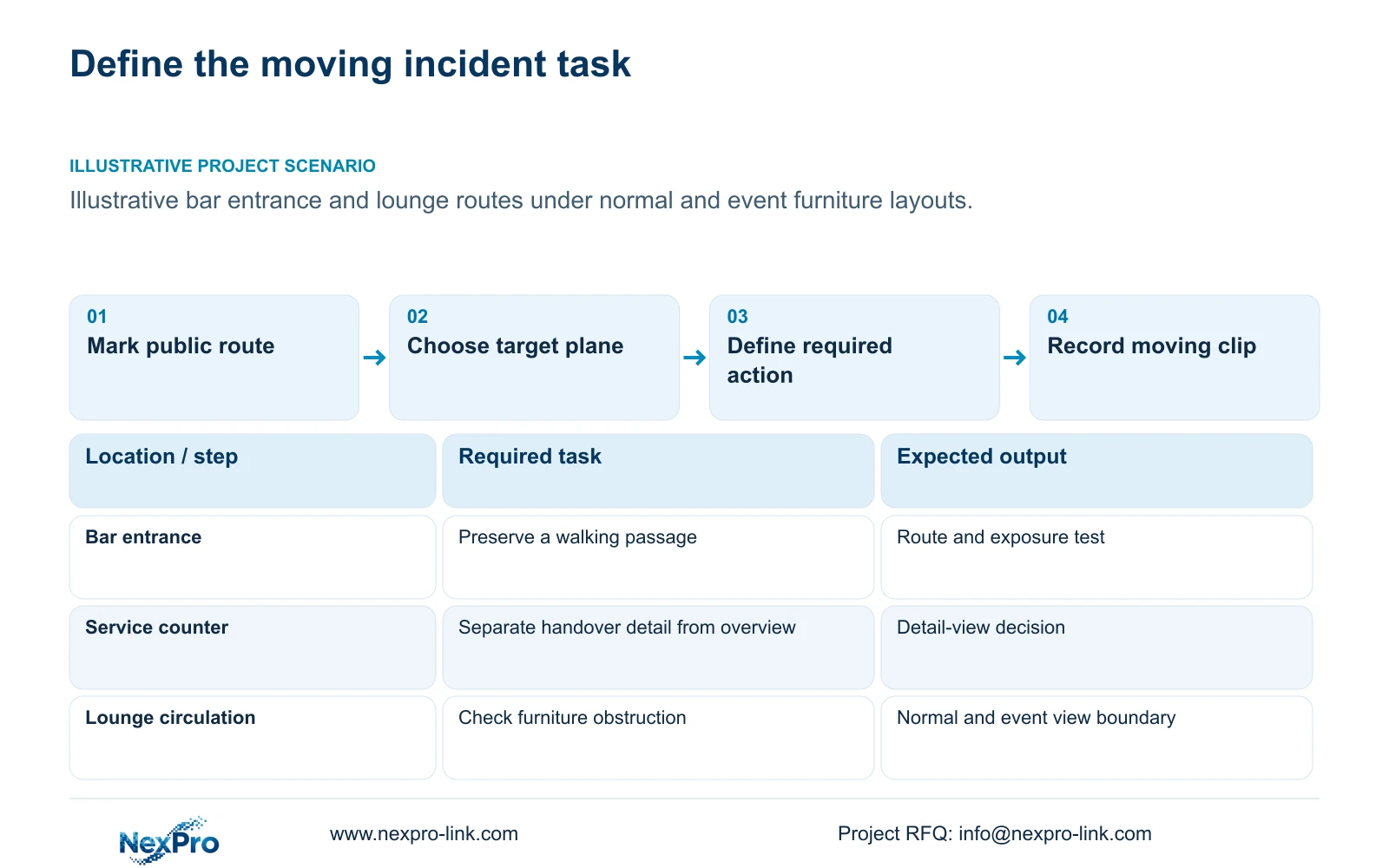
Define the action at a specific public location: a person passing the bar entrance, a handover at a service counter, or movement along a lounge circulation route. State whether the operator needs an overview of the sequence or detail at a narrower observation point. One wide view may be unsuitable for both tasks.
Normal seating and event furniture can change the route and obstruct the target plane. Mark the relevant route on both layouts and identify the permitted camera positions. Keep private spaces outside the coverage boundary, and treat audio as a separate authorized decision even when the hardware includes it.
| Required task | Given information | Decision still needed |
|---|---|---|
| Review passage through the bar entrance | Public route changes with event seating | Target plane and unobstructed camera position |
| Review a service-counter handover | A broad lounge overview is also wanted | Whether a separate detail view is necessary |
Section 02
Separate still-image brightness from moving detail
A long exposure can produce an appealing image of an empty lounge while allowing a walking subject to travel across several pixels during each exposure. The recording may show where the person went but lose the detail needed to interpret the action. Evaluate that distinction using recorded movement, including the actual playback view.
Frame rate controls how often the system samples a position. Exposure time controls how long each image collects light. Both matter, but raising frame rate does not by itself resolve blur within a frame. A camera recording at 25 fps can still use an exposure that is unsuitable for the selected moving task.
Keep the comparison consistent. Use the same route, viewing direction and target width, then record the exposure, lighting mode and stream settings for each clip. Compare normal playback and relevant individual frames. Unmatched screenshots cannot show whether improved brightness came from a slower shutter, different illumination or a different scene.
| Item | Still-image review | Recorded route review | Effect on selection |
|---|---|---|---|
| Brightness | Shows static appearance | Shows appearance during movement | Reject brightness gains that obscure the required action |
| Motion | May conceal exposure blur | Allows sequence and frame inspection | Choose settings against the moving task |
Section 03
Estimate exposure travel at walking speed
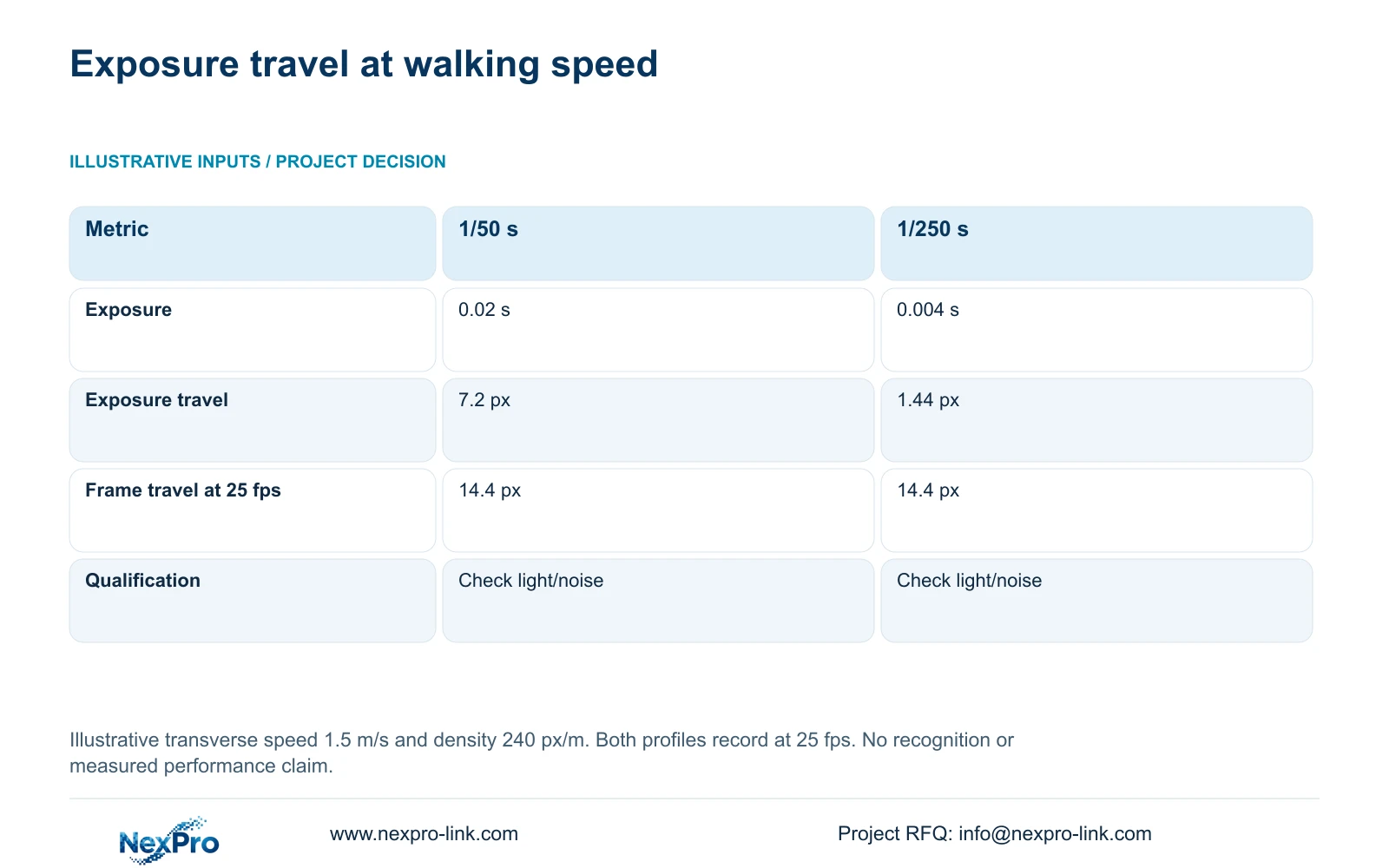
The illustrative calculation assumes transverse movement at 1.5 m/s and a planning image density of 240 pixels per metre at the target plane. Both profiles record at 25 fps. These are teaching inputs, not measured lounge conditions or guaranteed recognition performance.
Exposure travel in pixels equals speed in metres per second multiplied by exposure seconds and pixels per metre. At 1/50 s, the result is 1.5 × 0.02 × 240 = 7.2 pixels. At 1/250 s, it is 1.5 × 0.004 × 240 = 1.44 pixels. Frame-to-frame travel equals speed divided by frame rate, multiplied by image density: 1.5 ÷ 25 × 240 = 14.4 pixels in both profiles.
The shorter exposure reduces travel during image formation, while the sampling interval remains unchanged. Use it as the comparison candidate when blur is the problem. Confirm the light and noise balance in recorded footage before adopting it; the geometric result does not establish a universal acceptable-blur threshold.
| Metric / condition | 1/50 s exposure | 1/250 s exposure |
|---|---|---|
| Exposure seconds | 0.02 | 0.004 |
| Transverse image travel during exposure (px) | 7.2 | 1.44 |
| Frame-to-frame travel at 25 fps (px) | 14.4 | 14.4 |
| Additional requirement | Suitable image quality at the light level | Usually needs a different light/noise balance |
Section 04
Compare lighting modes on the same route
Separate seeing a subject's outline, retaining colour and preserving moving detail. Infrared, visible illumination and event-triggered supplementary light have different consequences for those tasks. Check the selected model's supported modes and switching behaviour before specifying a night profile.
Visible light may suit a public entrance where colour is required and the hotel accepts the illumination. In a lounge with sensitive lighting design or nearby private accommodation, an appropriate infrared configuration or a revised position may be preferable. Glass and reflective finishes also warrant attention because the intended light can produce distracting reflections.
The supplied DM2812M product PDF identifies NexPro-DM2812M88-8MP-DIC-AI as an 8MP model with 3840×2160 at 25 fps, a 2.8–12mm motorized lens, dual light, PoE and IP66. Those fields make it a candidate for evaluation. They do not prove the required night result, an exact field of view, or a verified maximum power demand. Motorized zoom does not provide PTZ patrol.
Section 05
Record bitrate under the busiest relevant conditions
After selecting a promising exposure and light combination, review the recording stream under representative busy conditions. Movement and low-light noise belong in the measurement plan. Record the configured bitrate limits and observed average rate, keeping each camera group identifiable. Resolution and codec names alone cannot determine storage demand.
Calculate video capacity from each group's camera count, average Mbps, daily recording hours and approved retention period, then add the groups. Use decimal TB and convert bits to bytes. If 20% of usable capacity must remain free, divide the video requirement by 0.80. A fixed encoding-saving percentage should not replace this calculation.
Keep the recorder's input bandwidth, supported image modes, disk layout and playback workload separate. Reducing viewing substreams can ease operator workload without reducing the recorded main stream. If the chosen night profile raises recording demand beyond the supported configuration, revise storage or recording hardware while retaining the required motion task.
| Retained outcome | Extra scope | Worth buying when | Change condition |
|---|---|---|---|
| Useful moving detail | Permitted supplementary light | Existing illumination cannot support the selected exposure | Light disturbance requires a different mode or position |
| Approved recording retention | Supported storage or recorder capacity | Qualified streams exceed the original capacity budget | Measured demand fits the existing supported configuration |
Section 06
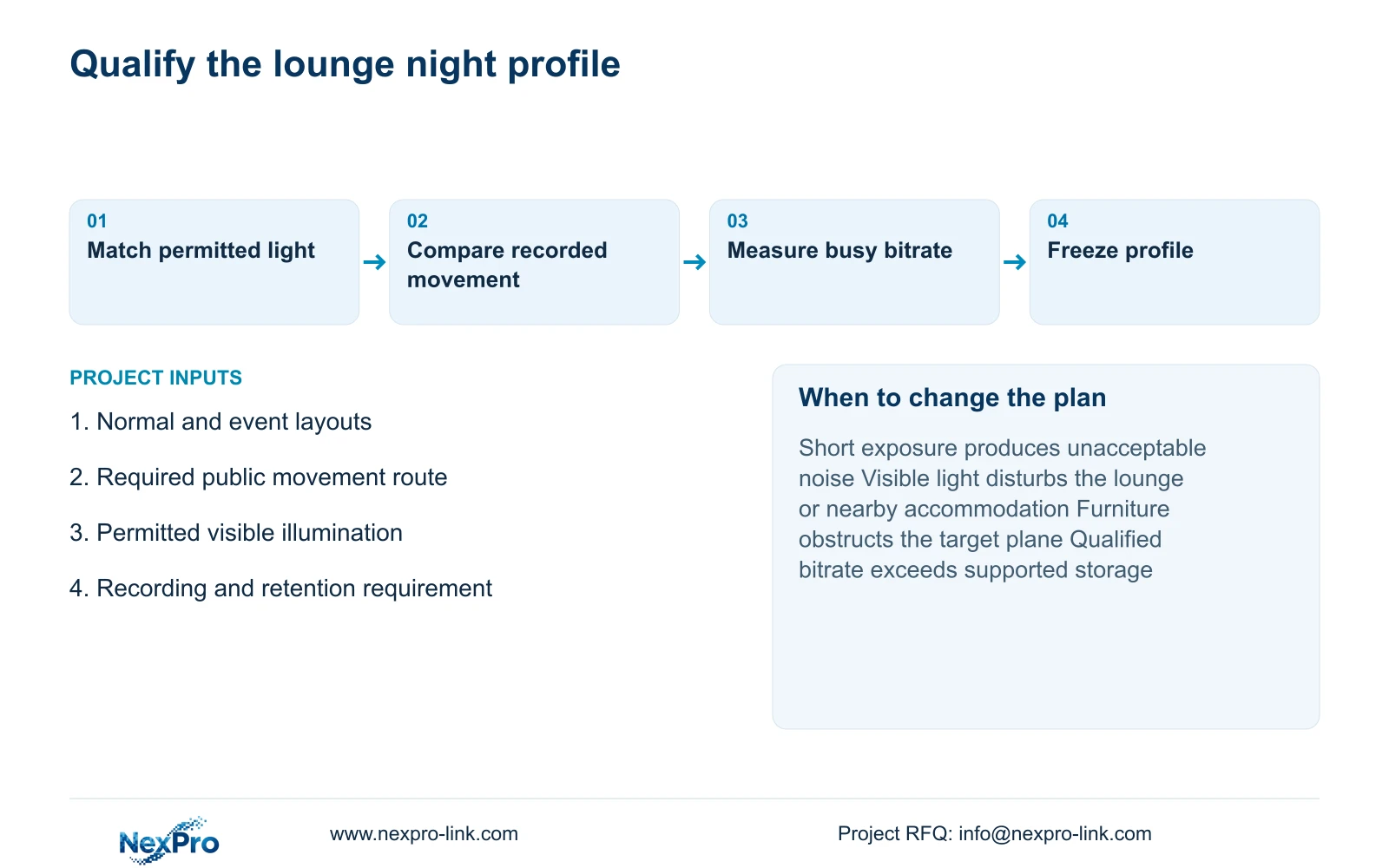
Choose and document the qualified night profile
Adopt the shorter-exposure profile when it retains the required action and the recorded light/noise result is acceptable. Use dual light where visible illumination is permitted. Change to an appropriate infrared or specialist approach when light disturbance prevents that choice, and revisit position or target width when geometry remains inadequate.
Document the selected camera identity, lens setting, exposure, lighting mode and recording profile together. The supplied PDF lists NexPro-DM2812M55-5MP-DIC-AI with a 2880×1620 main-stream mode and a 2.8–12mm lens. Preserve that source output rather than substituting another assumed 5MP format. Neither its Dome designation nor the 8MP alternative establishes an impact rating or a night-performance ranking.
Send normal and event lounge layouts, the required public movement route, permitted lighting conditions and the recording requirement to info@nexpro-link.com. NexPro-Link can discuss model matching and BOQ support. Its CCTV manufacturing core and coordinated equipment supply have distinct responsibilities; local lighting work, installation and the recorded comparison need an agreed project scope.
Section 07
Buyer questions
Can we approve a camera from a bright night screenshot? A screenshot can support a static appearance review, but approval for a moving incident task needs recorded clips with documented exposure and lighting. Request the playback result for the required route before freezing the purchase.
Does choosing 8MP remove the need to compare shutter settings? No. Additional source pixels do not establish sharp movement during an exposure. Compare the 5MP and 8MP candidates at the required target width and recorded settings, then check their separate recording and storage consequences.
Can NexPro-Link compare options without receiving guest footage? Yes. Start with layouts, task descriptions and permitted lighting information. A controlled project comparison can be defined without sending guest images or access credentials in the initial inquiry.
Engineering references
These sources support the general planning principles. Always use the selected product's current datasheet and applicable project standards for final design.


