

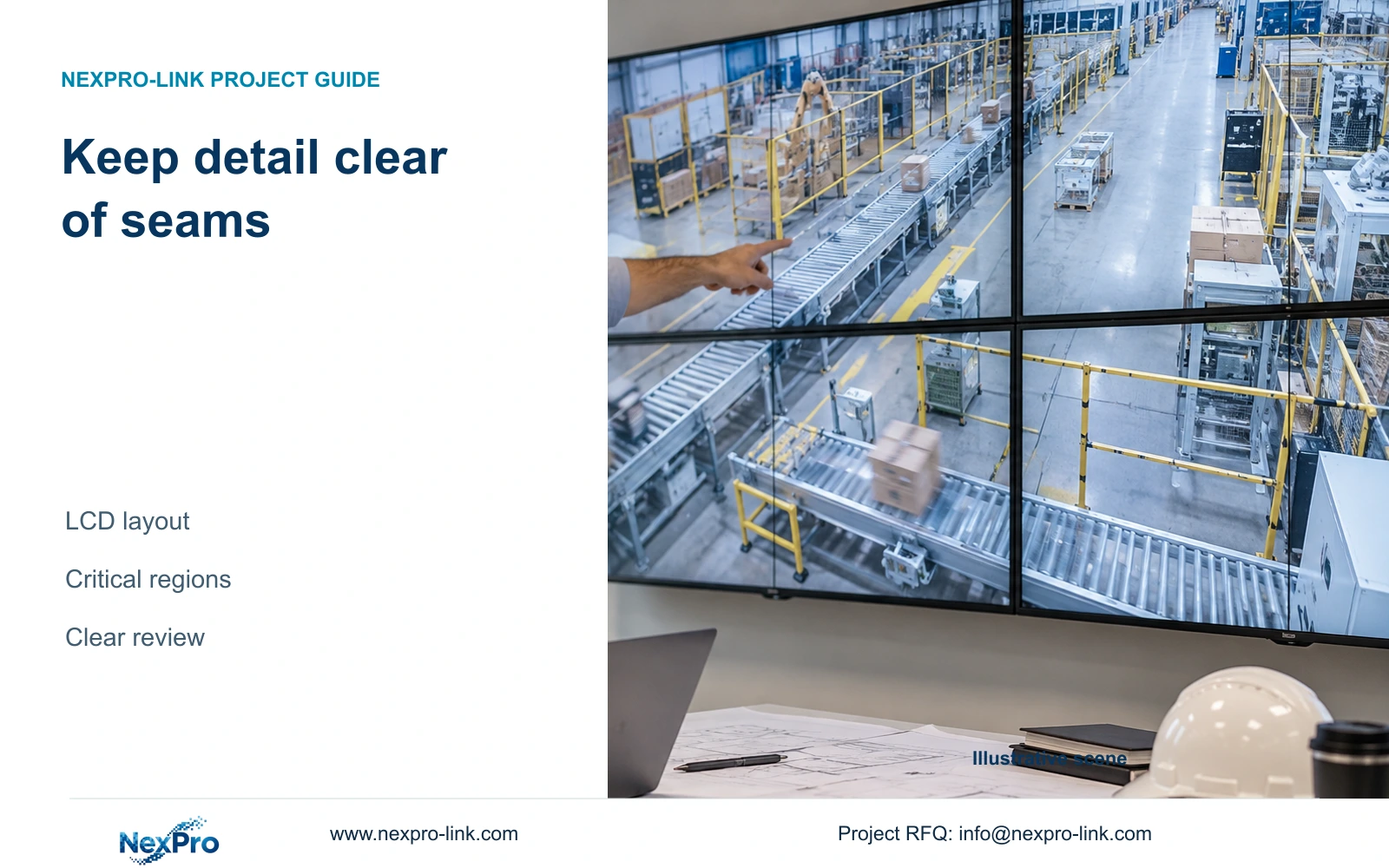
A useful factory wall layout keeps critical image regions clear of LCD seams and gives operators a reliable route to detail review. Nominal total resolution cannot validate the arrangement on its own.
Section 01
Place critical evidence within an uninterrupted review area
Arrange a factory LCD wall so critical image regions can be reviewed without avoidable interruption by panel seams. Use panel-contained windows for routine monitoring and reserve a clear detail-review area for selected incidents. Whole-wall enlargement can remain available for overview, but total pixel resolution alone does not establish that the layout serves the required evidence task.
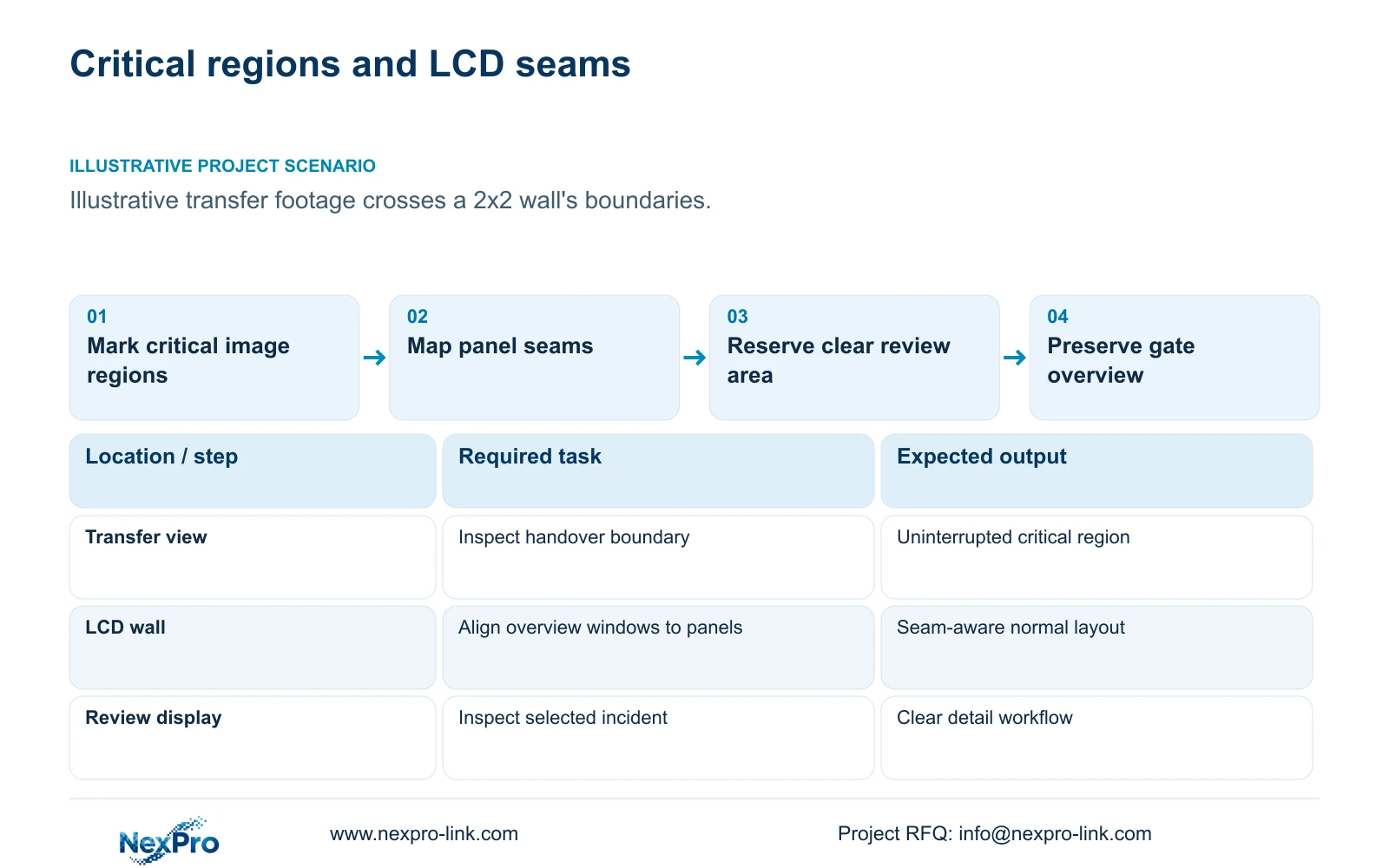
Illustrative project scenario: The proposed wall stretches critical transfer footage across several LCD boundaries. Use CASE01's 32-camera factory as the background and assume operators need to review material handovers while retaining gate awareness. The proposed 2x2 LCD arrangement and review priorities are planning inputs, not a completed control-room installation.
Have the owner identify what matters within each view: the transfer boundary, a person's movement, a trolley entering a store or the dispatch handover. The designer should map these regions against the physical seams. Treat the camera picture, application labels and operator controls separately, since a readable scene can still have an important timestamp or control obscured by the layout.
Section 02
Assign whole-wall and panel-contained layouts different jobs
Use whole-wall layouts where a broad scene helps shared observation and a seam does not prevent the required interpretation. Use panel-contained windows where a critical region needs an uninterrupted presentation. A camera may be suitable for both layouts at different times, provided operators have a clear way to choose the correct one.
The NX-VP-5535 reference lists a 55-inch 1920×1080 LCD and a 3.5mm seam/bezel field. Keep that source wording and obtain the actual assembled seam and mounting geometry from the supplier. Do not calculate an exact lost-pixel area from the millimetre field without the active dimensions and the processor's compensation behavior.
Document normal monitoring, selected detail and shared incident layouts as separate operating states. If enlarging one camera removes gate views, define where the gate task continues. A second desk screen can be a practical review point, but its client session and processing load need to be included. A larger wall does not itself create another independent operator.
Section 03
Reserve a detail area with a verified source
Select a panel-contained review area or a separate seamless desk display for footage whose critical region would otherwise cross the central seam. Specify the source stream and playback method used there. Enlarging a low-detail overview source may make the picture larger without supplying the information needed for a disputed handover.
Keep recording quality independent of the display layout. CASE01 records 32 streams at an assumed average 4Mbps for 30 days; rearranging windows does not change that retention target. Cropping or masking for presentation should be checked so operators know whether they are seeing the complete recorded frame or only a displayed portion.
Assign the operator a simple selection and return workflow: choose the incident, reach the clear review area, inspect the required region and restore the normal layout. Ask the integrator to verify that the selected client or decoder supports this workflow. NX-VD-4K16 is a decoding reference, not proof of every layout, playback combination or simultaneous window count.
Section 04
Use pixel boundaries to make the seam problem visible
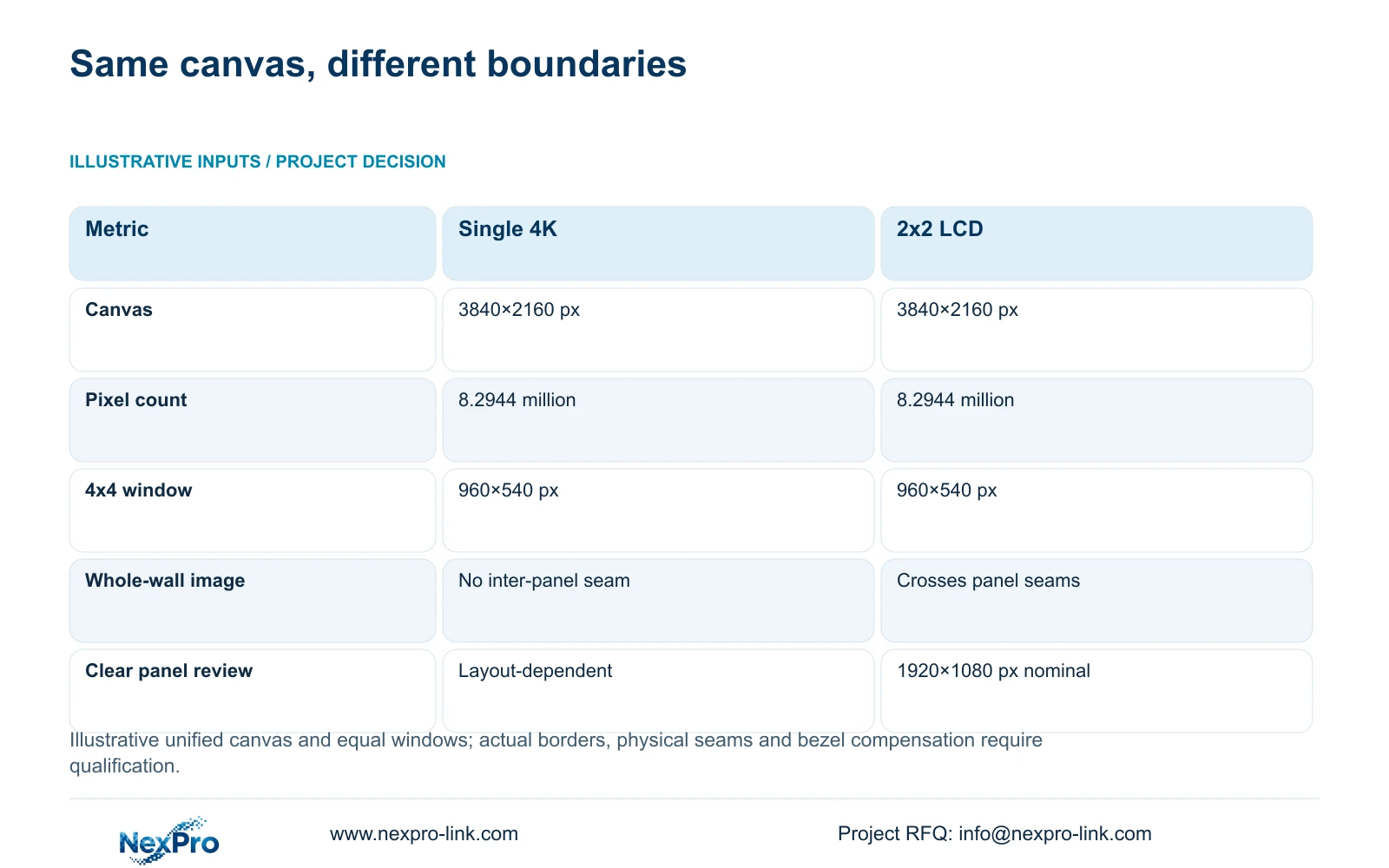
The supplied illustrative inputs compare one 3840×2160 display with a 2x2 array of 1920×1080 LCD panels treated as one canvas. Calculate canvas = (columns × panel_width_px, rows × panel_height_px). The wall gives 3840×2160 pixels and 8.2944 million pixels, matching the single screen's nominal canvas.
For a 4×4 equal-window layout, nominal_window_px = canvas_px / (4,4), giving 960×540 pixels per window. In an ideal panel-aligned arrangement without interface offsets, the central panel boundaries fall after the second window column and second window row. That permits four overview windows per panel without making an individual tile cross the central seams.
The decisive difference appears when layouts change. A full-wall camera picture crosses the panel boundaries even though the total canvas remains unchanged; a panel-contained detail view avoids that interruption but has a smaller nominal allocation. Check actual borders, labels and compensation on the selected processor. The arithmetic is a layout aid, not a decoder benchmark or a guarantee that every recorded detail is visible.
| Metric | Single 4K display | 2x2 full-HD LCD |
|---|---|---|
| Canvas | 3840×2160 px | 3840×2160 px |
| Total pixels | 8.2944 million | 8.2944 million |
| 4x4 window | 960×540 px | 960×540 px |
| Physical units | 1 | 4 |
| Whole-wall detail | No inter-panel seam | Crosses panel boundaries |
| Panel-contained review | Layout-dependent region | Nominal 1920×1080 panel |
Section 05
Prefer stable overview with a clear route to detail
For this transfer-review scenario, recommend a panel-aligned overview and a dedicated uninterrupted review position. Keep the gate task visible while an operator investigates. Approve whole-wall enlargement for scenes where its physical presentation helps, but avoid making it the only way to inspect critical transfer evidence that falls across a seam.
Change the arrangement when the task cannot be completed in the available clear area, when seating makes labels unreadable or when the required number of persistent views exceeds the approved layout. Consider fewer windows, another review screen or a different display technology only after identifying the actual limitation. Repositioning a window can solve a layout problem without replacing the whole wall.
The cost comparison should separate layout configuration from hardware additions. A new review client adds equipment, sessions, cables and power; a saved-layout change may use the existing architecture but still needs qualification and commissioning. Do not treat either route as automatically free. Preserve required software functions and compare proposals against the same accepted evidence-review task.
Section 06
Handover layouts with camera identity and restoration behavior
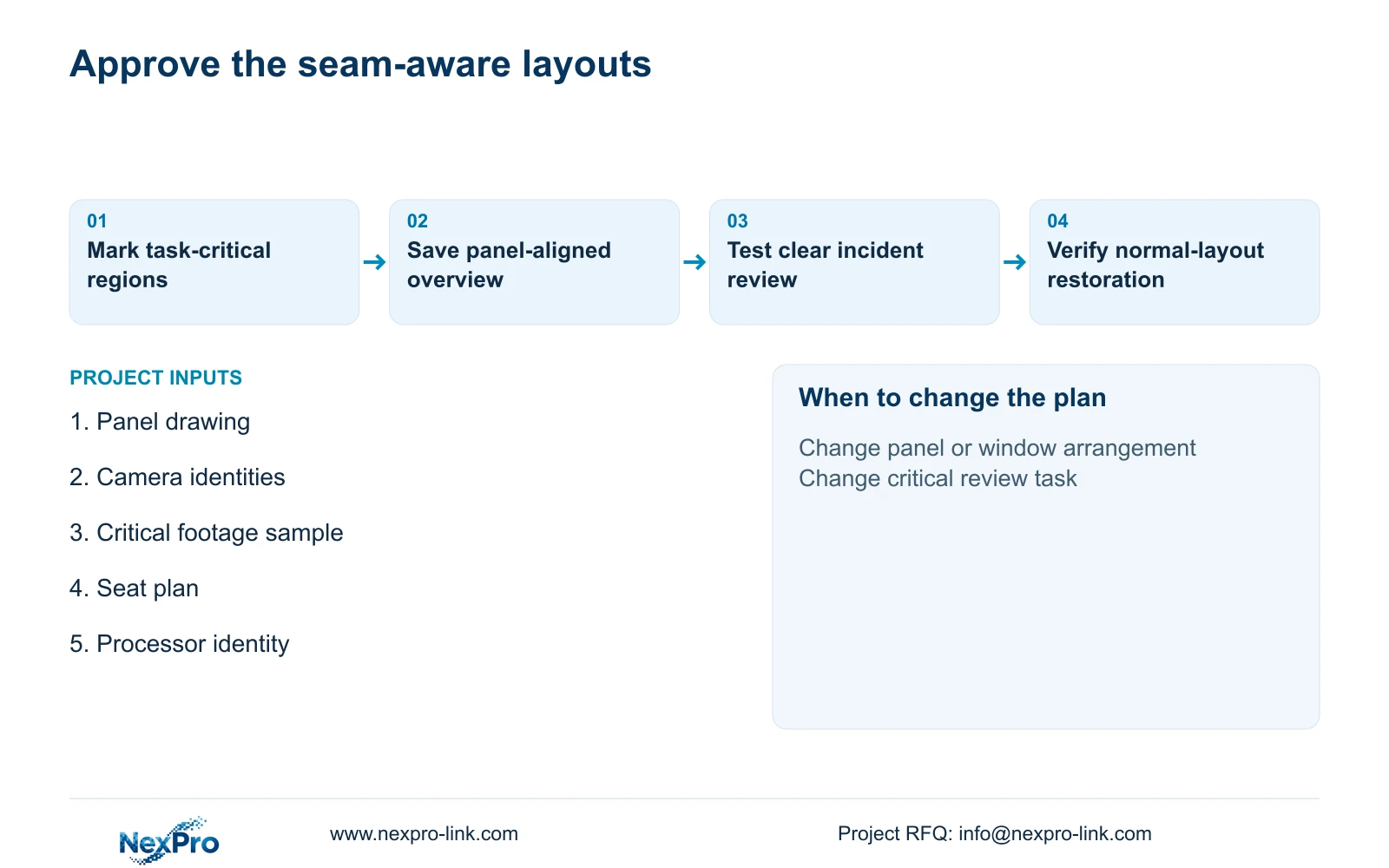
Prepare a layout drawing showing panel positions, window names, critical regions and the route to detail review. Link each window to the camera schedule rather than relying on temporary display labels. Mark the normal layout and who is allowed to change it. Include viewing seats and the relevant display-power boundary so the installation and outage modes remain understandable.
NexPro-Link can discuss LCD references, related decoding scope and BOQ documentation for the selected arrangement. The local integrator should implement and test layouts using the chosen hardware and firmware, while the owner approves camera priorities and review tasks. Project packing can identify panel positions and signal accessories without implying that physical labels configure the software.
Acceptance should use representative transfer footage, check it from each intended seat and demonstrate review without losing essential live views. Test the normal-layout restoration procedure after a client restart or display interruption. Recording should remain available through the display work. Keep layout screenshots and configuration identities so a future panel or processor replacement can be checked against the approved operating result.
Section 07
Buyer questions
Does the LCD bezel remove pixels from the recorded footage? The physical seam affects presentation. Recording can remain unchanged, but processor cropping or compensation must be checked so operators understand what portion of the frame is displayed.
Can bezel compensation solve every critical-detail problem? No. Its behavior depends on the processor and layout, and the physical boundary remains. Verify the actual critical region or use an uninterrupted review display.
Must every camera stay in the same window? A stable normal layout helps operators locate views, while approved incident layouts can serve other tasks. Document camera identity and the return procedure so temporary changes do not become an unnoticed loss of coverage.
Section 08
Check your critical views against the LCD seams
Send your panel layout, required persistent views, representative critical-image regions and operator seat plan to info@nexpro-link.com to discuss a seam-aware display and detail-review scope.
Engineering references
These sources support the general planning principles. Always use the selected product's current datasheet and applicable project standards for final design.


