Before supported disk intervention, record the available recording allowance during the work and the event window at risk. Preserve required incidents first.
Section 01
Use operating evidence to decide when to intervene
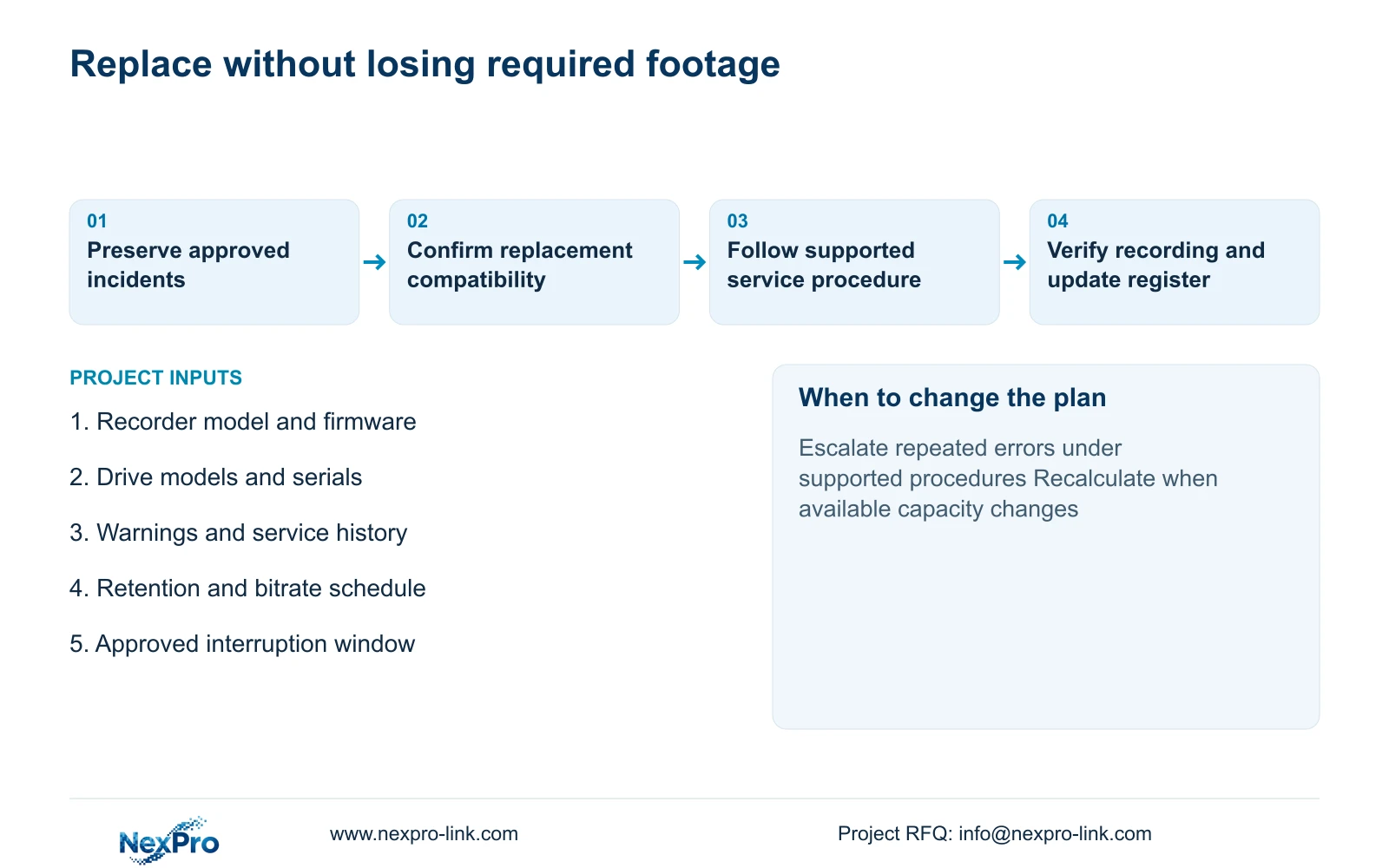
Before supported disk intervention, record the available recording allowance during the work and the event window at risk. Preserve required incidents first. After restoration, verify new writes and oldest accessible footage separately. If reduced capacity cannot meet the approved interim task, revise the service plan rather than assuming normal retention continues.
Plan factory storage intervention from supported device monitoring, recording and retrieval checks, error history, workload and service policy. A common replacement birthday for every HDD cannot establish the condition of each drive. Age belongs in the maintenance record, but the decision also needs the consequences of an interruption and a supported route for preserving required footage.
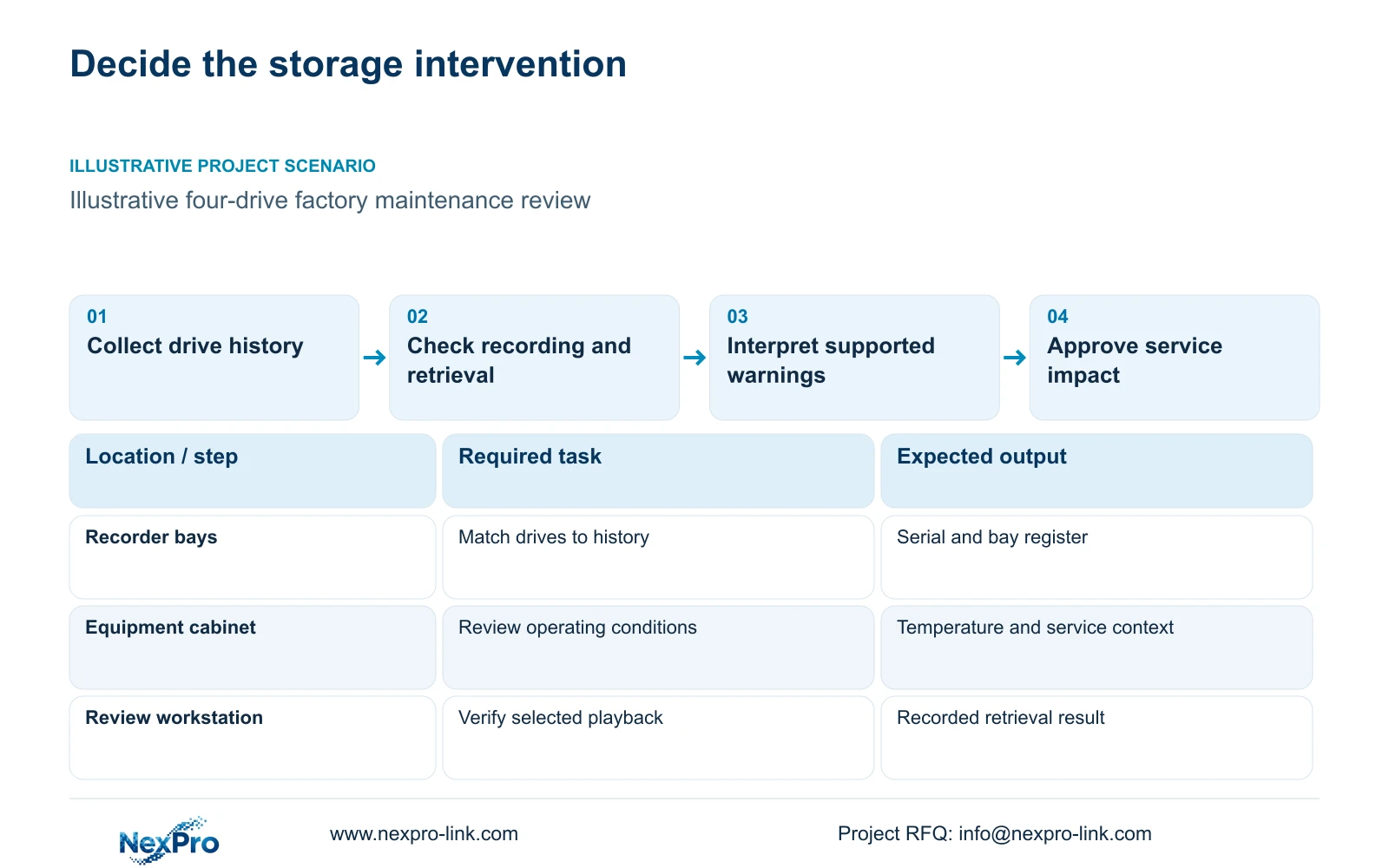
Illustrative project scenario: The maintenance team asks whether every drive must be replaced after the same number of years. Use the hypothetical CASE01 CNC factory as the background: 32 ordinary-area cameras record continuously to one recorder with four 16 TB drives. Assume the team is preparing a maintenance policy and has not yet obtained consistent disk histories. No drive in this example has been diagnosed or tested.
Start a register linking each drive's model and serial number to its recorder bay, installation date, replacement history and available alerts. Record current stream groups, recording hours, retention target and cabinet conditions. Review these records alongside successful new writes and playback. A normal status snapshot cannot predict the next failure, while an unexplained recording gap deserves investigation even when the disk icon appears healthy.
Section 02
Plan the service window around lost capacity
Before authorising replacement, identify which recordings may become unavailable and whether the system can continue recording during the supported service procedure. Establish this from the actual disk arrangement and recorder documentation. Multiple bays do not prove redundancy or hot-swap support. Where shutdown is required, the owner should approve the recording interruption and the responsible team should arrange any necessary temporary coverage.
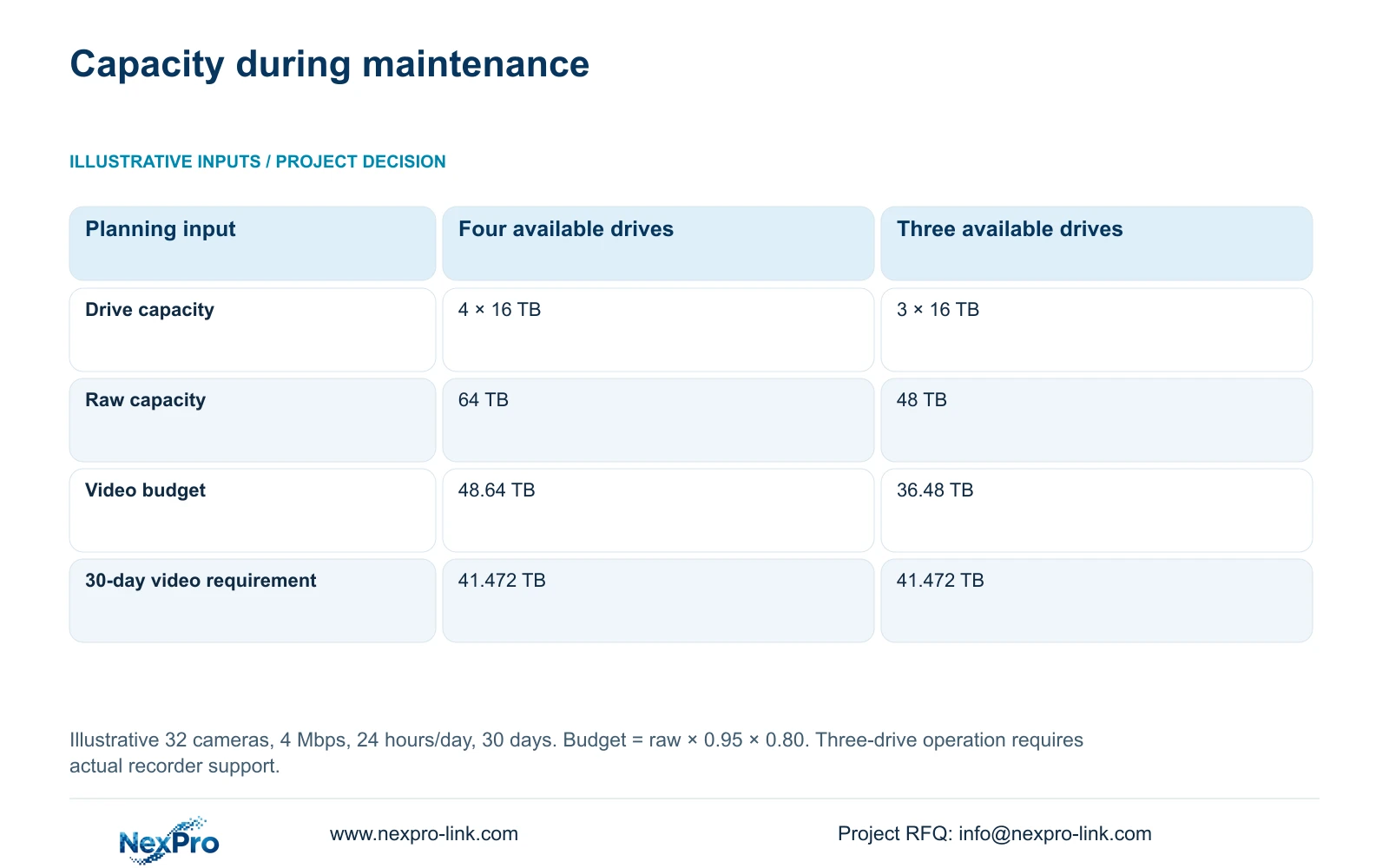
CASE01 provides a useful capacity check. Its illustrative 32 cameras × 4 Mbps × 10^6 × 86400 seconds/day × 30 days / 8 / 10^12 produces 41.472 TB of video. Four 16 TB drives give 64 TB raw and a video budget of 64 × 0.95 × 0.80 = 48.64 TB. The 95% formatting allowance and 20% free-space reserve are planning assumptions, already included in that budget.
For an additional illustrative maintenance comparison, three available 16 TB drives would provide 48 TB raw and 48 × 0.95 × 0.80 = 36.48 TB of video budget. That falls below the 41.472 TB target volume. This arithmetic does not establish that the recorder supports operation with a drive removed. It shows why continued recording, if supported, can still leave the retention objective unmet during a reduced-capacity state.
Section 03
Verify recovery without treating it as a forecast
A recovery check should establish whether the team can retrieve required footage and return the recorder to its agreed operating state. Select a recent recording, seek through it and verify an export on the intended review computer. Record camera identity, time range and the result. Successful retrieval demonstrates that particular workflow at the time of the check; it does not certify the remaining life of the disk.
Preserve approved incidents before a service action that could alter or erase their only available copy. Assign an archive destination and custodian, then verify the export. An old drive retained after replacement should be identified and handled according to the owner's preservation decision. Do not initialise, format or repurpose it simply because a new drive has begun recording.
Keep destructive disk tests, rebuilds and firmware changes outside a generic article-based maintenance routine. Use supported procedures for the exact system and agree the interruption before work begins. The technician's completion record should distinguish disk detection, restored recording, checked playback and the retention position. An installation success message alone leaves the owner uncertain about whether the recording service has actually recovered.
Section 04
Match each observation to a supported action
Use the decision matrix to separate a meaningful observation from a weak shortcut. It requires actual recorder alerts, available disk data and operating history; no universal SMART failure threshold is assumed. The engineer should record the exact warning and obtain the device or drive manufacturer's interpretation. Translating every unfamiliar value into the same replacement rule can produce an unsupported diagnosis.
The decisive difference is whether the evidence establishes the operating condition being judged. New writes plus usable playback check recording function. A green icon reports a narrower status. Repeated errors require investigation and an approved preservation path, while a recurring cabinet-temperature concern also calls for review of ventilation and operating conditions. Installing another disk without addressing the recorded condition can leave the underlying problem unresolved.
Where playback gaps occur, compare camera connectivity, recorder events and disk observations before attributing every gap to storage. Escalate a warning under the applicable service procedure, and assign a date and owner for unresolved findings. The resulting record should justify continued observation, planned intervention or urgent supported service without assigning arbitrary health scores.
| Observation | Evidence-led action | Insufficient shortcut |
|---|---|---|
| Current recording | Verify new writes and playback | Accept a green icon alone |
| Device warning | Use the actual manufacturer's interpretation | Invent a universal threshold |
| Repeated errors | Investigate and preserve required footage | Erase the only event copy |
| Replacement decision | Confirm compatibility and interruption plan | Replace solely at a fixed age |
Section 05
Combine condition review with an explicit service policy
Recommend condition-informed maintenance backed by planned service access and a compatible replacement path. This approach retains useful equipment while giving the owner a documented basis for intervention. It requires someone to review alerts, test retrieval and close unresolved findings. Monitoring that nobody reviews cannot support a credible replacement decision.
A scheduled replacement policy may still be appropriate where the owner has a defined maintenance cycle, limited access windows or an approved service requirement. Describe it as a service policy rather than a prediction that every disk fails at that age. Include preservation work and post-replacement checks in the scope. If the site cannot tolerate the recording interruption, review an alternative supported architecture before selecting a maintenance date.
Compare proposals using the same retained footage, recording continuity and recovery objectives. Price compatible drives, technician access, preservation work, installation and verification separately. The NexPro-NVR4449-4K lists four bays with up to 18 TB per drive; the NexPro-NVR8864-4K lists eight with the same per-drive ceiling. Neither bay count proves RAID or automatic recovery, and a larger recorder should not be proposed solely to avoid investigating an existing warning.
Section 06
Order a compatible replacement with clear responsibilities
Build the replacement schedule from the exact recorder model and firmware, installed drive identities, available health observations and approved capacity target. A catalogue capacity ceiling does not by itself approve every drive model. Ask the supplier to identify the proposed drive and the evidence for compatibility with the actual recorder. Keep any substitution visible so the service team receives the unit that was approved.
The owner decides preservation and interruption requirements; the appointed technician follows the supported installation procedure; the supplier confirms the equipment and document scope. NexPro-Link's BOQ and tender support can help coordinate model matching and quotation deviations. Request a recalculable capacity and archive plan alongside the replacement schedule, so the maintenance action does not silently change retention or leave incident copies unassigned.
Include the replacement drive, delivery scope, any required accessories and the local service work as separate procurement items. Define the handover evidence: bay identity, installed serial number, successful recording and playback checks, and the updated disk register. Where warranty support is relevant, confirm the applicable order terms and storage scope instead of transferring a headline main-equipment warranty to every HDD.
Section 07
Buyer questions
Should all drives be replaced when one reports a warning? A warning on one drive does not establish the condition of every drive. Review shared operating conditions and the remaining drive histories, then follow the supported interpretation and service policy. Any group replacement needs its own compatibility, preservation and interruption plan.
What if the recorder exposes little disk-health information? Document the monitoring limitation. Use available alerts, verified recording and retrieval, service history and supported technical assistance. Do not invent missing SMART values or describe the absence of warnings as proof of future reliability.
Is an unused replacement drive a hot spare? A stored replacement is a service spare. Hot-spare operation is a system function that requires explicit support and configuration. Neither an empty bay nor a drive kept on a shelf establishes that function.
Section 08
Prepare a storage intervention schedule
Send the recorder model and firmware with the current disk layout, available alerts and service history, stream bitrates and retention target, and the permitted interruption window to info@nexpro-link.com.
Engineering references
These sources support the general planning principles. Always use the selected product's current datasheet and applicable project standards for final design.