A replacement recorder needs supported settings and authorised access; selected incident footage needs its own independent copy. Define both recovery tasks before buying spare hardware.
Section 01
Define separate recovery targets for footage and settings
For factory disaster recovery, keep authorised copies of critical clips separate from supported recorder configuration backups. A clip preserves a selected event; a configuration backup helps reconstruct the recording service. Define both deliverables and their access arrangements before selecting spare equipment. RAID, where supported, and an unused recorder do not automatically preserve historical footage, usable settings or credentials.
Illustrative project scenario: The owner wants to restore a recorder configuration and recover selected evidence after equipment loss. Use CASE01's hypothetical new CNC factory: 32 ordinary security views covering gates, stores, permitted material transfers, common routes, dispatch and equipment-room approaches. Assume the owner nominates an evidence custodian and the integrator maintains the approved configuration record. No equipment loss or successful restoration has actually been reported.
Decide how much interruption to new recording is acceptable and how recent the recoverable settings must be. Separately identify which incidents require preservation outside normal recorder retention. Loss of the single recording node could remove access to its local history and interrupt all 32 recording paths. A configuration copy cannot reconstruct video that was never copied, and an exported clip cannot restore the camera schedule.
Section 02
Place authorised copies outside the recorder's failure domain
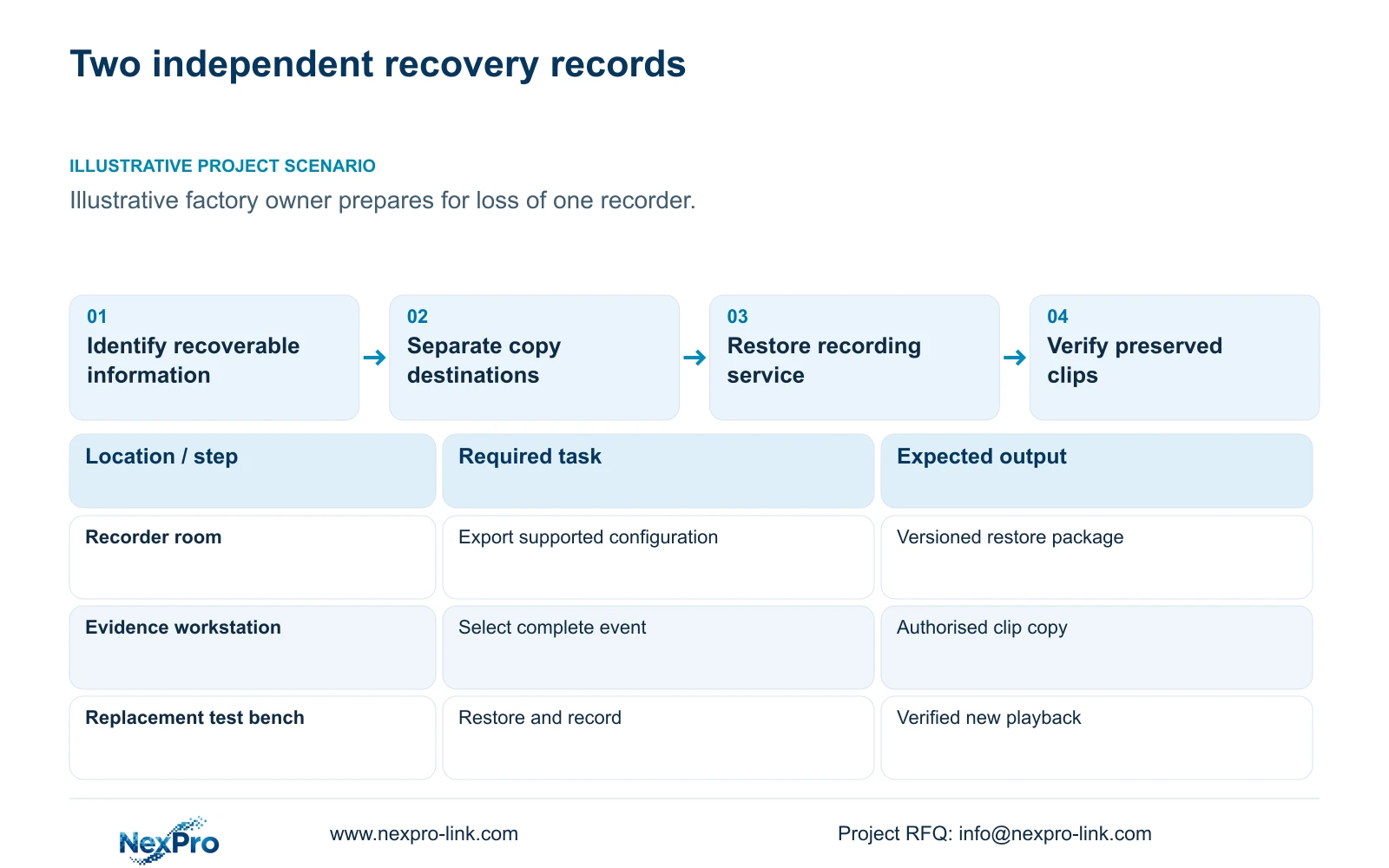
Choose copy destinations by the equipment-loss scenario. A USB device left beside the recorder may be convenient for export but remains exposed to the same cabinet incident. For this illustrative factory, propose a controlled destination outside the recorder cabinet, with a separately accessible recovery record. If the owner includes loss of the entire building in the objective, select a destination beyond that building's failure domain.
Give the evidence custodian responsibility for approved camera and time selections, receipt of copied files and subsequent access. Record camera IDs, the requested interval, recorder time reference, export method and handling history. Keep credentials in the owner's approved access-management arrangement rather than embedding passwords in a public handover document. Authorised video access and access to configuration files may require different permissions.
Ask what the supported configuration export includes and excludes. Camera addresses, channel assignments, recording schedules, user settings and network parameters must each be checked rather than presumed present. Preserve a readable schedule for omitted fields and record the model and firmware associated with the backup. NIST SP 800-82 Rev.3 offers relevant context for protecting access and keeping security recovery work within approved operational network boundaries.
Section 03
Test restoration on a controlled replacement path
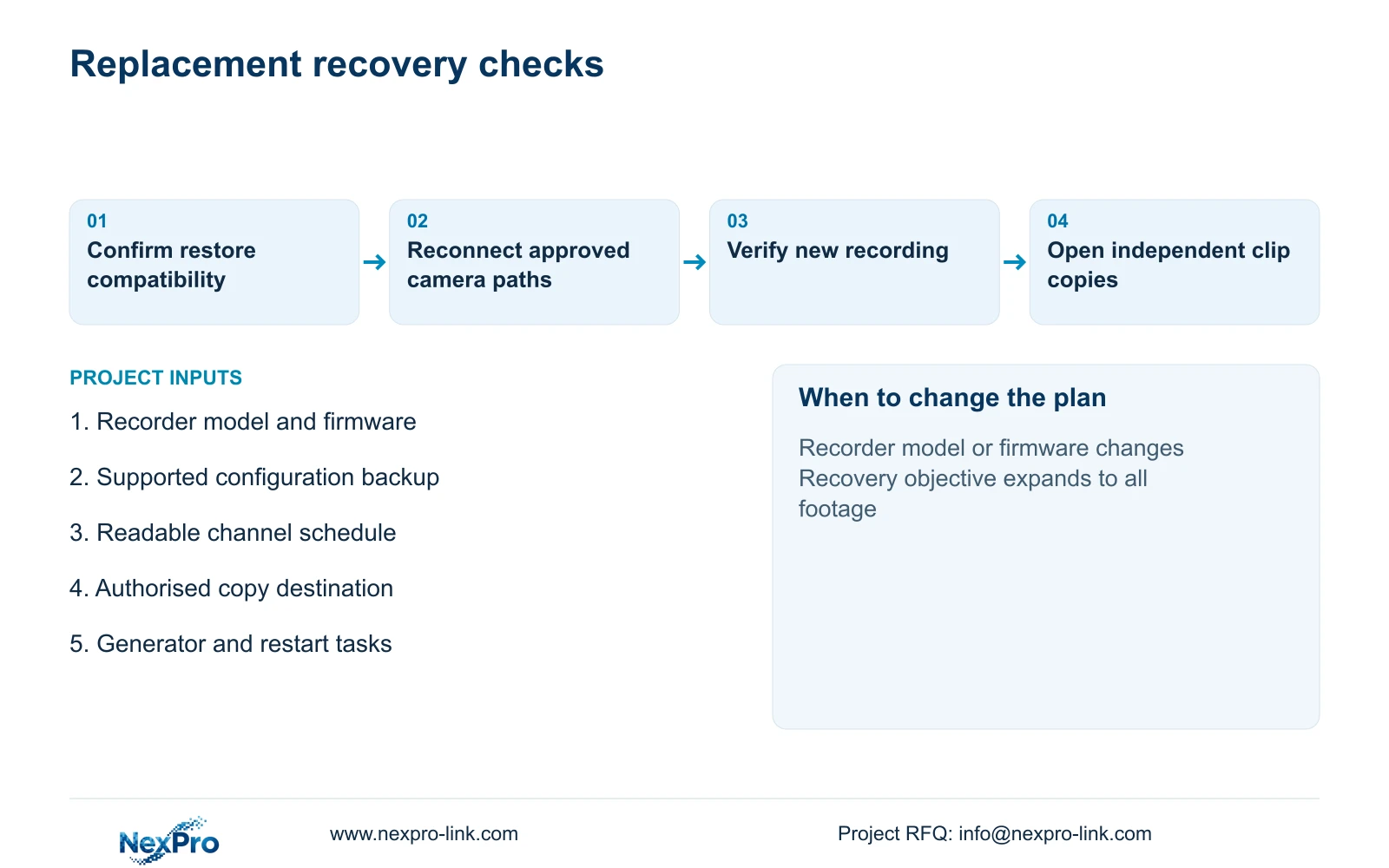
Define a restore exercise that resembles equipment replacement without disturbing the active recorder. The integrator should confirm the proposed replacement's supported import method and firmware relationship, then use an isolated or otherwise approved test arrangement. Do not initialise original disks or overwrite working settings simply to demonstrate that a spare unit starts.
Follow the dependencies: suitable power, approved network connectivity, authorised access, camera assignments, recording schedule and storage readiness. Compare restored values with the accepted schedule. Then record a new interval and verify playback and export from the restored service. Measure the actual exercise if a recovery-time commitment is needed; no duration follows from channel count or a configuration-file size.
Test the preserved clips independently on the intended review computer. Check that the selected interval opens, the necessary views are present and any required player is available. Assign the supplied replacement equipment to the supplier's scope, site reconnection to the local integrator, copy custody to the owner and final acceptance to the security lead. Keep unsuccessful steps in the recovery record so the next attempt has a clear starting point.
| Item and status | Required task | Responsible party |
|---|---|---|
| Configuration package: maintained | Confirm supported export and restore fields | Integrator |
| Critical clips: authorised copies | Preserve selection and verify external playback | Owner's evidence custodian |
| Replacement recorder: optional supply | Match approved recording and restore requirements | Equipment supplier |
| Site reconnection: local work | Restore paths and verify new recording | Local integrator |
Section 04
Choose export boundaries before sizing the copy
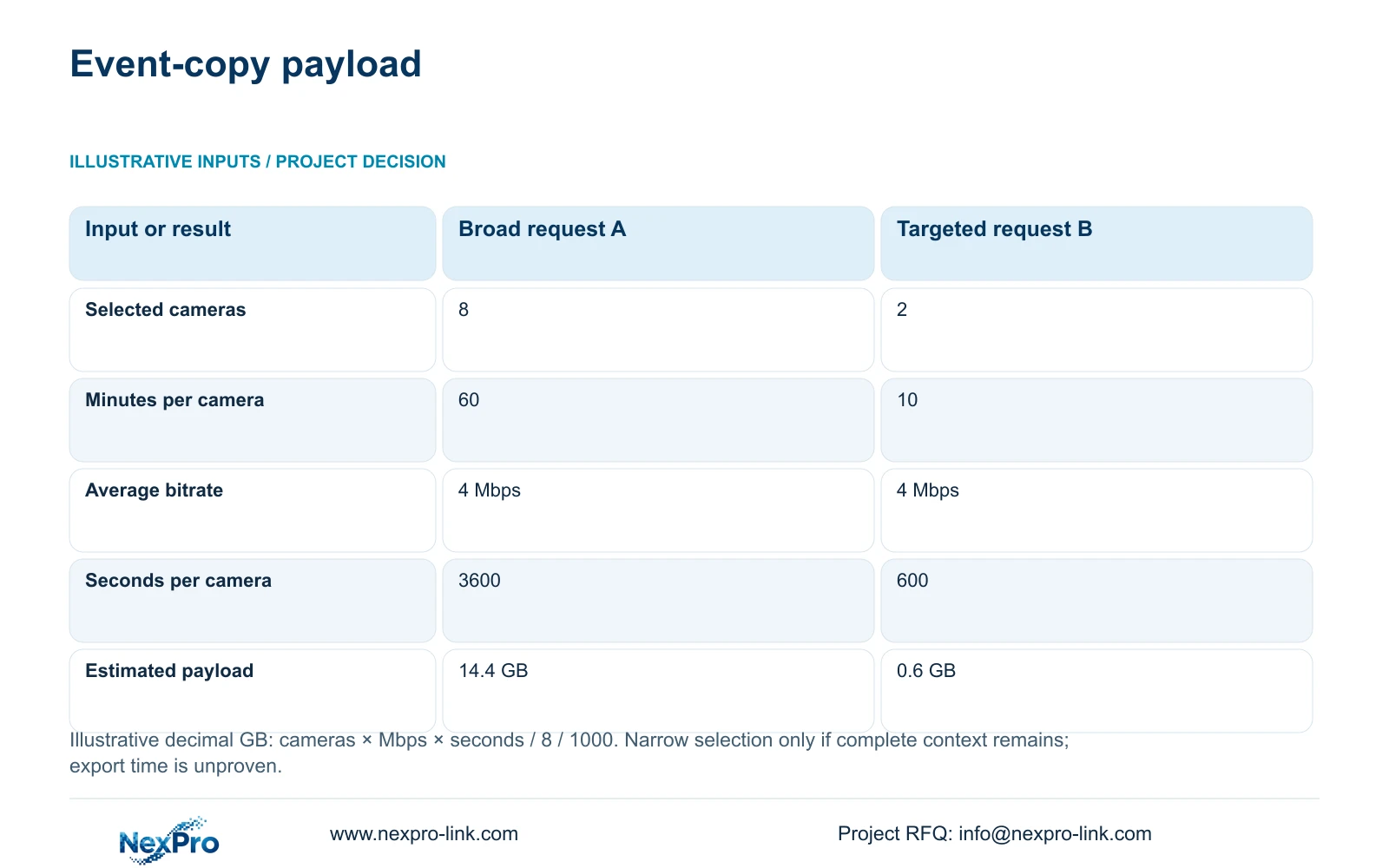
The supplied illustrative comparison uses a broad request of eight cameras for 60 minutes each and a targeted request of two relevant cameras for 10 minutes each. Both assume an average payload bitrate of 4 Mbps. Use decimal gigabytes and the formula GB = cameras × Mbps × seconds / 8 / 1000. This estimates selected video payload, not the size of every export container or its transfer duration.
For the broad request, 8 × 4 × 3600 / 8 / 1000 = 14.4 GB. For the targeted request, 2 × 4 × 600 / 8 / 1000 = 0.6 GB. The smaller selection follows from fewer cameras and a shorter interval, with the bitrate unchanged. It is suitable only after review confirms that those boundaries retain the complete required event.
Keep the broad request when the transfer route, event start or relevant views remain uncertain. Narrow it when an approved time-and-camera mapping establishes the necessary context, including any justified period before and after the event. Allow for actual bitrate variation and additional export material when specifying storage. Neither result proves staff-time savings, guaranteed export speed or legal evidence status; those are separate questions.
| Input or result | Broad request A | Targeted request B |
|---|---|---|
| Selected cameras | 8 | 2 |
| Minutes per camera | 60 | 10 |
| Average bitrate per camera | 4 Mbps | 4 Mbps |
| Seconds per camera | 3600 | 600 |
| Estimated video payload | 14.4 GB | 0.6 GB |
Section 05
Match additional hardware to the information at risk
Recommend supported configuration backups plus verified copies of selected incidents as the baseline for this owner's stated task. CASE01 assumes continuous recording for 30 days at 4 Mbps per camera. Its calculated video requirement is 41.472 TB. Four 16 TB disks provide 64 TB raw; the illustrative recording budget is 64 × 0.95 × 0.80 = 48.64 TB, already including formatting allowance and free-space reserve.
That capacity comparison supports the hypothetical retention plan. It does not create an independent archive or establish disk fault tolerance. The NexPro-NVR4449-4K source lists four SATA bays and separates 49×5MP from 9×4K summary modes; no supported RAID mode is established by those fields. A replacement unit therefore needs an approved recording configuration and storage plan, rather than an assumption that old disks or backup files will work unchanged.
Change the architecture if the owner must recover all footage after recorder loss or maintain new recording through that failure. Those objectives need a separately supported copying, replication or continuity design and a revised capacity assessment. Include the generator arrangement and restart tasks when commissioning the replacement path. UPS protection can address an interruption at its connected loads, but it does not preserve footage after physical equipment loss.
Section 06
Specify a recovery package that survives project changes
Request a recovery package containing the approved equipment identities, supported configuration-backup procedure, readable settings schedule, clip-copy procedure and restoration acceptance checks. Specify the location and owner of each retained copy. Record what remains manual and which functions require additional software, so procurement does not mistake documentation for an automated backup service.
NexPro-Link can discuss model matching and relevant technical documentation through its BOQ and Tender Support scope. For a replacement recorder or coordinated factory package, identify required recording modes, compatible storage and the preparation tasks to be included in the quotation. Keep local installation, owner-controlled accounts and clip custody assigned to the parties that can perform them. Compare alternative offers against the same recovery objective.
Refresh the supported configuration copy after accepted changes to channels, network settings, schedules or permissions. Recheck restoration when hardware or firmware changes, and revisit clip boundaries when production routes move. The handover should state which version was tested and which unresolved steps remain. A stored file with no known restore method gives the replacement team little basis for deciding whether recovery is complete.
Section 07
Buyer questions
Should we ship the supplier our existing recording disks? Do not make that the default recovery step. First clarify whether footage must be preserved, who may handle it and whether the replacement supports the intended disk workflow. Use an approved procedure before any operation that could initialise or alter the disks.
Can a different recorder model import our configuration? Treat cross-model import as unverified until the supplier confirms and demonstrates the supported method. Retain a readable settings schedule so the integrator can reconstruct required fields when automatic import is unavailable.
How should a recovery exercise be accepted if some settings require manual entry? List the manual fields and responsible person in advance. Acceptance should verify the required recording, playback and export tasks after those fields are entered, rather than require an unsupported fully automatic restore.
Section 08
Specify the information your CCTV must recover
Send your recorder model and firmware, critical-clip preservation scope, equipment-loss and continuity objective, and generator/restart tasks to info@nexpro-link.com to discuss a supported replacement and recovery package.
Engineering references
These sources support the general planning principles. Always use the selected product's current datasheet and applicable project standards for final design.