A factory security UPS should follow the recording and network power path. This worked example separates that scope from machine controls and motors, then compares recording-only and display-wall capacity requirements.
Section 01
Separate the security circuit before adding machine loads
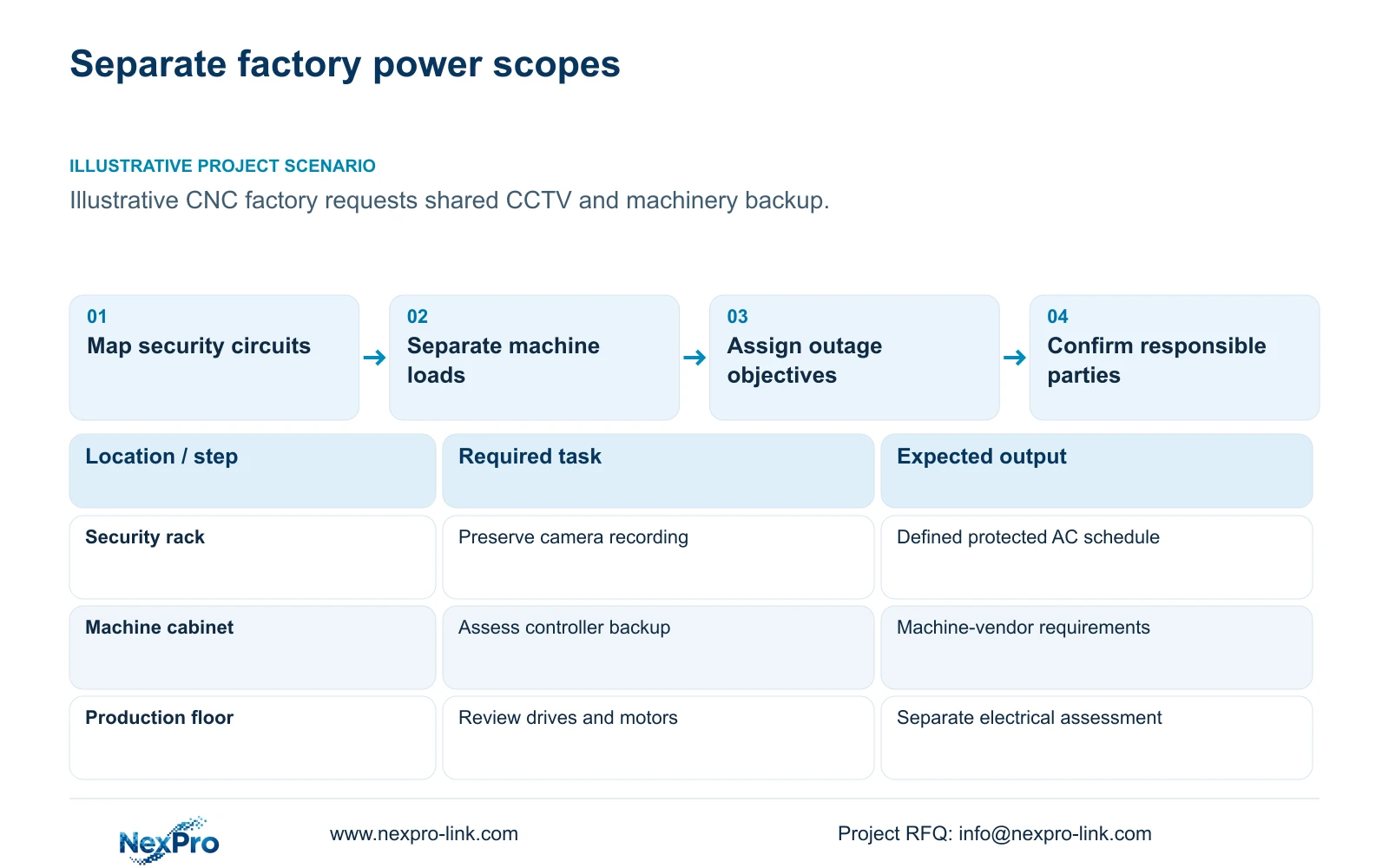
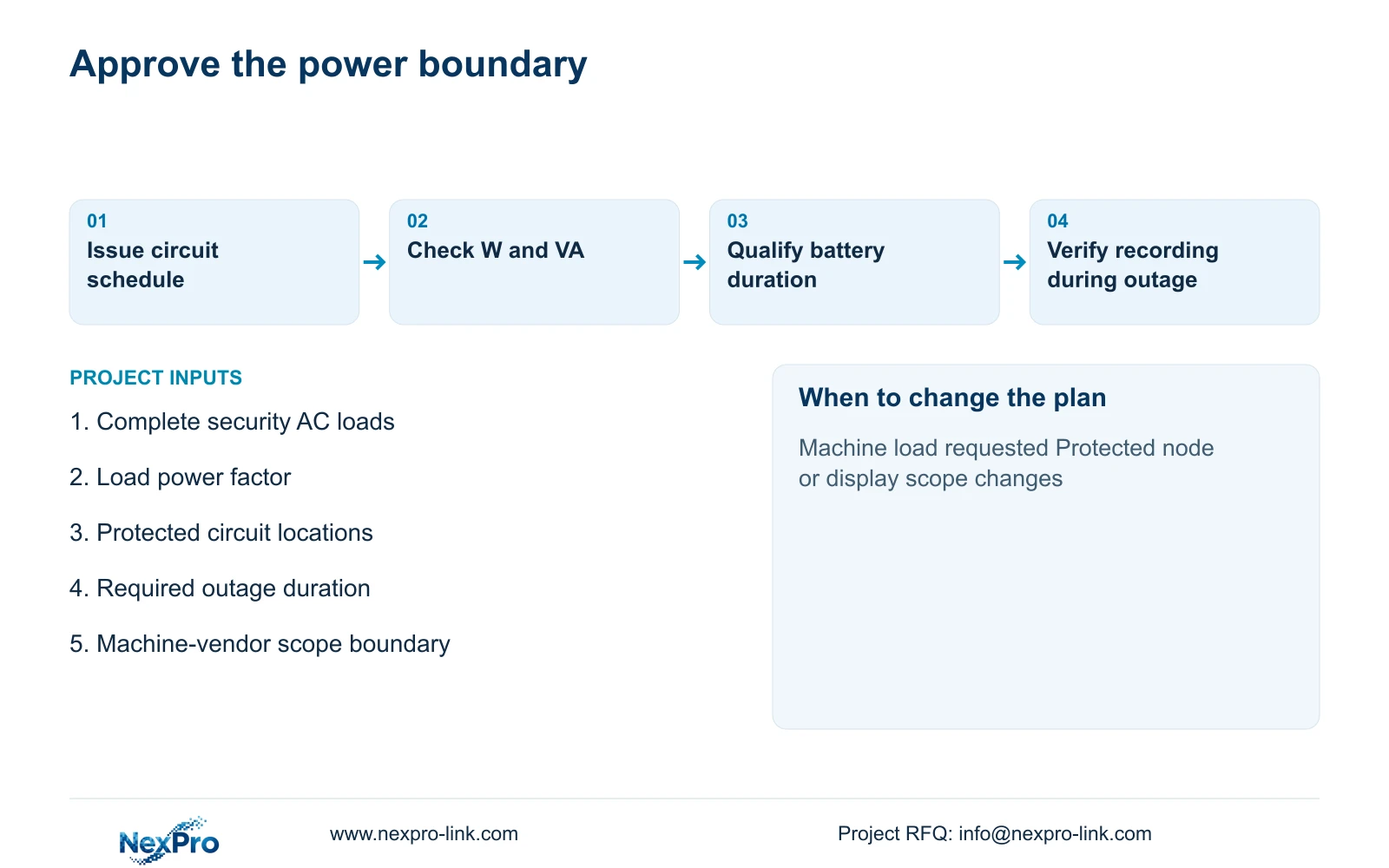
Size the factory CCTV UPS for its defined surveillance circuit, and assess production machinery through a separate equipment-specific power study. A unit selected for switches, a recorder and an operator screen has no established suitability for arbitrary controllers, drives or motors. Start by marking the actual protected outlets and circuits on the electrical drawing, then assign every proposed load to an owner.
Illustrative project scenario: A factory asks whether the CCTV UPS can also support machine controllers and motors. Use the supplied new CNC factory reference as the security baseline: 32 ordinary-area cameras covering gates, stores, permitted material transfers, common routes, dispatch and equipment-room approaches. Assume the security equipment occupies one protected electrical node. No machine load, operating sequence or manufacturer-approved backup interface has been supplied.
The engineer should issue two schedules. The security schedule lists complete AC inputs and the equipment needed to keep recording available. The machinery schedule identifies each controller, drive, motor and auxiliary supply for assessment by the machine vendor and electrical designer. Equipment sharing a room or network connection does not establish that it belongs on the same UPS circuit.
Section 02
Give each service an explicit outage objective
For CCTV, define whether the objective is continued recording, operator visibility or a controlled end to operation. These objectives require different protected devices. Keeping the NVR powered while its PoE switches lose power leaves the recorder operating without new camera streams. Keeping cameras and recording available can still leave operators unable to review footage if their screen or necessary network equipment is outside the protected circuit.
For machinery, ask the equipment supplier what must happen when incoming power fails. A controller may need to preserve information or complete an approved shutdown sequence, while a drive or motor presents a different electrical and operational task. Continued control power must also be assessed against the intended stop and restart behavior. The CCTV designer should not define that behavior by adding a spare outlet to the security UPS.
In this example, adopt a 30-minute recording objective for the security node and leave production backup unresolved pending machine-vendor inputs. Record separate acceptance evidence: a security outage check should inspect camera availability, recording and retrieval; machinery acceptance should follow its approved operating sequence. This prevents a successful CCTV demonstration from being mistaken for approval of production continuity.
Section 03
Use rack ratings only within the assessed load scope
The NexPro-Link rack online UPS source lists SP1KR(S) at 1 kVA / 900 W, SP2KR(S) at 2 kVA / 1800 W and SP3KR(S) at 3 kVA / 2700 W. These are quoted capacity references. Check both W and VA against the proposed security load; neither rating establishes backup duration or qualifies the unit for an unspecified industrial machine.
Before retaining any UPS, obtain its exact model, electrical configuration and battery arrangement. For a proposed controller load, obtain complete input characteristics and the manufacturer's supported power interface rather than relying on a cabinet label or average operating watts. Starting demand, operating transitions and the required recovery sequence remain project inputs, with no machinery figures assumed here.
Keep the power drawing separate from the data topology. A central viewing connection does not mean a central UPS supplies a remotely powered camera cabinet. If later drawings distribute the four PoE groups across separate mains nodes, assess protection at each node or document an approved distribution design. The original aggregate calculation cannot demonstrate that remote equipment receives backup power.
Section 04
Calculate the security rack before choosing display expansion
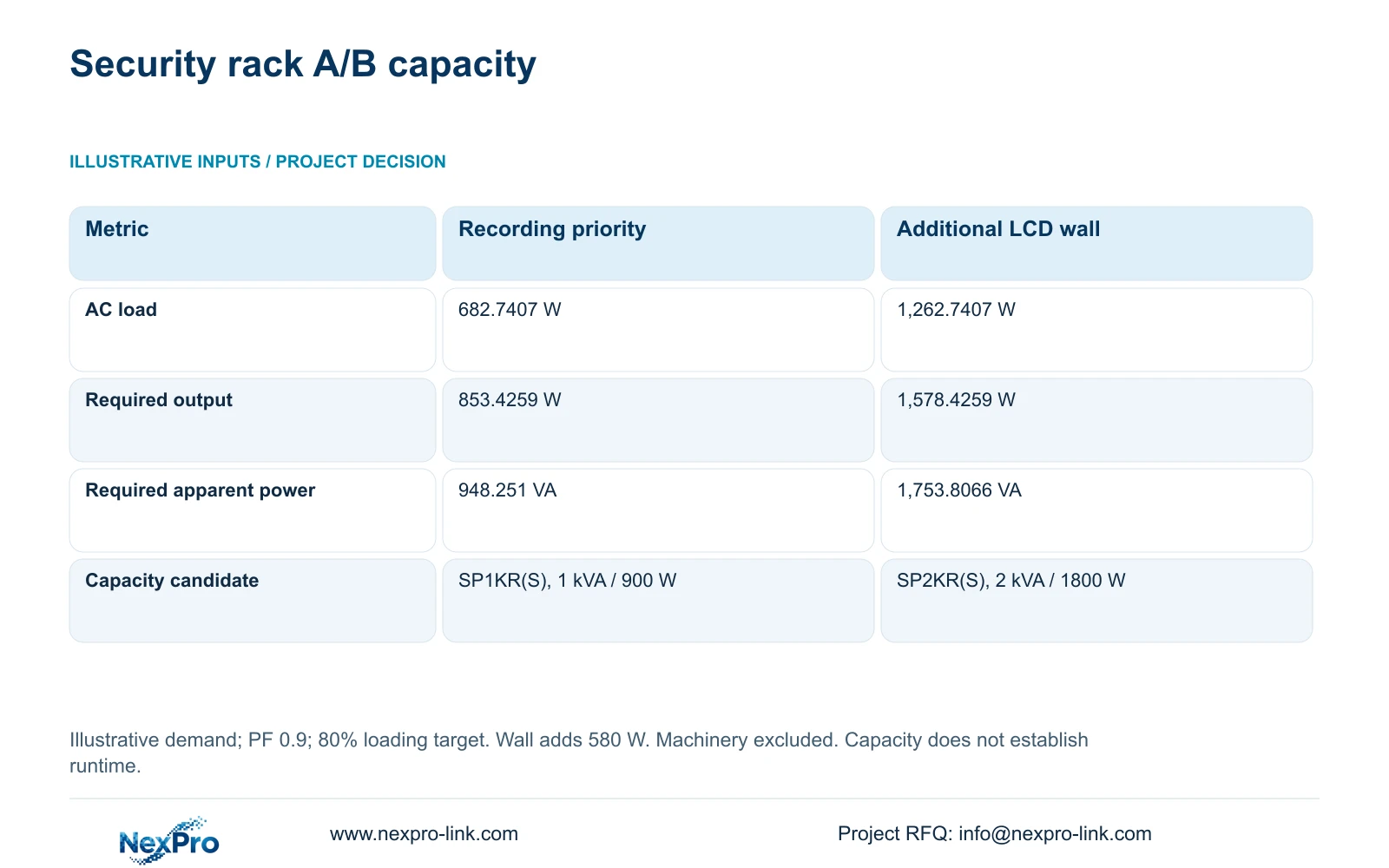
The illustrative baseline uses four eight-camera PoE groups, with assumed camera-side demand of 12 W per camera. Each group's complete switch AC input is ((8 × 12 W / 0.90) + 15 W) / 0.90 = 135.1852 W. The two 90% factors represent cable delivery and PSU efficiency; 15 W represents switch electronics. Add the recorder at 30 W, four disks at 8 W each, a 25 W core, a 15 W router and a 40 W operator screen. The resulting Option A load is 682.7407 W. Camera demand is already inside the switch AC inputs and must not be added again.
Option B retains that screen and adds four assumed 120 W LCD panels plus 100 W decoding equipment, increasing demand by 580 W to 1,262.7407 W. With aggregate load power factor assumed at 0.9 and a target maximum loading of 80%, required_UPS_W = P_AC / 0.8 and required_UPS_VA = P_AC / (0.9 × 0.8). All device consumption values are planning assumptions, including the LCD and decoder loads.
The decisive difference is the display requirement: it moves the illustrative capacity candidate from SP1KR(S) to SP2KR(S), without adding any production machinery. For 30 minutes, load_Wh = P_AC × 30 / 60 gives 341.3704 Wh for A and 631.3704 Wh for B. These load-side energy requests require a supported battery configuration and runtime evidence; they are not proven UPS runtimes.
| Metric | Option A: recording priority | Option B: additional LCD wall |
|---|---|---|
| Protected AC load | 682.7407 W | 1,262.7407 W |
| Required rated output | 853.4259 W | 1,578.4259 W |
| Required rated apparent power | 948.251 VA | 1,753.8066 VA |
| Capacity candidate only | SP1KR(S): 1 kVA / 900 W | SP2KR(S): 2 kVA / 1800 W |
Section 05
Prefer recording priority unless live visibility is essential
Choose Option A as the security baseline when the owner needs outage recording and occasional review through the retained operator screen. Choose B when simultaneous wall viewing is an agreed operating requirement during the outage. The optional wall does not change the camera recording task, and its decoder performance needs separate qualification. LCD panel count alone says nothing about supported simultaneous streams.
Compare supplier offers against the same protected devices, loading allowance and operating duration. A lower equipment price is not a complete comparison if one offer excludes batteries, distribution accessories or commissioning. Ask the cost team to separate the additional display equipment from the battery and electrical work associated with protecting it, using actual quotations rather than assumed savings.
Reopen the assessment when measured AC demand, load power factor, camera functions or protected-node locations change. A machinery request should enter its own review even if the security UPS appears to have spare capacity. If an approved shared-power design is later proposed, compare its load behavior, maintenance effects and failure exposure explicitly before replacing the separate baseline.
Section 06
Turn the boundary drawing into a coordinated supply schedule
Attach the protected-load schedule to the RFQ and identify supplied, retained, optional and excluded equipment. In this scenario, the four access-switch groups, recorder, drives, core, router and operator screen form the security basis; the wall is optional. Controllers and motors remain outside it. Name the local electrical party responsible for circuit mapping and installation, and the machine supplier responsible for production backup requirements.
Request a UPS proposal that states rated W and VA, input/output configuration, exact battery arrangement and runtime evidence at the accepted load. Include the conditions used for that evidence and the planned outage acceptance procedure. Record unresolved inputs as quotation qualifications, so a provisional capacity choice cannot silently become a guaranteed operating duration.
NexPro-Link's BOQ and tender-support scope can help translate this security boundary into model matching, technical documents and a coordinated equipment quotation. Project packing can identify the security node and distinguish optional display cartons. Production-machine engineering and final local electrical approval remain separately assigned, allowing the CCTV package to progress without implying that every factory load has been assessed.
Section 07
Buyer questions
Can a small machine controller be included if its watts fit? Watts alone are insufficient. Obtain the machine supplier's supported power interface, operating transitions and approved outage behavior. Assess the controller separately before considering shared protection, even when its average demand appears small.
Should the outage test stop when the NVR remains powered? No. Verify new footage from the required cameras, timestamps, playback and the agreed operator access path. An illuminated recorder does not demonstrate that its camera power or necessary switching remained available.
Does a spare UPS outlet represent expansion capacity? It represents a connection opportunity only. Any added load needs W/VA assessment, runtime review and confirmation that its function belongs within the approved security scope.
Section 08
Define your protected security scope
Send your security and machinery load boundary, complete security AC load list with PF, target outage duration, and protected-circuit locations to info@nexpro-link.com for a coordinated CCTV UPS capacity and battery proposal.
Engineering references
These sources support the general planning principles. Always use the selected product's current datasheet and applicable project standards for final design.