

Deleting a camera connection does not establish footage preservation or erasure. Protect required clips and test retrieval before closing a channel reassignment.
Section 01
Define the connection change before touching footage
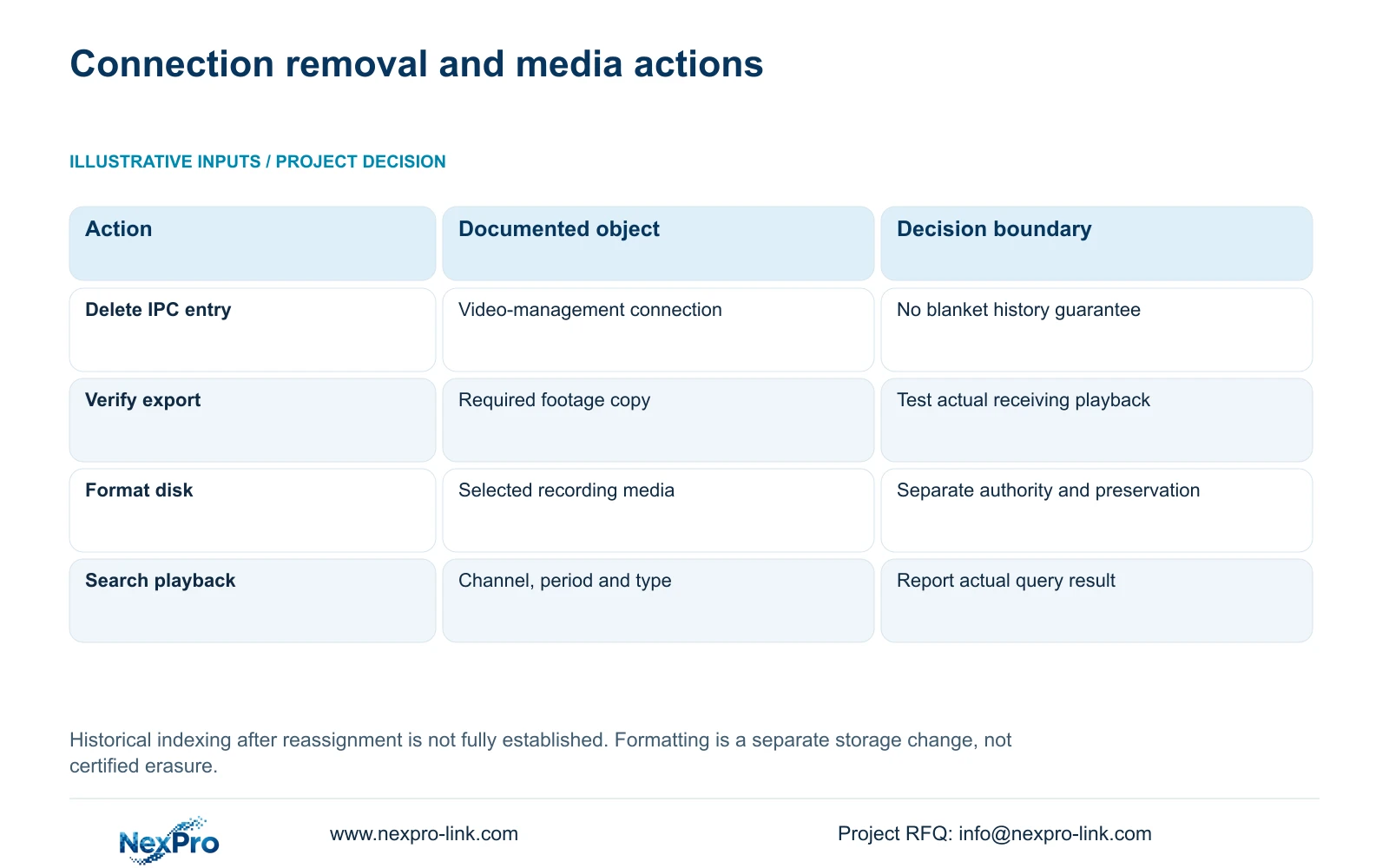
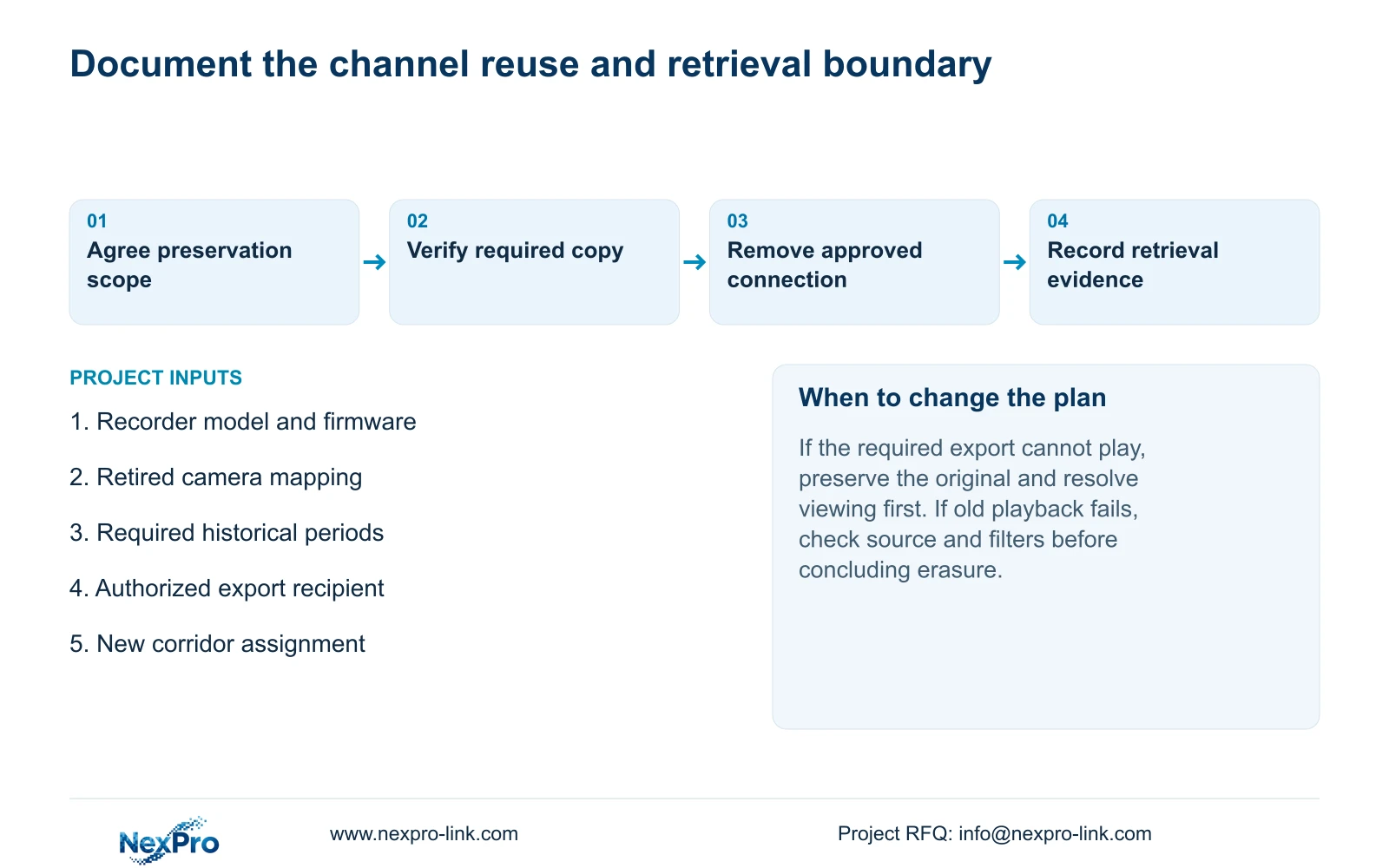
Deleting a camera entry removes a connection through the recorder's video-management workflow; it does not establish that stored footage has been erased or that every old recording will remain searchable. Before reusing the channel, identify the periods the owner needs, export accessible required material and verify those copies on the receiving system. Record the old camera position and the new channel purpose with a clear change boundary. Keep disk operations outside the connection-removal task unless separately authorized. After reassignment, search both required historical periods and a known new recording period, and report their actual retrieval results without promising undocumented index behavior.
The source is the supplied private NVR4.0 user manual CH_V2.4.doc, whose body identifies V2.2. Section 4.3.1 covers device removal; sections 4.11.2 and 4.11.4 cover playback and backup. Section 4.12.21 describes disk operations. Section references take priority over differing page layouts.
Section 02
Specify what the owner is authorizing
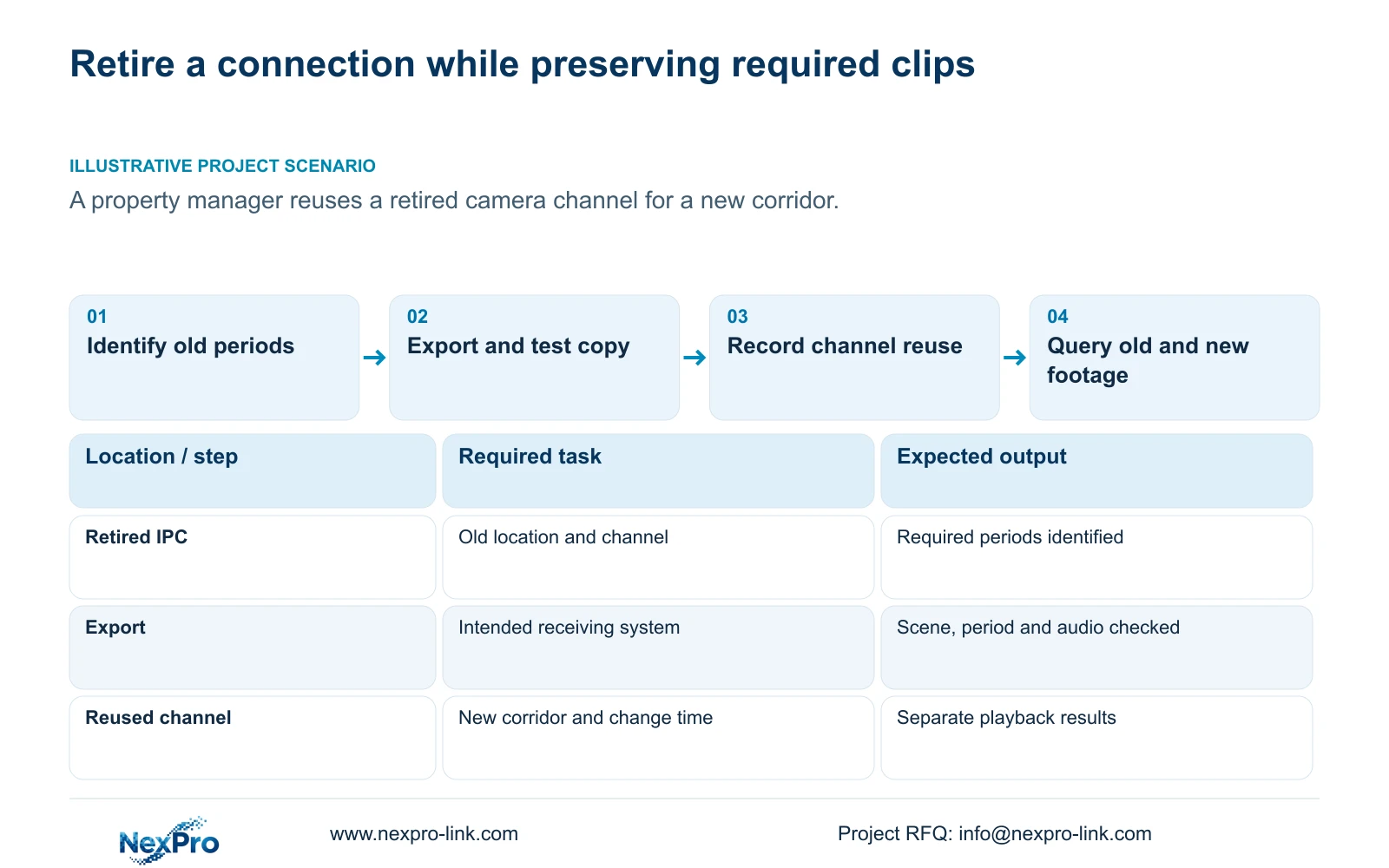
Write the immediate task as removal of the identified camera connection, with any channel reuse described separately. Name the retired location and physical camera in the controlled change record. This prevents an instruction to remove a camera from being interpreted as permission to erase recordings across the recorder.
Ask which old periods must remain available before starting. The answer may require exports, a retrieval check or a pause in reassignment until the preservation task is resolved. A general instruction to keep history is insufficient if nobody identifies the clips and viewing route that matter.
The manual does not fully describe historical indexing after every deletion or reassignment. If continued on-recorder retrieval is an acceptance requirement, obtain evidence for the actual model and firmware and test the relevant periods. An unchanged storage screen cannot substitute for that retrieval test.
Section 03
Verify required exports before the channel changes
Select the required old channel and period, then use the applicable backup workflow. Record the source location and requested start and end points so the receiving person can identify the material without relying on a filename alone. Include audio in the check when the owner requires it and the source supports it.
A completed progress indicator confirms less than a usable deliverable. Open a sample on the intended receiving system, confirm the scene and period, and check playback and required audio. Section 4.11.4 mentions players such as VLC; it does not guarantee every platform and codec combination.
If the receiving system cannot play the export, keep the original footage protected while resolving the viewing method. Record which method was successfully tested and identify the authorized recipient. Do not close preservation merely because a file was copied to another device.
| Request or observation | Supported conclusion | Next action |
|---|---|---|
| Remove the retired IPC entry | A video-management connection change is requested | Preserve required clips and record the reassignment scope. |
| Export completes but will not play | The required copy is not yet verified | Protect the original and resolve the receiving viewing path. |
| Old period is absent after reassignment | That query did not retrieve the expected sample | Check channel, date and type filters before concluding loss. |
| Format the selected disk | A separate storage-changing action is requested | Confirm media, preservation and explicit authorization first. |
Section 04
Keep the old location attached to its footage
Maintain drawing location, physical camera identity, IP address, recorder channel and displayed name as separate fields. Sections 4.4.4 and 4.12.6 supply naming and OSD controls, but the project record must explain the historical relationship between the channel and its location.
When the channel moves to a new corridor, retain the retired position in the change record and identify when the new purpose begins. A current corridor name should not cause an operator to attribute older footage to that corridor. The change time helps the reviewer choose the correct identity for each period.
Use the actual recorded scene and source mapping when checking exports. Preview-window position is a display choice, and a familiar label can survive a change of camera or location. Neither establishes where an older event occurred.
Section 06
Keep formatting outside routine connection removal
Formatting changes storage and must not be used as a harmless way to tidy a retired channel. Identify the selected disk, determine whether it contains required recordings, preserve accessible required material and obtain the owner's authority before any separate formatting operation.
On a recorder with several disks, verify the selected media instead of assuming a screen number corresponds to a physical bay label. If the target or preservation requirement remains uncertain, stop the storage-changing action while continuing only authorized inspection.
Connection deletion does not prove secure destruction. Likewise, this manual does not establish a certified erasure result from the formatting control. A buyer requiring verified disposal needs a separately defined method and evidence appropriate to that requirement.
Section 07
Test historical and new periods with the correct filters
Section 4.11.2 describes orange dates as having recordings and grey dates as having no recordings in the documented playback workflow. Entry defaults to the preview-selected channel. Confirm the intended channel explicitly before choosing the date and time.
Check ordinary, alarm and motion type filters against the expected footage. An orange date does not prove uninterrupted coverage for the whole day, and an unsuccessful query does not by itself prove erasure. Record the selected source, period, filter and result.
After channel reuse, retrieve a known new period separately from the required old samples. If either fails, retain the verified exports and the exact failing query for support. Report the scope actually tested rather than declaring all history preserved or all history removed.
Section 08
Apply the boundary to a retired camera position
Illustrative project scenario: A property manager retires one camera position and intends to reuse the channel for a new corridor. The engineer identifies required old clips, verifies exports and records the location change before removing the entry. Subsequent checks cover the specified old periods and a new corridor recording. The scenario does not assume either automatic preservation or automatic erasure.
Section 09
Can an orange calendar date close the preservation check?
No. Retrieve the required channel and period and verify playback. The date indicator establishes that recordings exist within the documented query scope.
Section 10
Define the required preservation result
Send NexPro-Link the recorder model and firmware, planned channel reassignment and historical periods that must remain retrievable at info@nexpro-link.com.
Engineering references
These sources support the general planning principles. Always use the selected product's current datasheet and applicable project standards for final design.


