

Attach each category upgrade to an owner-approved future application, affected route and review date. Where expansion remains unspecified, quote it as a separate conditional option instead of asserting a universal benefit.
Section 01
Define the link task before selecting a category
Attach each category upgrade to an owner-approved future application, affected route and review date. Where expansion remains unspecified, quote it as a separate conditional option instead of asserting a universal benefit. Recheck containment and terminations for that option; changing the cable label alone does not provide a complete upgraded installation.
Choose CAT6 or CAT6A from the required network application, route, PoE conditions and complete component arrangement. For the supplied ordinary-camera planning case, CAT6 is the baseline candidate, subject to confirmation of the actual link requirements. Specify CAT6A where an approved future application or owner standard justifies it, and obtain evidence for the complete proposed system.
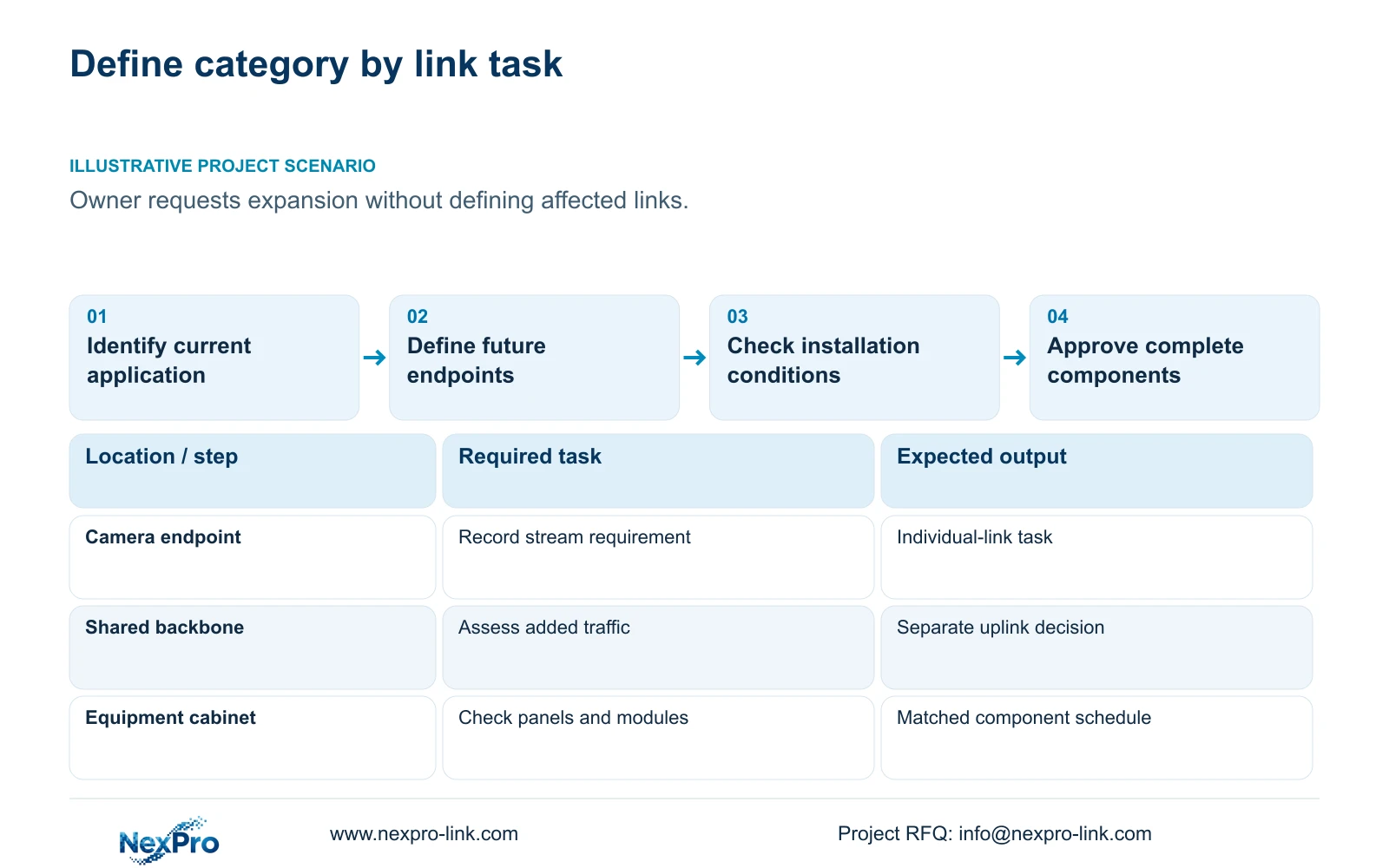
Illustrative project scenario: The owner wants future expansion, but most endpoints have modest current stream loads. Assume the initial installation follows CASE01's 32-camera CNC security scope, with 4 Mbps average video per camera and a 128 Mbps aggregate recording payload. The owner has not yet identified whether expansion means more camera points, different endpoint network applications or larger backbone traffic.
Ask the owner to define those changes separately. More endpoints need ports and additional routes. Higher aggregate traffic affects shared uplinks. A different application on an individual copper link can change its performance requirement. Camera resolution alone does not identify which of those conditions applies, so avoid making it the sole basis for a category upgrade.
Section 02
Check physical fit and PoE conditions using exact products
Compare the proposed cable's documented dimensions and installation requirements with tray space, conduits, cabinet entry and termination room. Do not assume two category labels have the same handling requirements or that every CAT6A construction needs an identical allowance. Obtain the exact proposed cable and connector details before checking bend management or usable cabinet depth.
For PoE, request the endpoint demand and the relevant cable manufacturer's installation conditions. CASE01 assumes 12 W at each ordinary camera for power planning; that is not a measured maximum for a NexPro-Link camera. The assumed eight-camera groups and cable delivery efficiency are system calculation inputs, not evidence that either category is automatically suitable for every bundle or ambient condition.
Keep shielding selection as a separate field. The industrial route assessment, termination arrangement and bonding design should govern that decision. If the route changes to obtain suitable separation or access, update the continuous lengths and cut plan. A category comparison based on the old route would then be pricing a different physical installation.
Section 03
Compare complete component schedules and test boundaries
A cable reel label is only one part of the link proposal. List the cable, modules, panels, patch cords and any direct camera plugs, with the exact intended category and installation method. Ask each bidder to show how that combination supports the specified application and what installed test deliverable will demonstrate acceptance.
NexPro-Link's SP5648 is a Cat6 48-port patch panel and DT968MX is a Cat6 tool-less module. They are relevant to a Cat6 termination schedule. Their published category does not establish a CAT6A channel when connected to a CAT6A cable. A CAT6A proposal therefore needs its own suitable component schedule and supporting documentation.
Fluke Networks guidance distinguishes the typical 90 m permanent link and 100 m complete channel. Select the applicable boundary and test setup in the specification. If both proposals will be accepted by permanent-link testing, compare them on that agreed scope; if final patch cords are included in channel acceptance, identify and control those cords as well. Do not describe an untested installation as certified.
Section 04
Resolve overlength routes independently of category
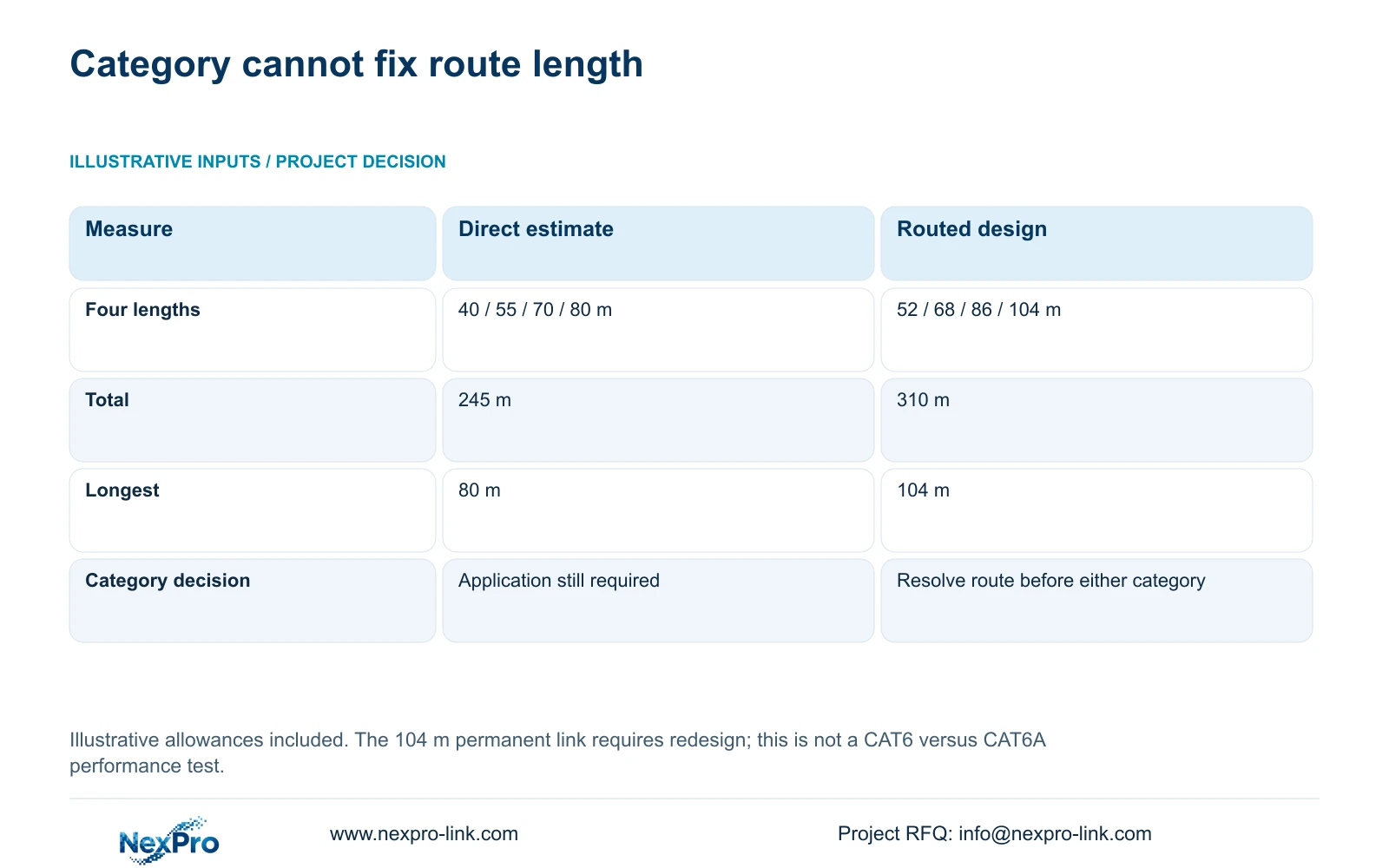
The supplied four-link illustration compares direct estimates of 40, 55, 70 and 80 m with routed lengths of 52, 68, 86 and 104 m, including installation allowances. Using total_m = sum(individual_link_lengths), the totals are 245 m and 310 m. This calculation tests the route assumptions, rather than demonstrating a performance difference between CAT6 and CAT6A.
The 104 m planned permanent link needs redesign against the stated ordinary 90 m reference. Selecting CAT6A does not alone authorize that run as a normal permanent link. Review cabinet relocation, a shorter acceptable route or a fibre-fed local node. The engineer must establish the replacement design before either category is ordered for the affected link.
The decisive comparison is whether each option serves the same approved link task. The matrix below separates a suitable Cat6 baseline, a justified Cat6A upgrade and an unresolved route. Preserve that distinction when asking for alternate quotations: no bidder should win by removing an expansion requirement or ignoring the long link.
| Project condition | CAT6 basis | CAT6A basis |
|---|---|---|
| Current ordinary camera links | Candidate after application and installation checks | Upgrade needs a stated project benefit |
| Approved higher-demand future application | Require evidence for the specified application | Specify matching complete-system evidence |
| Known Cat6 panels and modules | Check the proposed Cat6 combination | Obtain a suitable Cat6A component schedule |
| 104 m planned permanent link | Redesign route or architecture | Redesign route or architecture |
Section 05
Target expansion provision at the resource that changes
For CASE01, retain a checked Cat6 baseline for suitable ordinary camera links unless the owner defines a stronger individual-link requirement. Its 41 to 76 m continuous cuts total 1,872 m, with a feasible seven-reel plan. Those quantities give procurement a physical baseline; they do not prove that a different cable construction will use the same routes or terminations.
If expansion means more cameras, consider approved spare routes, cabinet connection capacity and accessible pathways alongside cable category. If it means a different application at selected endpoints, identify those endpoints and obtain a matching category proposal there. If it means increased shared traffic, review the backbone and switching rather than automatically replacing every horizontal camera run.
Compare installed scope, documentation and maintenance obligations in addition to equipment supply. A higher-category option may change termination work, cable management or test requirements. Request those changes as explicit quotation lines. Retain any mandatory owner specification, and show the proposed alternative as a deviation for approval rather than substituting a lower category without consent.
Section 06
Release category decisions with a clear acceptance basis
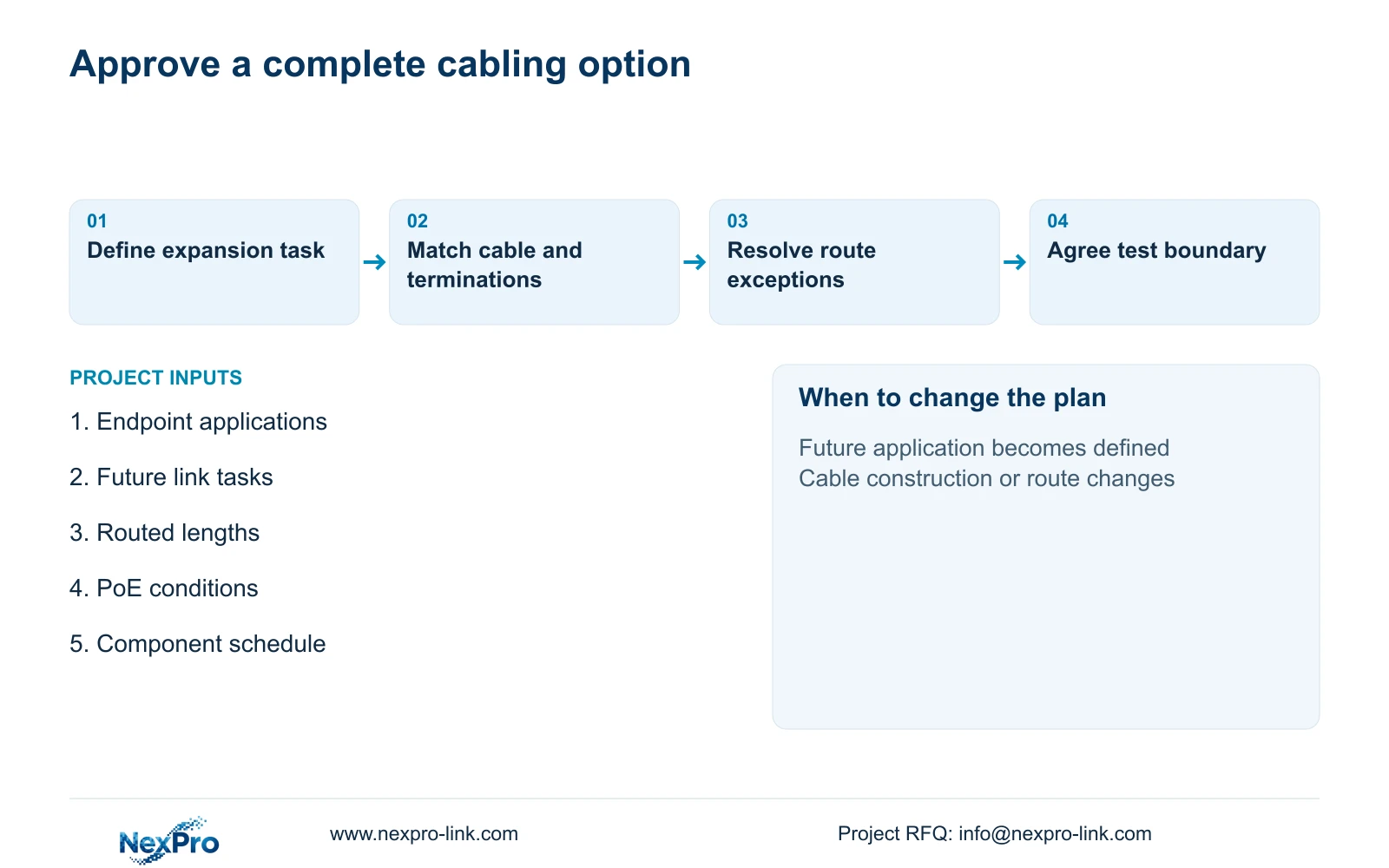
The engineer's schedule should state the present application, approved future task, route length and complete proposed termination arrangement for each link group. Include exposure and cabinet information so the supplier can identify missing product fields. Mark unresolved future requirements as unresolved; do not translate an undefined ambition into a claim of guaranteed future compatibility.
Use NexPro-Link's BOQ and Tender Support scope to discuss the relevant component list, model matching and technical deviations. Its Structured Cabling references provide identifiable Cat6 components, while bulk cable and any CAT6A system remain exact selections to be confirmed. Local installation and installed acceptance records belong in the project scope rather than being inferred from the equipment quotation.
Before release, reconcile the cable schedule with the cutting plan and test specification. A changed cabinet can affect length, termination quantity and the category comparison at once. Record the accepted revision so the installer, quantity surveyor and supplier use the same design, with any optional upgrade kept separate from the required opening package.
Section 07
Buyer questions
Does an 8MP camera automatically require CAT6A? No. Obtain the camera's configured stream and network requirements, then assess the individual link and shared network. The megapixel label alone does not determine cable category.
Can we install CAT6A now and leave component selection until later? Avoid that approach. Approve the intended modules, panels and patching arrangement before installation so space, termination work and the acceptance boundary are coordinated.
How should an undefined future upgrade appear in the tender? Keep it as a clearly described option or unresolved input. Ask the owner to specify the future application and affected endpoints before making it a mandatory performance requirement.
Section 08
Define the category comparison
Send your current endpoint network requirements, approved expansion tasks, routed link schedule and proposed termination components to info@nexpro-link.com to discuss a comparable cabling supply scope.
Engineering references
These sources support the general planning principles. Always use the selected product's current datasheet and applicable project standards for final design.


