An available channel is only the first check. Calculate the added recording load and qualify storage, power, network paths and the operator's playback task.
Section 01
Qualify the shared resources before adding the channel
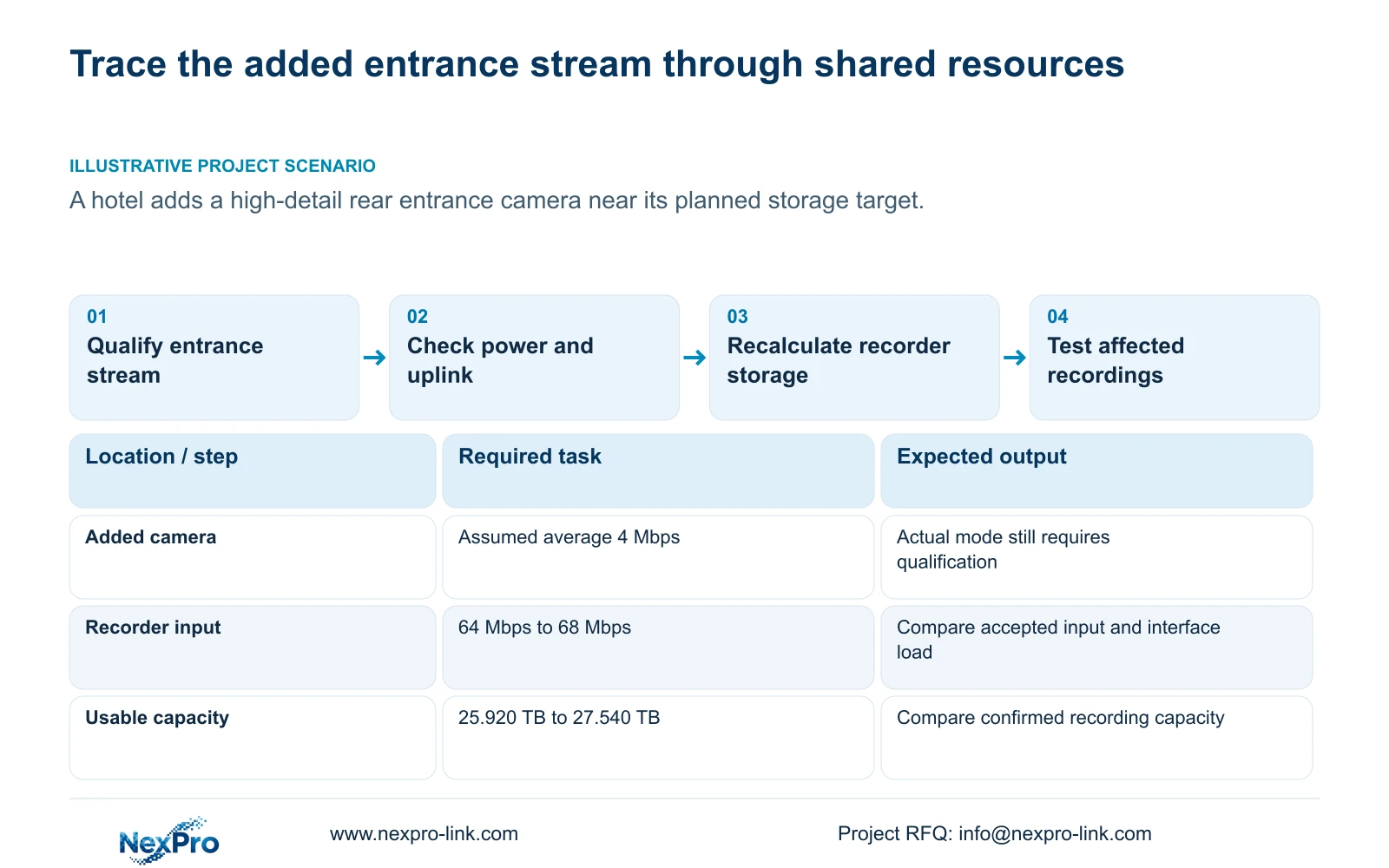
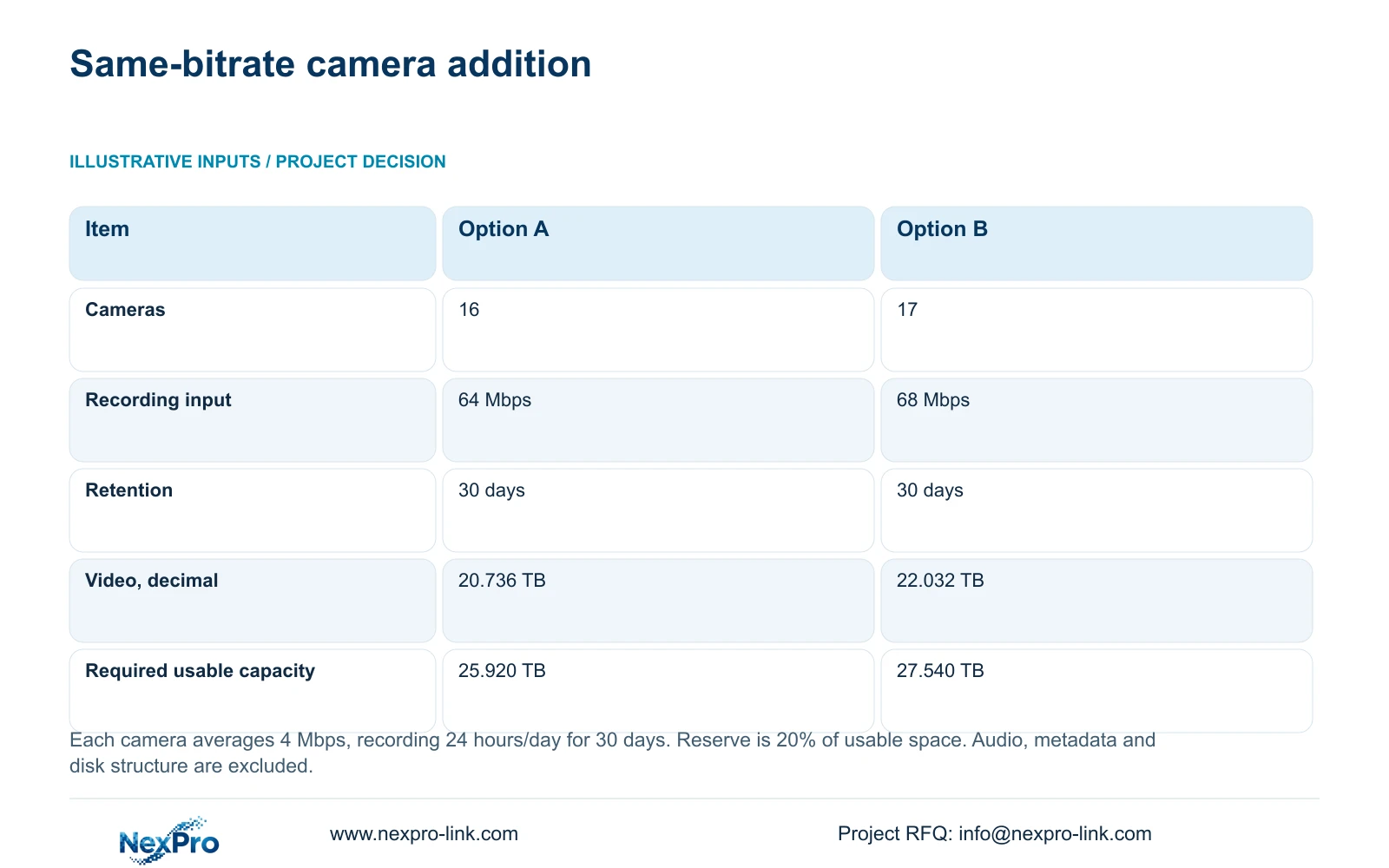
Approve an additional camera only after checking the recorder's accepted stream modes, total input, usable storage, camera-power group and affected network path. Confirm the operator's required playback combination separately. In the supplied illustration, increasing from sixteen to seventeen cameras at an assumed average 4 Mbps each raises video input from 64 Mbps to 68 Mbps. With continuous recording for thirty days and 20% reserved usable space, the calculated requirement rises from 25.920 TB to 27.540 TB. Those figures describe a planning example, not the hotel's measured load. The rear entrance camera's actual mode and representative bitrate must support the final decision.
The technical basis is the supplied private NVR4.0 user manual CH_V2.4.doc, with V2.2 in its body: sections 5.1 and 5.2 for capacity scope, 4.4.5 for encoding fields, 4.3.3.3 for traffic and 4.11 for recording checks. Current commercial model evidence remains separate.
Section 02
Check channel availability and playback as different constraints
An unused channel answers the enrollment-count question. It does not establish acceptance of the added stream's resolution and frame rate, sufficient incoming bitrate, or the simultaneous playback task needed during an entrance incident.
The manual's TS8232C4 playback example is 1×4K OR 4×2MP OR 2×5MP. These are alternative combinations, not capacities to add together. TS8836M/TS8436M lists 1×4K 30fps OR 2×5MP OR 4×4MP@20fps OR 4×2MP@25fps. Use each model's own scope when comparing the operator's task.
There is no established mapping from those TS models to NexPro-Link commercial SKUs. For a current candidate, obtain its separate stream, playback and storage evidence. A larger nominal channel count cannot resolve a missing or incompatible playback combination.
Section 03
Establish the added camera's actual recording mode
Record the proposed camera's mode and CBR or VBR configuration, then distinguish those settings from measured traffic and stored volume. Use a representative average for retention planning and the relevant peak or limit for interface evaluation. Document the lighting and motion conditions represented by the sample.
The supplied comparison holds every camera at an assumed average 4 Mbps to isolate the effect of adding one channel. A high-detail entrance task does not establish that this will be its actual average. If the selected camera needs a different bitrate or schedule, replace the illustration with camera-group inputs before approving disks.
Do not reduce the new stream merely to fit the old estimate without checking whether its recorded image still meets the entrance requirement. Preserve the operating task while identifying the resource change.
Section 04
Recalculate the full retention load
Option A uses 16 cameras × average 4 Mbps × 24 hours/day × 30 days. Option B uses 17 cameras with the same average bitrate, daily hours and retention. Both reserve 20% of usable space. Audio, metadata and the actual disk structure are excluded from this illustration.
In decimal units, video TB = 0.00045 × channels × Mbps × hours/day × days. The coefficient converts megabits per second over recording hours into decimal terabytes, using eight bits per byte. For mixed groups, sum each group's channels × bitrate × hours × days before applying the coefficient.
Option A video = 0.00045 × 16 × 4 × 24 × 30 = 20.736 TB. Option B video = 0.00045 × 17 × 4 × 24 × 30 = 22.032 TB. Input is 16 × 4 = 64 Mbps and 17 × 4 = 68 Mbps.
Required usable TB = video TB ÷ (1 − 0.20). Therefore 20.736 ÷ 0.80 = 25.920 TB, and 22.032 ÷ 0.80 = 27.540 TB. The addition is 22.032 − 20.736 = 1.296 TB of video, requiring 27.540 − 25.920 = 1.620 TB more usable capacity under the same reserve policy.
Division by 0.80 leaves the specified share unused; simply adding 20% to video volume is a different calculation. Compare the result with confirmed usable recording capacity after applicable storage allowances, not an unexplained sum of physical disk labels.
| Item | Option A | Option B |
|---|---|---|
| Camera count | 16 | 17 |
| Video recording input | 64 Mbps | 68 Mbps |
| Retention | 30 days | 30 days |
| Video volume, decimal | 20.736 TB | 22.032 TB |
| Required usable capacity | 25.920 TB | 27.540 TB |
Section 05
Turn the calculated difference into a purchase condition
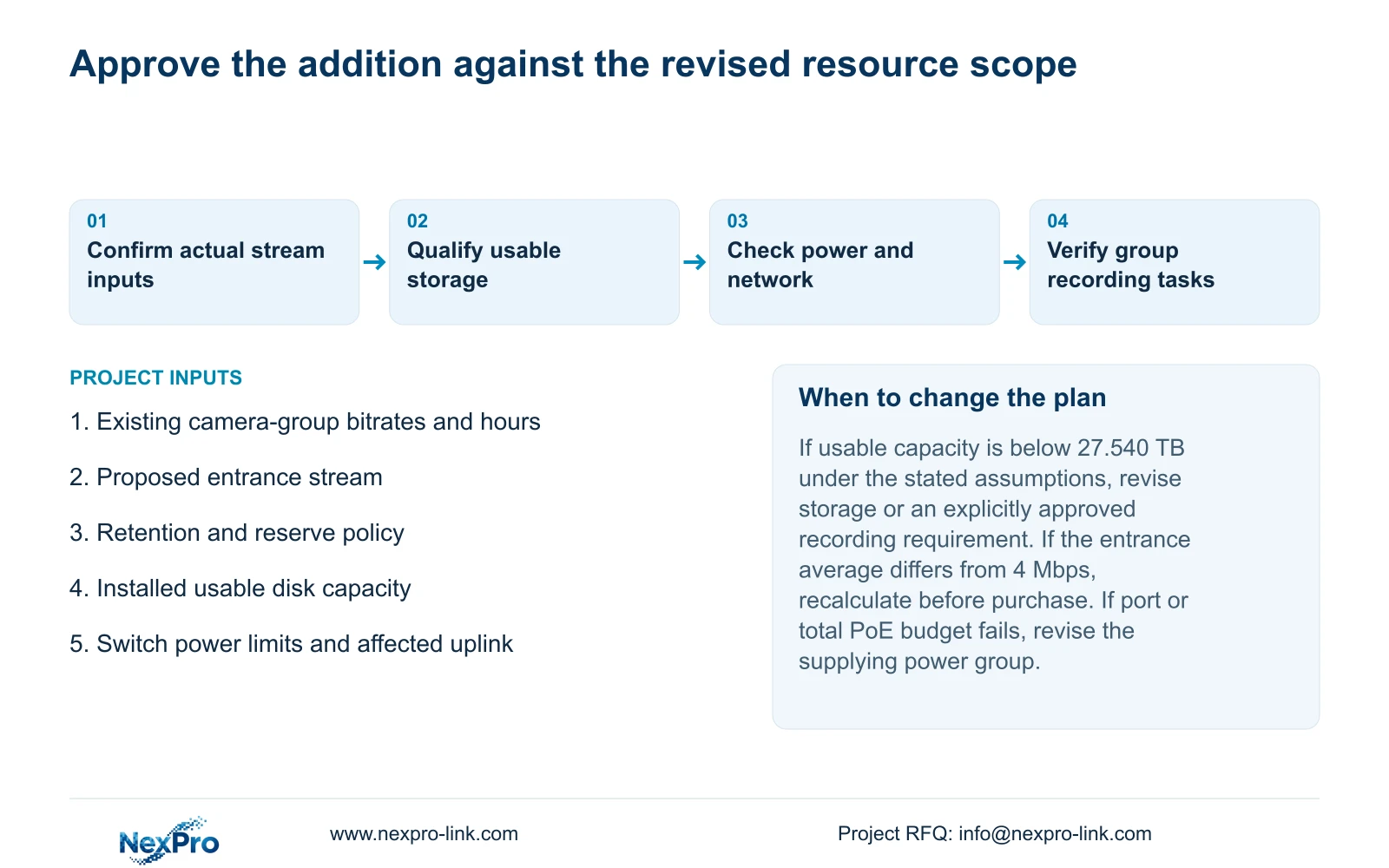
If confirmed usable capacity meets the revised requirement, storage may remain suitable under these assumptions. If it falls between the old and new requirements, the addition fails the revised retention screen even though the original plan passed. Resolve capacity or an explicitly approved recording requirement before ordering.
The separately supplied NexPro-NVR4449-4K fields include 49 channels, 320 Mbps input and four SATA positions with a stated maximum 18 TB per disk. Those limits can screen a model-level enquiry, but they do not establish the installed usable capacity, a RAID level or redundant storage. They also do not map the recorder to a TS model.
No disk configuration is selected by this calculation. Audio, storage overhead and any defined multi-disk arrangement still need their own treatment before the usable-capacity comparison is complete.
Section 06
Check the switch group supplying the new camera
Identify the actual camera power interface and its supplying group. For PoE, compare the camera's maximum device requirement with the selected port capability, then recalculate the group's total demand against the switch budget with appropriate delivery-loss and reserve assumptions.
The source supplies no camera peak wattage or switch budget for this addition, so a numeric PoE result cannot be completed. Obtain those values instead of assigning a generic camera wattage. Available data ports do not establish available power, and an ordinary recorder LAN interface should not be assumed to supply PoE.
Section 07
Inspect the affected uplink and test the operating group
Trace where the added stream joins the recording path and inspect that uplink's relevant load. Section 4.3.3.3 shows transmit and receive traffic separately. The 68 Mbps sum is video payload under the illustration; interface measurements may include overhead and other activity.
Remote viewing, playback and exports create additional paths. Record a defined operating interval that includes the required tasks instead of assuming outgoing traffic equals incoming camera traffic.
After the approved addition, check the new channel and affected existing channels for live view, correct time and newly generated footage. Retrieve a relevant older sample, verify export, and test intended accounts and events. Record any failed group task rather than closing acceptance on the new picture alone.
Section 08
Apply the addition to the rear entrance
Illustrative project scenario: A hotel adds a high-detail rear entrance camera to a recorder near its planned storage target. The same-bitrate comparison exposes the marginal storage requirement, but the engineer must qualify the entrance's actual stream, its power group and operator playback. The quote should identify any required storage or network change separately from the camera line. No installed outcome or price advantage is implied.
Section 09
Can spare disk bays prove the retention target is met?
No. Confirm supported disks and the actual usable configuration, then compare it with the completed retention calculation.
Section 10
Provide the revised recording schedule
Send NexPro-Link the existing camera-group bitrates and hours, retention target, installed disk configuration and proposed entrance stream at info@nexpro-link.com.
Engineering references
These sources support the general planning principles. Always use the selected product's current datasheet and applicable project standards for final design.