

A gigabit factory core does not require every camera to generate gigabit traffic. Trace the actual stream paths before choosing endpoint ports, aggregated uplinks and recorder capacity.
Section 01
Size the camera port from its outgoing streams
A 100 Mbps camera port can be an appropriate choice when the selected camera's simultaneous stream demand, relevant overhead and operating conditions fit it. Size the aggregated uplink and recorder independently. A gigabit core alone gives no reason to reject a suitable endpoint, and upgrading that endpoint does not remove a bottleneck elsewhere.
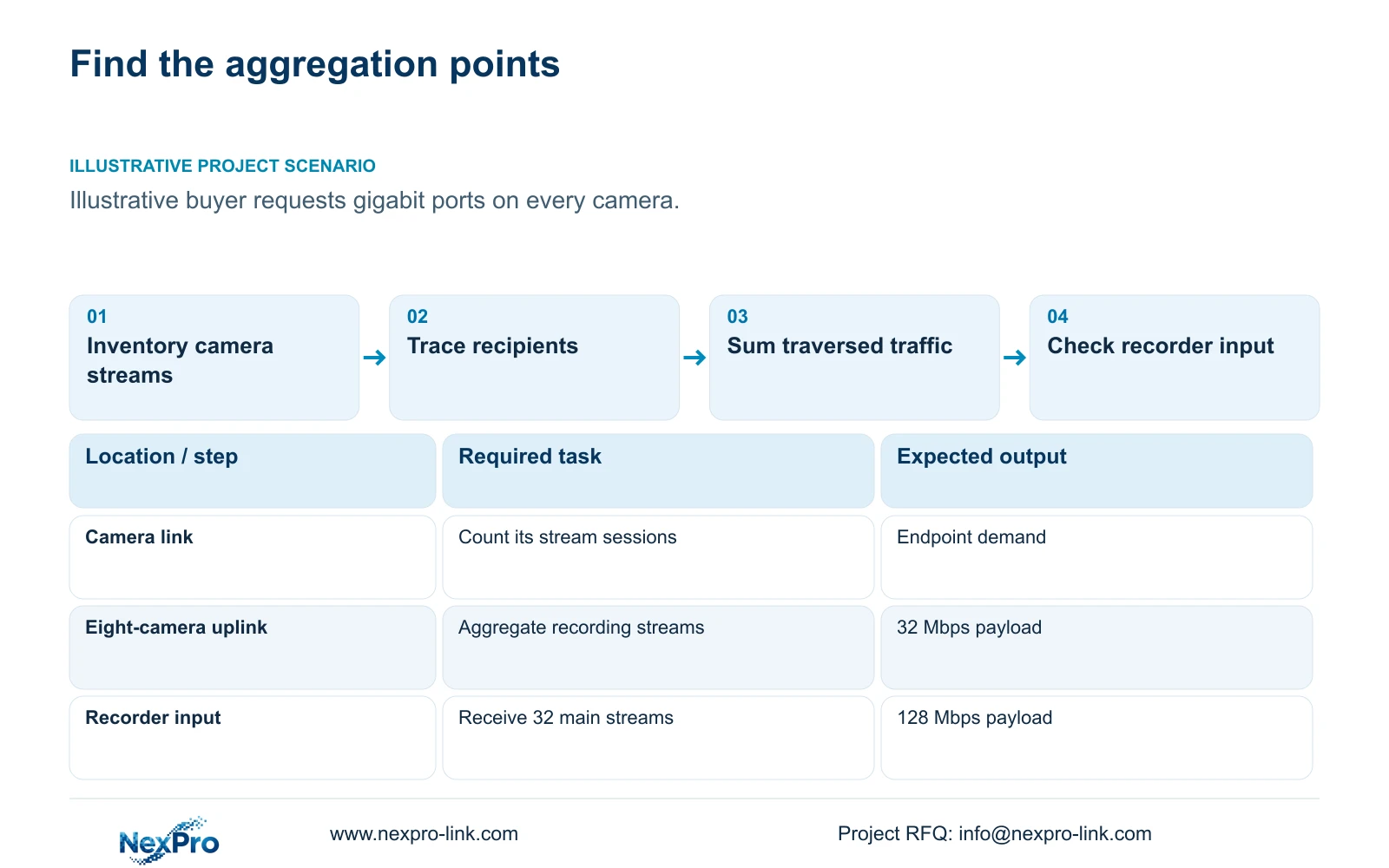
Illustrative project scenario: A buyer assumes every camera needs a gigabit port because the core network is gigabit. The supplied CNC reference contains 32 ordinary security views, each assumed to record locally at 4 Mbps. A separate operator comparison considers 16 simultaneous views at either 0.5 Mbps or 4 Mbps each. These are planning stream settings, not measured camera output.
Create a stream inventory for one representative camera before multiplying by 32. Identify recording, live viewing and other active streams, their recipients and whether separate sessions are used. Retain the selected image task while evaluating traffic; a lower stream setting should not be used to conceal an unsuitable network design.
Section 02
Count each stream on the interfaces it actually crosses
Draw camera-to-switch, switch-to-recorder and recorder-to-client paths with traffic direction. If a client receives video from the recorder, that outgoing viewing traffic does not automatically create another camera-to-recorder recording stream. If the client connects directly to cameras, the endpoint and access paths change and must be recalculated.
For four eight-camera access groups at the supplied 4 Mbps assumption, each group's recording uplink carries 8 × 4 = 32 Mbps of video payload. A central recorder receiving all groups carries 32 × 4 = 128 Mbps. Do not copy 128 Mbps onto each individual camera cable or each group uplink.
Add overhead and other services where they exist, without applying an unexplained universal percentage. Playback and export may use the same client-facing connection as live view, while unrelated factory traffic may share an uplink. Record the simultaneous operating case so the network owner can judge the actual shared capacity requirement.
Section 03
Check recorder input separately from Ethernet speed
The NexPro-NVR4449-4K source lists 320 Mbps input capacity and dual Gigabit LAN. Those are distinct published fields. Its recording summary distinguishes 49×5MP from 9×4K; neither its Ethernet interfaces nor channel count establishes unrestricted decoding or every high-resolution stream combination.
At 128 Mbps assumed recording payload, the CASE01 input is below the quoted 320 Mbps figure. Final approval still requires the actual stream modes, peak traffic and firmware conditions to fit. The source camera's listed 5MP output of 2880×1620 should remain unchanged in the schedule rather than be replaced with a presumed resolution from its family label.
Assign checks to the equipment that performs them. The network engineer verifies link traffic and available capacity; the recorder supplier confirms supported recording modes; the operator acceptance test verifies playback and export. A network upgrade should not be purchased as a substitute for checking recorder or client processing limits.
Section 04
Choose overview traffic without reducing local recording
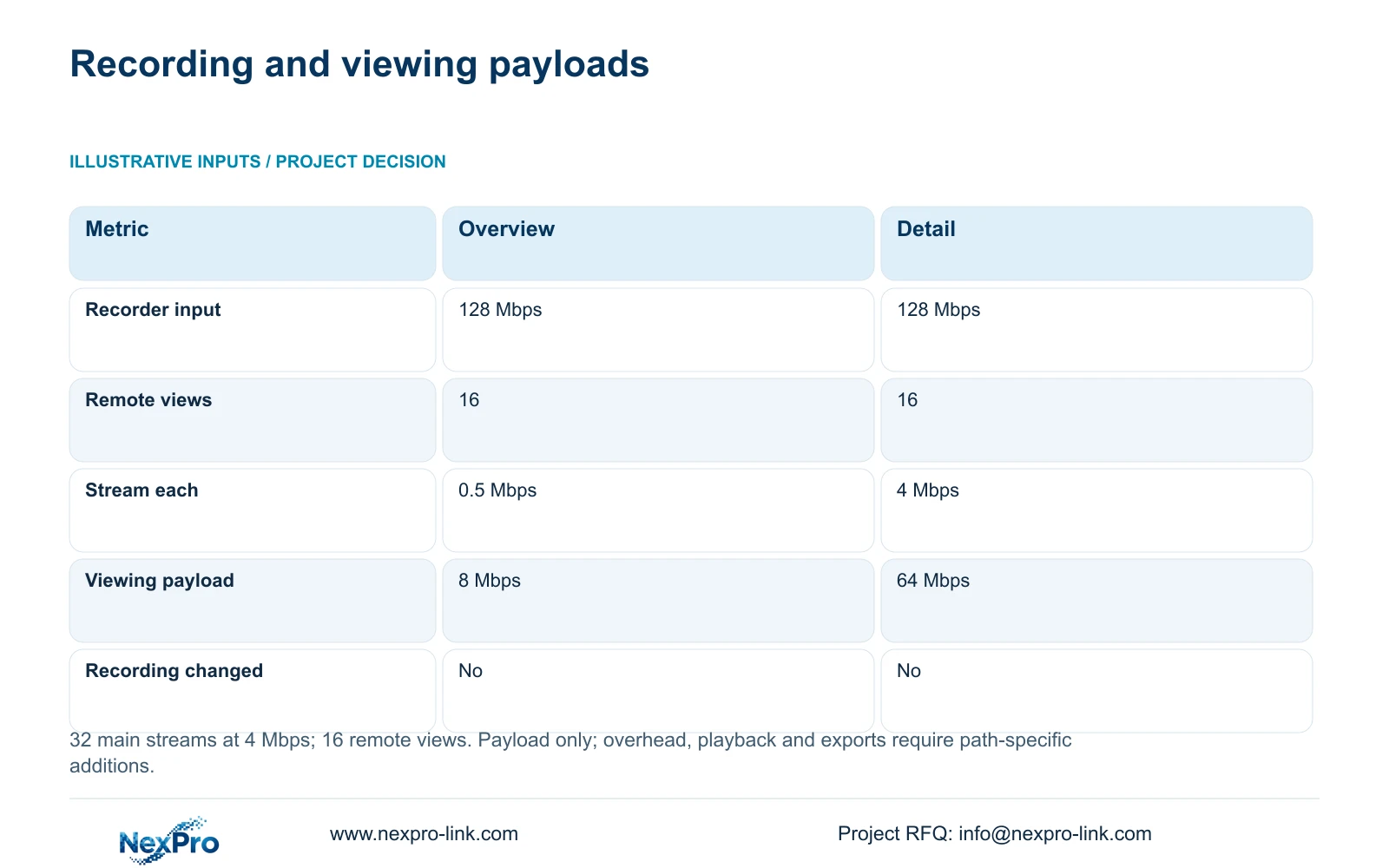
The supplied calculation uses recorder_Mbps = 32 × 4 = 128 Mbps for both options. For 16 simultaneous views, viewing_Mbps = 16 × stream_Mbps. At 0.5 Mbps each, the viewing payload is 8 Mbps; at 4 Mbps each, it is 64 Mbps. The table compares operator workflows while leaving local main-stream recording unchanged.
The decisive difference is the traffic on the separate viewing path. Prefer the 8 Mbps overview basis when the owner accepts its displayed detail and the selected camera, recorder and client support that workflow. Use the detail stream where the task requires it, checking the additional demand on every traversed interface.
These results are payload figures before protocol overhead. They do not guarantee WAN performance or universal substream compatibility. If recording and viewing share a physical path, count the applicable traffic there, including direction and simultaneous use, rather than treating the two worksheet columns as physically separate by default.
| Metric | Overview option | Detail option |
|---|---|---|
| Local recorder input | 128 Mbps | 128 Mbps |
| Concurrent remote views | 16 | 16 |
| Viewing stream each | 0.5 Mbps | 4 Mbps |
| Remote viewing payload | 8 Mbps | 64 Mbps |
| Local recording changed | No | No |
Section 05
Put additional bandwidth where aggregation requires it
Retain suitable endpoint ports and prioritise the links that aggregate multiple streams. Specify an uplink from its calculated traffic, growth allowance and supported interface arrangement. Select a gigabit endpoint when the exact camera and task justify it, rather than making it a blanket purchasing condition for all ordinary views.
Check PoE alongside bandwidth without mixing their units. The reference uses an assumed 12 W camera demand, but a Mbps result cannot establish port power support. A replacement camera may fit the data budget while requiring a different supplying port or increasing the cabinet's AC load.
Factory IT should approve recording, operator and management access paths. NIST SP 800-82 Rev.3 provides the supplied context for protecting OT boundaries. Do not move security traffic onto production-control connections merely because those connections appear faster. An approved low-bandwidth viewing route can preserve local evidence quality while reducing shared-link demand.
Section 06
Require a traffic schedule and a simultaneous-use demonstration
Issue the offer schedule with endpoint stream settings, access-group payloads, recorder input and operator concurrency. Ask bidders to identify supplied and retained network components and any limits affecting that operating case. NexPro-Link's BOQ and Tender Support scope can coordinate the related camera and recorder matching without assuming that all mixed-brand workflows are supported.
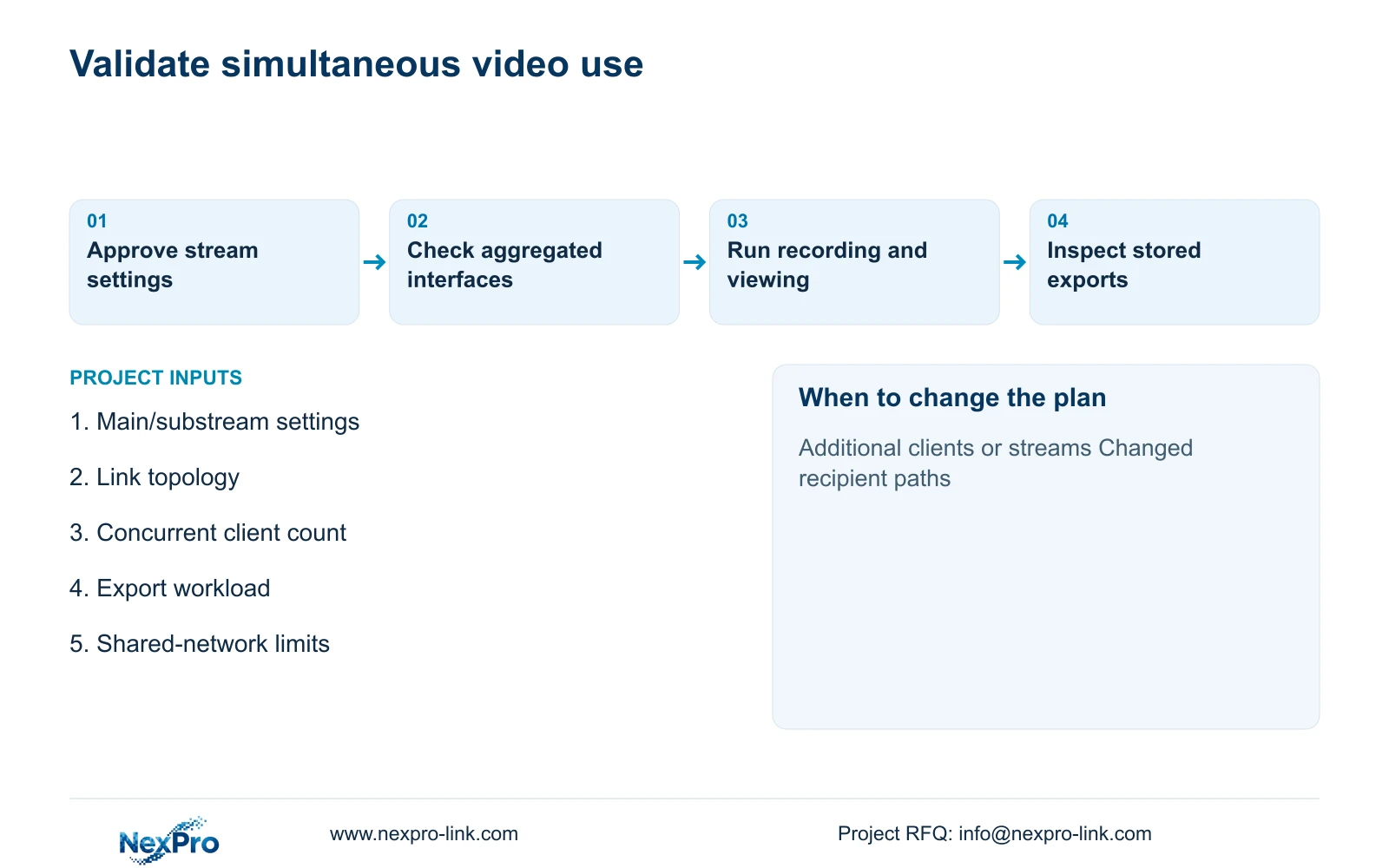
Run a planned demonstration with continuous recording, the accepted live layout and representative playback or export activity. Observe the relevant interfaces and inspect the stored footage after the test. A smooth live screen alone cannot confirm that the recorder retained usable video during concurrent demand.
Keep a configuration revision with the handover records. Recalculate when stream settings, client count, direct-camera access or shared-link use changes. Record whether a proposed improvement changes the network, recording mode or operator workflow so the cost team can compare the same accepted service across offers.
Section 07
Buyer questions
Will a gigabit camera port improve image detail? Its speed rating alone establishes no image-quality improvement. Compare the accepted scene, camera settings and actual delivery performance before attributing a difference to the port.
Does dual Gigabit LAN double the recorder's recording allowance? Do not assume that. The source separately lists 320 Mbps input and dual Gigabit LAN. Confirm the supported use of both interfaces and the applicable recording limits.
Can we keep high-detail recordings with a low-bandwidth remote overview? Yes, where the exact devices and client support separate recording and viewing streams. Verify stream selection and stored footage in the accepted workflow before release.
Section 08
Review the links that carry your video
Send your main/substream settings, camera-to-recorder topology, simultaneous viewing and export requirements, and shared-network constraints to info@nexpro-link.com for a path-specific equipment review.
Engineering references
These sources support the general planning principles. Always use the selected product's current datasheet and applicable project standards for final design.


