A limited factory uplink should change the remote viewing workflow, not silently weaken local evidence. Separate recording, overview, detail and recovery traffic.
Section 01
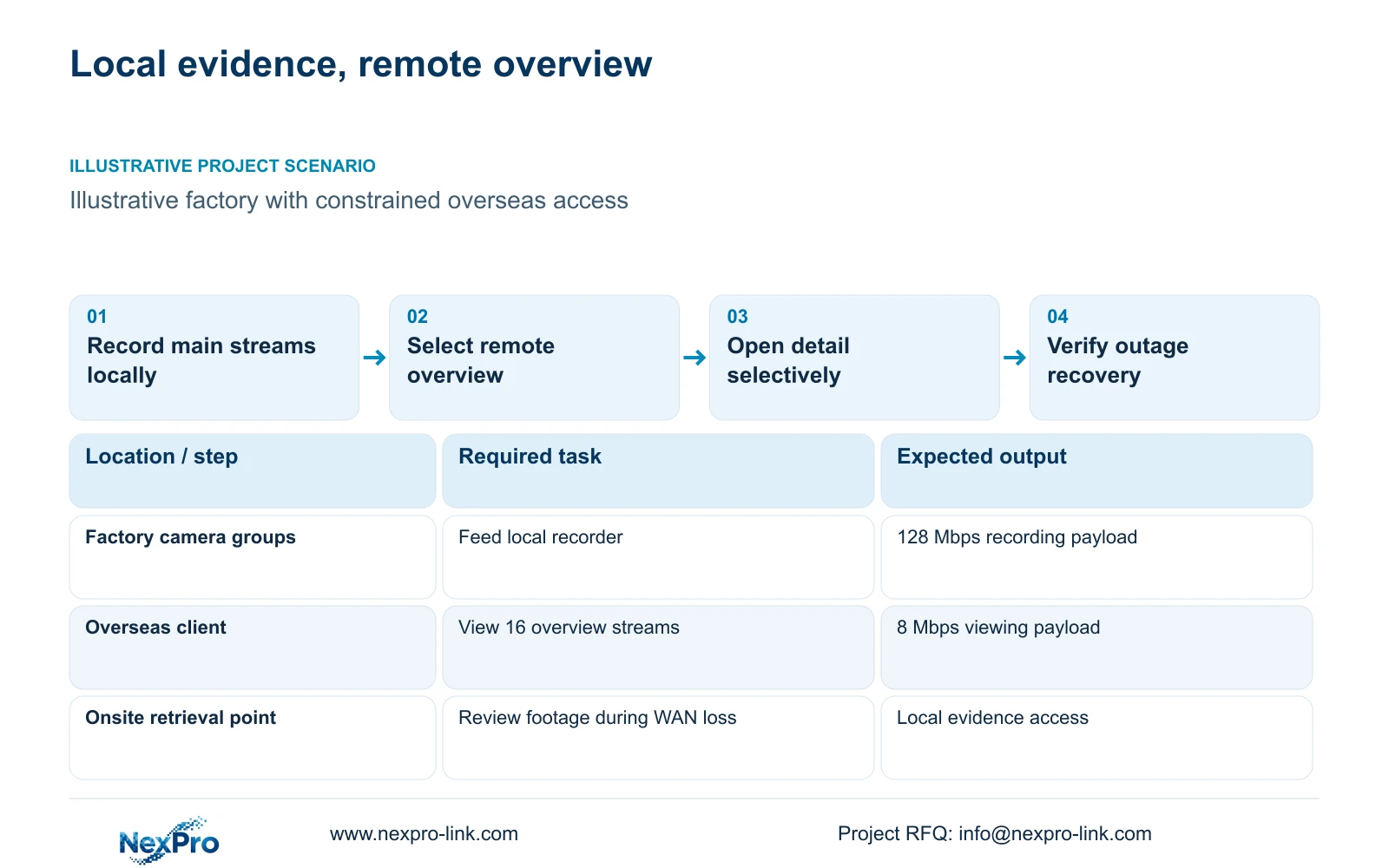
Keep the required recording path inside the factory
For factory remote monitoring over weak WAN links, preserve the required camera-to-recorder stream locally and budget remote viewing separately. Limited internet capacity should determine which views the overseas owner opens, how many run together and when exports travel. It should not silently reduce the accepted local evidence quality or make routine recording depend on an overseas connection.
Illustrative project scenario: The overseas owner connects through an uplink that is much smaller than the site's total recording traffic. Use the CASE01 planning arrangement of 32 ordinary security cameras at a new CNC factory, covering gates, stores, permitted transfers, common routes, dispatch and equipment-room approaches. Assume continuous local recording at an average 4 Mbps per camera for 30 days. The site and overseas viewing workflow are hypothetical, with no measured WAN performance implied.
Draw two paths: cameras through local access switches to the recorder, and authorised remote clients through the approved WAN access route. Mark where those paths share an interface. The local acceptance task is continuous evidence and usable retrieval at the factory. The remote task is selected visibility from overseas. Each needs its own performance check and support owner.
Section 02
Match remote streams to the operator's actual question
Ask whether the overseas user needs a broad operational overview, close review of one transfer, historical playback or an evidence export. A multi-camera overview can use a lower-bandwidth stream if its picture answers the agreed question. Detail review may need a larger stream and fewer simultaneous windows. Keep those choices visible in the operating instructions so that a small remote image is not mistaken for the quality of the local recording.
The supplied comparison assumes 16 concurrent remote views, each at either 0.5 Mbps or 4 Mbps. These are design inputs, not guaranteed stream settings for every model or client. Confirm that the selected camera, recorder and viewing client expose and use the intended stream. ONVIF profile applicability and exact firmware matter where interfaces are mixed; basic video connectivity alone does not qualify the entire viewing workflow.
A relevant ordinary-area reference is the NexPro-BL2812M55-5MP-DIC-AI, whose source lists 2880×1620 output within the 5MP family and 25fps@5MP. Those fields do not establish a fixed 4 Mbps recording rate or a universally available 0.5 Mbps remote stream. Test the proposed settings with the actual scene and client, particularly where moving vehicles or changing light increase demand.
Section 03
Specify what continues during an internet outage
Define WAN loss separately from local power or LAN loss. With the proposed local architecture, disconnecting the external connection should leave camera-to-recorder recording available, provided its local dependencies remain powered and operational. The onsite team needs a local method to check recording and retrieve footage. Do not make a remote login the only way to confirm that the factory still has evidence.
Record the supply boundary in the per-node switch/power schedule. In CASE01, four eight-camera PoE groups support one recorder; maximum camera demand must be obtained for final selection. Protect the local recording dependencies according to the agreed outage objective. A UPS at the recorder does not protect a switch on an unrelated circuit. Keeping the router powered also cannot guarantee that the upstream internet service remains available.
After WAN recovery, check client reconnection, authorised access and sample local footage spanning the outage. Assign factory IT to investigate the uplink and approved access path, and the security contractor to verify recorder and client behaviour. Automatic cloud upload, gap filling or remote archive synchronisation must be separately specified and demonstrated if required; none is assumed in this scenario.
Section 04
Calculate recording and viewing traffic on their own paths
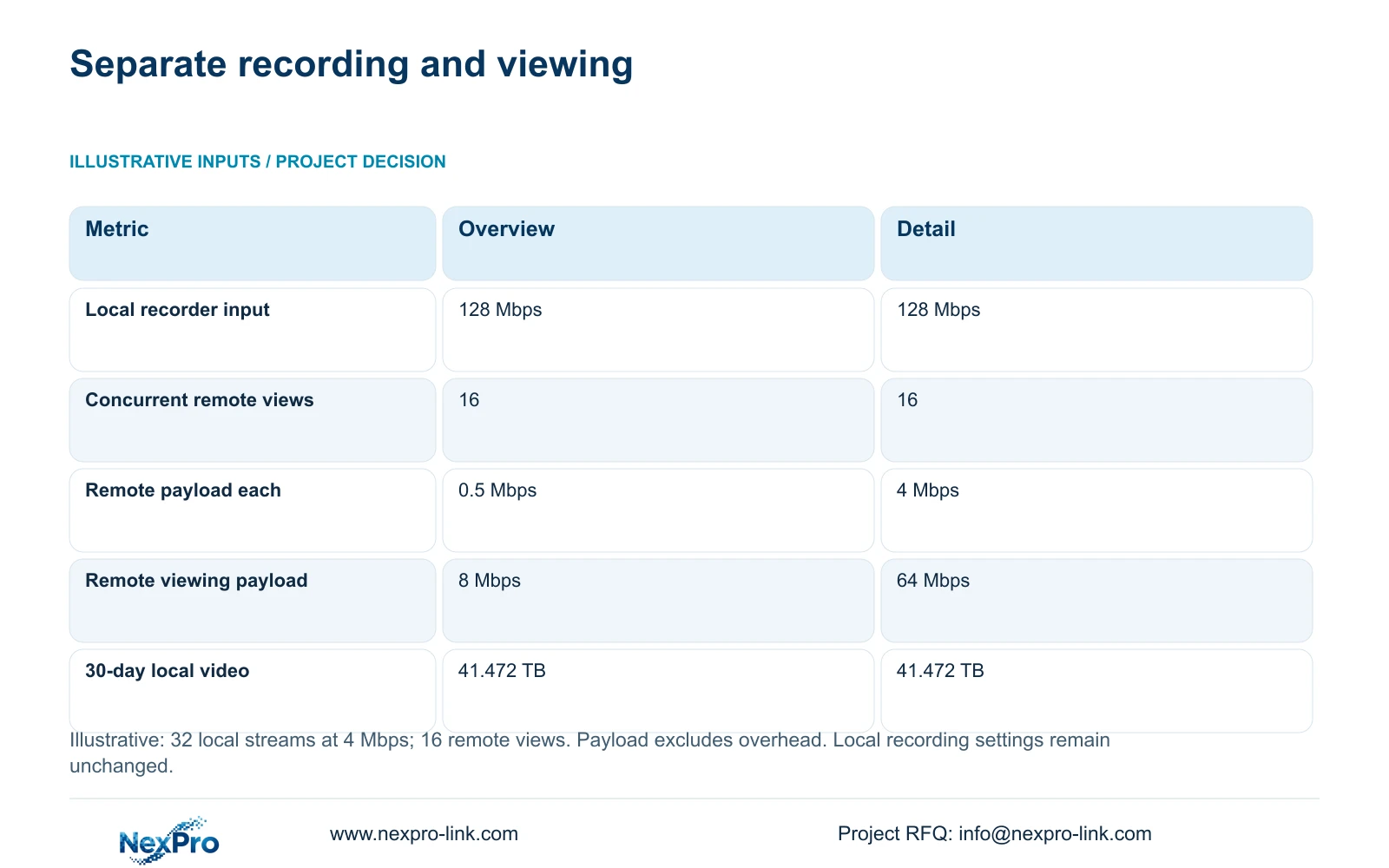
The illustrative recording calculation is recorder_Mbps = 32 × 4 Mbps = 128 Mbps. For remote viewing, viewing_Mbps = 16 × stream_Mbps. Option A therefore carries 16 × 0.5 Mbps = 8 Mbps of viewing payload; Option B carries 16 × 4 Mbps = 64 Mbps. Both retain the same assumed local main streams. The decisive difference is the WAN viewing demand, not the local recording requirement.
These payload figures exclude protocol overhead, other site traffic and additional playback or export sessions. An uplink described as 8 Mbps does not thereby qualify for an 8 Mbps video payload. Obtain available upstream capacity under relevant operating conditions, along with latency and loss observations. If Option A does not fit, reduce concurrent remote views or revise the access service while preserving the local stream.
Count traffic only where it crosses an interface. An eight-camera recording group carries 32 Mbps of assumed video toward the recorder. A recorder-side interface serving remote views may carry recording and viewing traffic in different directions; document both directions and the actual forwarding route. Do not assign 128 Mbps plus all viewing traffic to every camera cable or automatically treat the resulting sum as a bidirectional interface limit.
| Metric | Option A: remote overview | Option B: remote detail |
|---|---|---|
| Local recorder input | 128 Mbps | 128 Mbps |
| Concurrent remote streams | 16 | 16 |
| Remote payload per stream | 0.5 Mbps | 4 Mbps |
| Remote viewing payload | 8 Mbps | 64 Mbps |
| Local recording quality changed | No | No |
Section 05
Choose overview access without reducing retention
Prefer Option A for the overseas overview when its image is accepted and the measured available uplink supports it. Permit detail review as a controlled task with fewer selected views when necessary. Change the recommendation if the owner requires simultaneous detailed observation, multiple remote users or frequent exports. Those requirements may justify a better WAN service or a different qualified architecture, rather than a lower local recording setting.
Local retention remains a separate capacity decision. Using decimal TB, video_TB = 32 × 4 × 10^6 × 86400 × 30 / 8 / 10^12 = 41.472 TB. CASE01 installs four 16 TB drives, giving 64 TB raw. Its illustrative recording budget is 64 × 0.95 × 0.80 = 48.64 TB, already allowing formatting overhead and a 20% reserve. Compare 41.472 TB directly with 48.64 TB; do not apply the reserve again.
The NexPro-NVR4449-4K is a candidate with 320 Mbps published input and four SATA bays supporting up to 18 TB per drive. Its summary distinguishes 49×5MP from 9×4K modes. Confirm actual streams, disks and concurrent playback/export demands before purchase. Channel capacity does not prove decoding capacity or RAID. A Hikvision, Dahua or other alternative should preserve the same local retention and qualified remote task for a meaningful comparison.
Section 06
Qualify remote access before releasing the project package
The procurement package should separate supplied cameras, recorder and disks from retained WAN equipment, installer-provided connections and optional remote services. Its permitted traffic matrix should identify authorised clients, approved destinations and the responsible access administrator. Use the owner's IT/OT constraints when defining the route. NIST SP 800-82 Rev.3 is a useful OT-security reference for that boundary; remote viewing is not a reason to introduce unrestricted access into production networks.
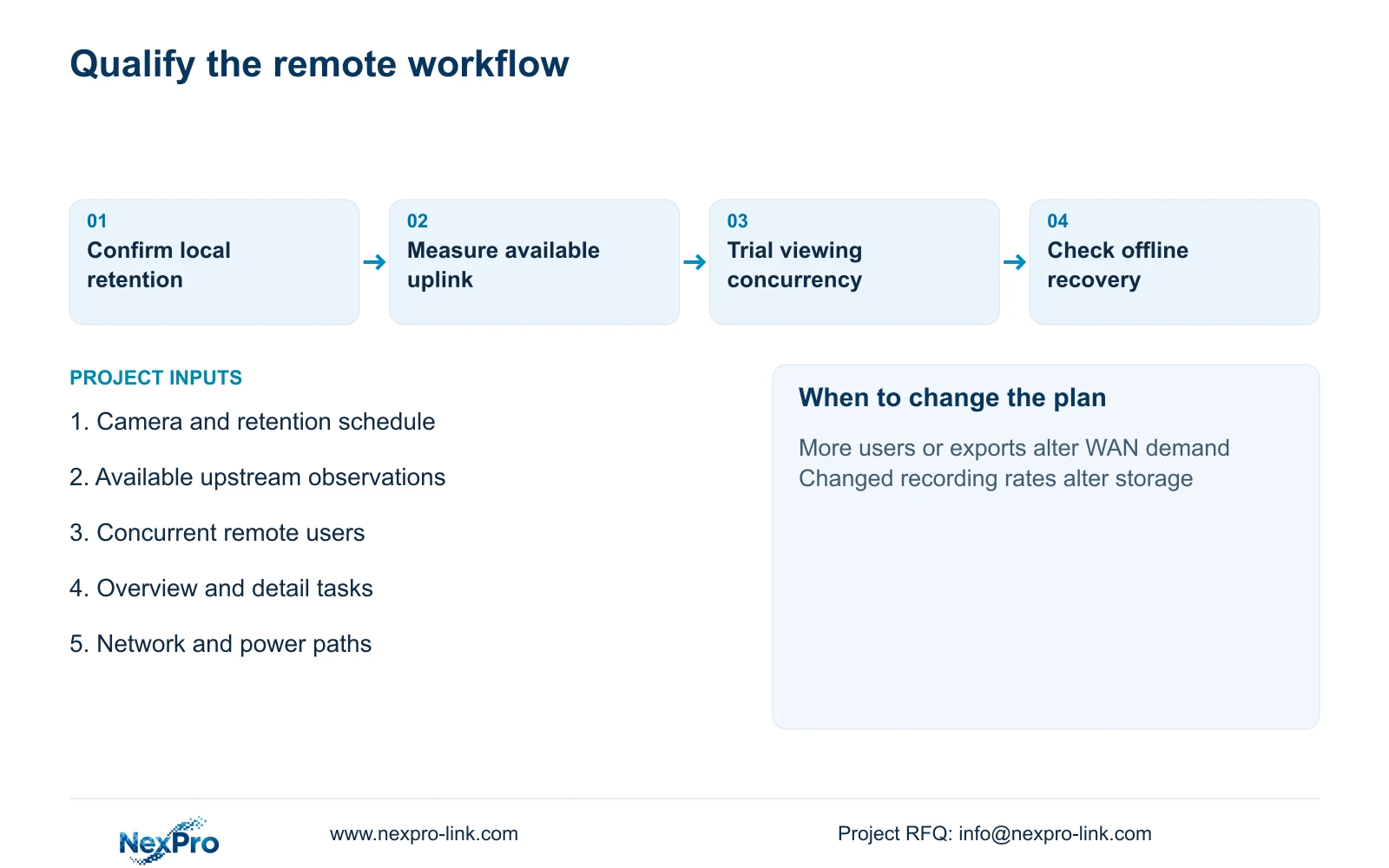
Demonstrate the overseas workflow with the intended client and concurrency. Run the overview, then review a selected detailed scene and export a representative clip. Observe local recording during those operations and during an approved WAN-disconnection check. Record stream selections and firmware versions with the results. A successful bench demonstration prepares the configuration, but it cannot substitute for qualification on the site's actual connection.
NexPro-Link can use its factory project and BOQ support scope to coordinate model matching, technical documents and equipment preparation around these requirements. Keep internet service provision, access administration and local installation assigned separately. The resulting handover should explain how an operator moves from an overview to useful evidence, who investigates a failed remote session, and how the onsite team verifies recording when overseas access is unavailable.
Section 07
Buyer questions
Will adding more local storage make remote playback faster? More capacity can support retention, but it does not increase available WAN bandwidth. Remote playback also depends on the selected stream, client and recorder workload. Evaluate capacity and retrieval performance as separate requirements.
Can we offer remote access without buying a permanent display wall? Yes, if an approved client and suitable local retrieval arrangement meet the operating task. A display wall is a separate monitoring choice and does not solve a constrained uplink. Specify the required users and views before adding display equipment.
Should two overseas users be treated as one viewing session? Do not assume they share one transported stream. Confirm how the actual access service handles concurrent sessions and count the traffic crossing the site uplink. Repeat the qualification with the expected number of users.
Section 08
Scope a local-first remote monitoring package
Send your camera and local-retention schedule, available uplink observations, remote-user concurrency and viewing tasks, and approved network/power paths to info@nexpro-link.com. NexPro-Link can discuss a local recording package with a separately defined remote-access scope.
Engineering references
These sources support the general planning principles. Always use the selected product's current datasheet and applicable project standards for final design.