A repeat CCTV order can retain the same customer logo while changing hardware, firmware or accessories. Separate approval records make those changes visible before purchasing and shipment.
Section 01
Approve a repeat-order baseline beyond the logo
Factory OEM repeat orders should reference separate approved records for artwork, equipment identity, configuration and accessories. Keep unchanged records in force, identify each proposed substitution, and review the affected installation or operating task before release. A purchase order saying “same as last order” leaves the supplier and installer to decide which details must remain identical.
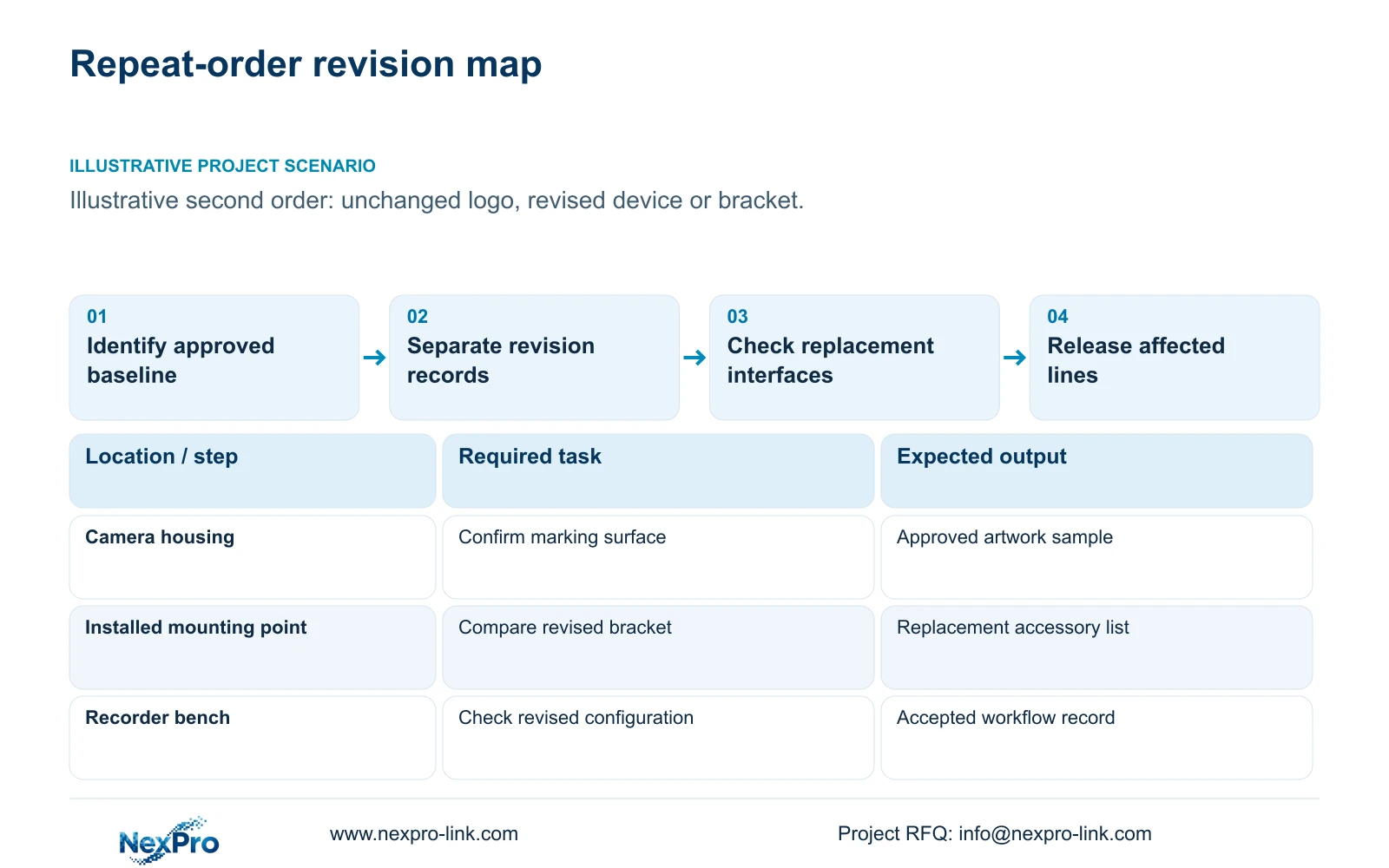
Illustrative project scenario: The second factory order uses the same logo but a device or bracket revision has changed. Assume the first installation follows the CASE01 planning reference: 32 ordinary security views covering gates, stores, permitted machine-hall transfers, common routes, dispatch and equipment-room approaches. The repeat batch supports those same roles; it is not evidence of a completed customer installation.
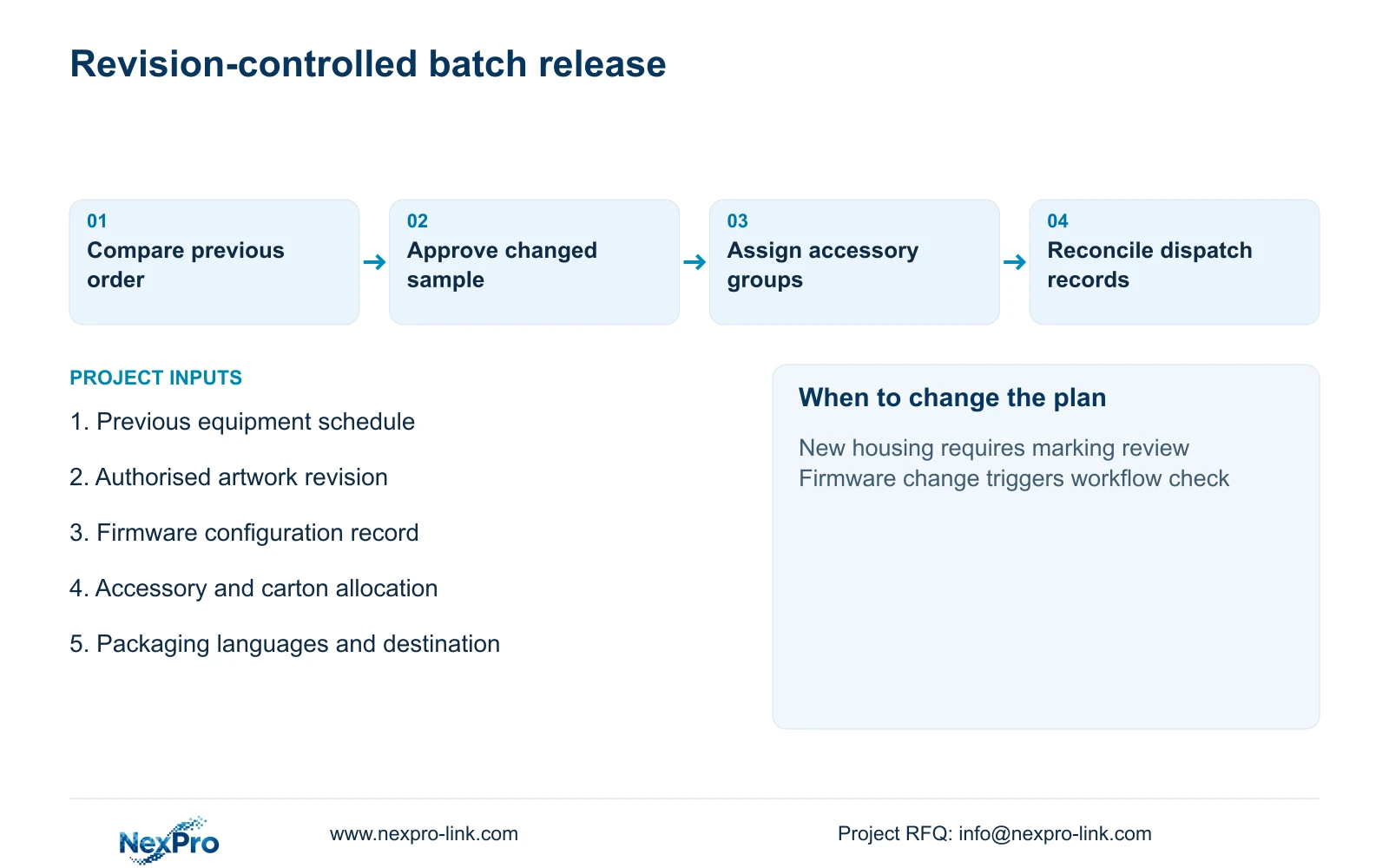
Create a baseline register linking the previous purchase order to exact models, approved marking samples, firmware records, accessory lists and carton assignments. Include customer-authorised artwork, packaging languages and delivery destination. The quantity surveyor can then distinguish a genuine repeat item from a substituted item carrying familiar branding, while the engineer sees which technical approvals need attention.
Section 02
Keep artwork, hardware and configuration revisions independent
Use separate revision identifiers rather than one blanket package version. An artwork change may affect marking and printed materials without changing the camera. A housing or bracket change may affect mounting, accessory packing and the approved logo position. A firmware change may require another recording and export check even when the exterior remains identical.
For a repeat NexPro-BL2812M55-5MP-DIC-AI item, preserve its exact identity and the source-listed 2880×1620 output in the technical schedule. Do not silently replace that field with a different interpretation of 5MP. Record the agreed stream settings separately from the specification so the supplier knows what to prepare and the installer knows what still requires site adjustment.
Issue a change record stating the previous revision, proposed revision, affected quantities and required evidence. If packaging gains another language, review translated model references and support instructions without reopening an unchanged mounting approval. If firmware changes, review the relevant camera-to-recorder workflow without assuming that a new logo sample settles software acceptance.
Section 03
Approve replacements against the installed interface
Define spare compatibility by the replacement task. For the assumed bracket revision, the installer should compare the existing mounting pattern, fixing arrangement, cable entry and available clearance with the proposed assembly. Specify whether the spare includes an adapter, a complete replacement bracket or only the camera. A physically usable substitute can still create extra work if its required accessory arrives separately.
The engineer should also check the replacement stream and required functions against the installed recorder and firmware combination. In CASE01, the NexPro-NVR4449-4K is a recording candidate with 320 Mbps input and four SATA bays. Its catalogue recording capacity does not establish every decoding workflow or RAID support, and a matching camera family name does not prove replacement compatibility.
Return an explicit disposition: direct replacement, replacement with listed accessories, or separately approved alternative. Procurement records the supplied items; the local installer accepts the mounting work; the engineer approves the operating result. Keep old and new spare groups identifiable in cartons and the asset register so a maintenance technician can select the correct assembly without guessing from the logo.
Section 04
Allocate setup costs only across the applicable batch
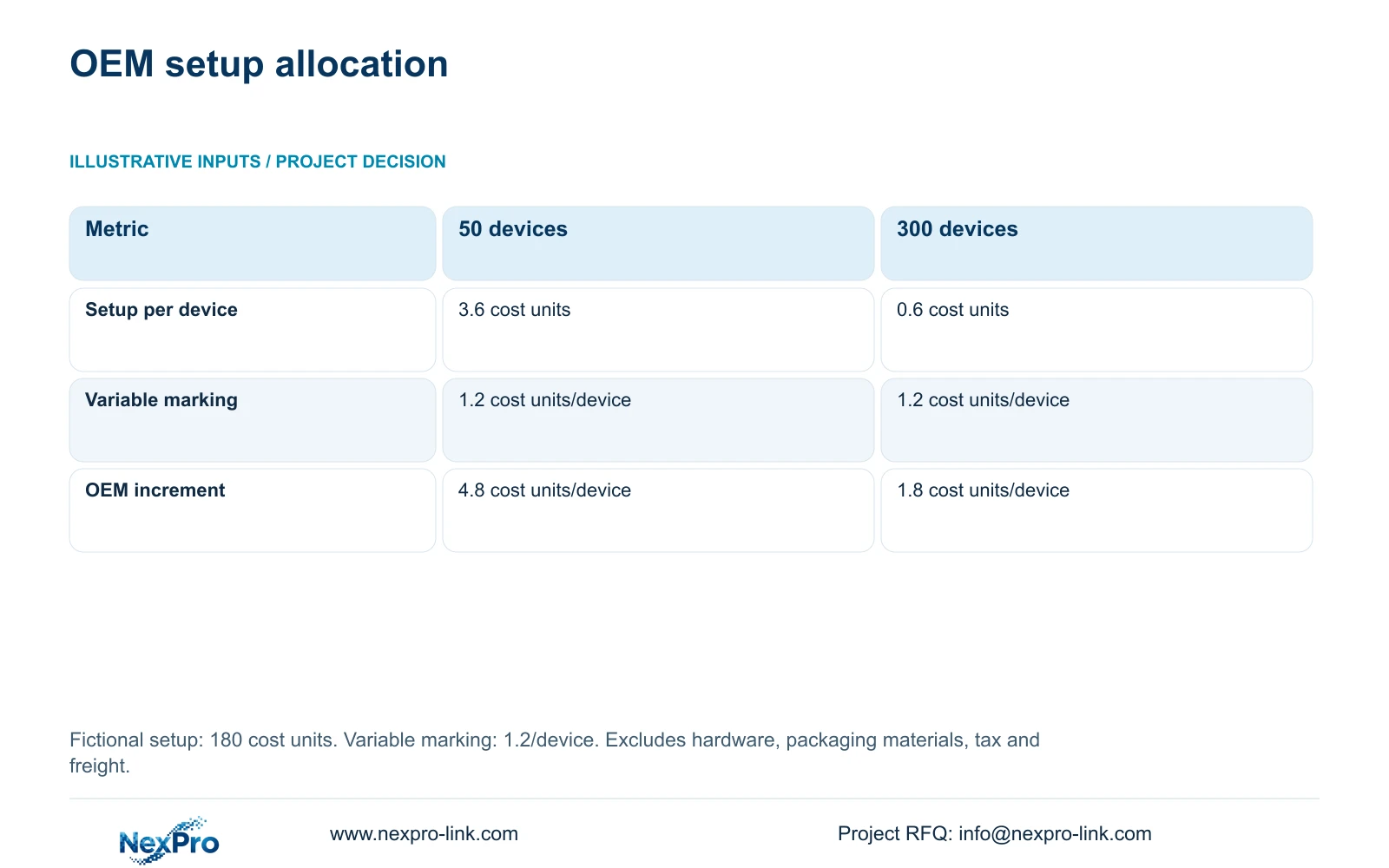
The following illustrative calculation uses fictional cost units: artwork/setup of 180 units and variable marking of 1.2 units per device. Hardware, packaging materials, tax and freight are excluded. The formula is OEM_unit_cost = setup_units / batch_qty + variable_units. For 50 devices, 180 / 50 + 1.2 = 4.8 cost units per device; for 300 devices, 180 / 300 + 1.2 = 1.8.
The decisive difference is the allocation of the same setup charge. Setup falls from 3.6 to 0.6 cost units per device while variable marking stays at 1.2. This illustrates allocation, not NexPro-Link pricing, a minimum order quantity or a promise that one marking process works on every housing. The 50- and 300-device batches are separate purchasing examples, not changes to the 32-view reference installation.
Before carrying an earlier setup charge into a repeat quotation, ask which preparation remains reusable. A changed surface, logo position or marking method may require a revised sample and separately quoted setup. Conversely, a firmware-only change does not itself demonstrate a need for new artwork preparation. Request those charges as distinct lines so the commercial adjustment follows the actual change.
| Metric | 50-device batch | 300-device batch |
|---|---|---|
| Batch quantity | 50 devices | 300 devices |
| Setup allocation per device | 3.6 cost units | 0.6 cost units |
| Variable marking per device | 1.2 cost units | 1.2 cost units |
| OEM increment per device | 4.8 cost units | 1.8 cost units |
Section 05
Choose branding depth around replacement readiness
For an established repeat program, retain approved branding and reopen only the changed technical or physical scope. Require a revised sample when a housing or marking position changes, and a focused bench check when configuration changes affect recording, retrieval or export. This gives the owner continuity without asking procurement to treat an unverified substitute as an unchanged item.
For an urgent replacement with unresolved artwork or surface approval, consider neutral equipment with approved project labels if the owner permits it. That option separates the immediate maintenance need from a later branded batch. Choose the fully branded package when brand presentation, distributor support or project handover requires it and the necessary sample approvals fit the delivery programme.
NexPro-Link's OEM/ODM scope includes project options for logos, labels, manuals, barcodes and packaging; customer-authorised laser-logo work can be discussed for the selected surface. Keep required technical identification visible. Hardware branding does not grant permission to rename Seetong or another third-party client. Treat a requested interface change as a separate feasibility and rights question before including it in the order.
Section 06
Release a packing scope tied to approved revisions
The release package should connect each order line to its equipment revision, approved configuration, accessory contents and artwork reference. Include a packing allocation by building or maintenance group, with carton identifiers matching the dispatch list. Where compatible spares serve both batches, state that explicitly; where they differ, keep them in separately identified groups.
List overseas delivery tasks independently from product approval. Confirm the destination, document language, packing arrangement and any split shipment before preparing cartons. NexPro-Link can coordinate the relevant equipment and OEM packing scope, while the buyer retains final approval and the appointed local installer confirms site work. An agreed equipment package should not leave installation adaptations unassigned.
Before shipment, reconcile the approved sample, order schedule and packing record against the actual batch. If a late change affects only accessories, amend those lines and identify the affected cartons. Preserve the earlier records for installed equipment rather than overwriting them. The result is a repeat-order history that supports purchasing, receipt checks and later replacement decisions.
Section 07
Buyer questions
Can existing branded spares be mixed with a revised batch? Only after confirming the replacement task for both revisions. Keep separate stock identities until mounting, accessories and required recording functions have been checked. If both groups are approved as interchangeable, record the accepted combinations rather than relying on matching appearance.
Does a repeat order require another complete system trial? An unchanged, documented baseline may need only batch confirmation. A changed camera, bracket or firmware requires checks targeted to its consequences. Expand the trial when the substitution changes stream modes, recorder interaction or installation conditions.
Should an OEM quotation include one combined customisation charge? Separate reusable setup, new preparation, variable marking and packaging materials. This lets the quantity surveyor identify which charges apply to the repeat batch and which arise from a changed requirement. Unpriced preparation should remain visible as an unresolved item.
Section 08
Define your repeat-order release
Send the previous approved equipment/configuration schedule, authorised artwork revision, accessory and carton allocation, and packaging languages with delivery destination to info@nexpro-link.com for a scoped repeat-order discussion.
Engineering references
These sources support the general planning principles. Always use the selected product's current datasheet and applicable project standards for final design.