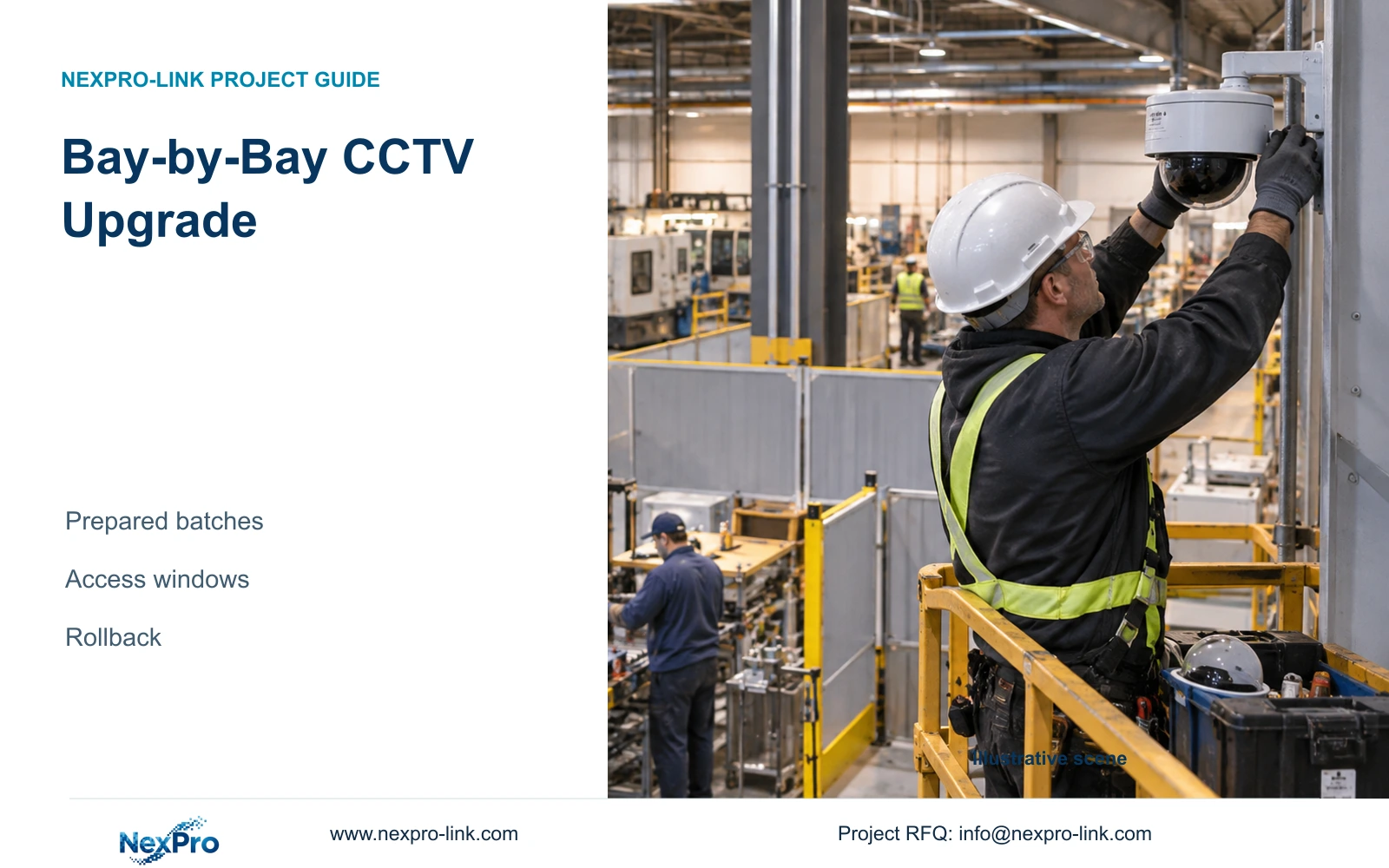
Hold a readiness review with the access owner, configuration administrator, acceptance witness and restoration lead. Record missing dependencies and the last decision point before disconnecting service.
Section 01
Confirm access before committing the cutover crew
Hold a readiness review with the access owner, configuration administrator, acceptance witness and restoration lead. Record missing dependencies and the last decision point before disconnecting service. A substitute witness needs authority to accept the agreed tasks, not merely availability. Defer the move when a required owner or recovery input remains absent.
Before a factory cutover weekend, release a readiness package covering physical access, authorized accounts, tested configuration, acceptance witnesses and rollback criteria. Each dependency needs an owner and a completion status. Preconfiguration can shorten selected connection tasks, but the project manager should authorize the move only when site checks and recovery work fit the approved window.
Illustrative project scenario: A contractor has a short approved weekend window to move the recording system. The planning context is CASE09, with 20 retained cameras and 12 additions serving receiving, dispatch and common routes. Assume six hours of site access for the cutover exercise. The eight connection tasks used later are work packages, not a claim that 32 cameras require only eight physical connections.
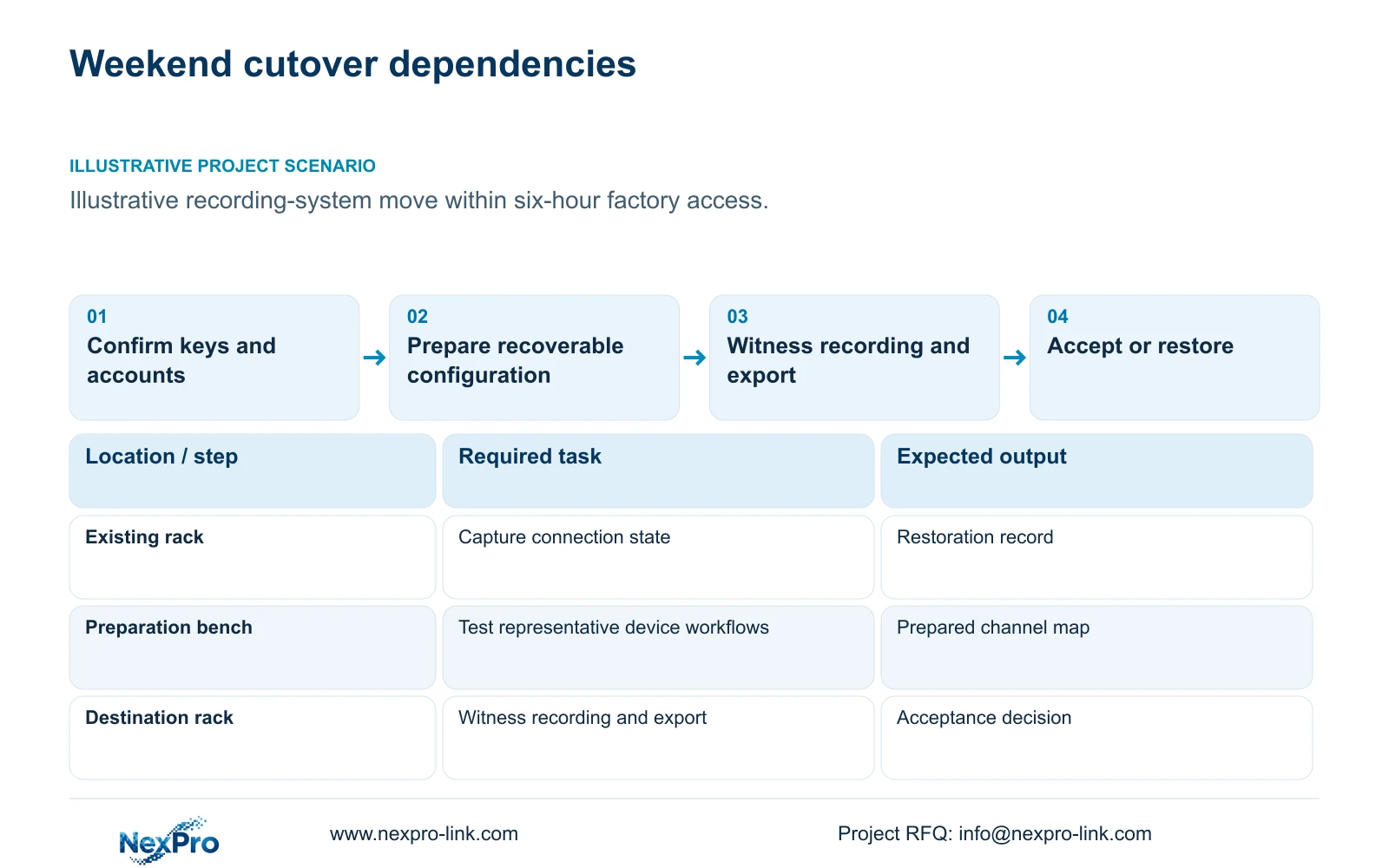
Confirm access to both equipment locations, cable routes, power isolation points and any locked network cabinets. Separately verify who can administer the recorder, switches and viewing clients. Test authorized login before the weekend, using an approved secure handover method. A cabinet key without a working account can leave the crew able to move hardware but unable to restore recording.
Section 02
Prepare a recoverable configuration and prove the workflow
Freeze a configuration record containing exact device models, firmware versions, channel assignments, addresses, stream settings, recording schedules and time settings. Capture available configuration backups and document how they are restored on the intended hardware. Preserve required footage separately; a settings export does not establish that historical recordings have been copied or remain readable after the move.
Bench preparation should exercise the intended workflow with representative retained and new devices. Check connection, recording, playback and export, plus any required audio or event functions. ONVIF Profiles provide a framework for checking exact device and client applicability, but basic video connectivity does not prove every workflow. Where the retained combination cannot be tested beforehand, reserve a site hold point instead of marking it compatible.
Keep the hardware identity attached to the preparation record. CASE09 uses a NexPro-NVR4449-4K candidate, with listed 49-channel capacity, 320 Mbps input and four SATA bays. Its planned 128 Mbps input is an illustrative recording load, not proof of the mixed-device combination. Label prepared ports and channel mappings so the site team can reconcile the actual installation against the tested configuration.
Section 03
Place acceptance ahead of the rollback deadline
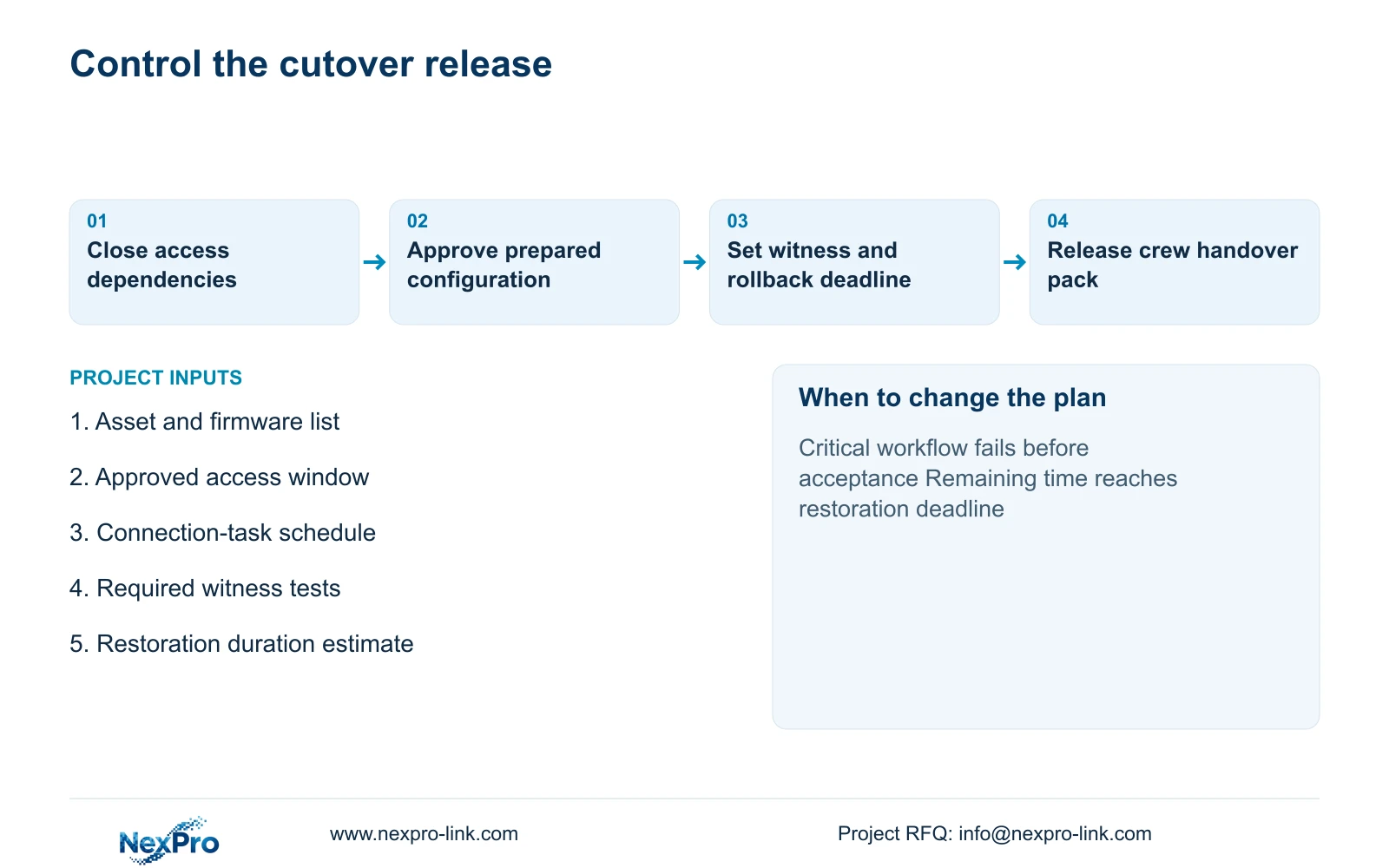
Define rollback triggers before disconnection. Examples include failure to recover a critical receiving view, missing recording on a retained channel, unsuccessful export or loss of required operator access. The owner should identify which defects prevent acceptance and which may remain as documented minor items. The contractor then estimates restoration work and sets the latest point at which rollback can begin.
Schedule witness tests while there is still time to act on a failure. The engineer checks channel identity, time alignment and recording status; the operator retrieves a known event and exports a sample. The project manager records the acceptance decision. If the witness is unavailable, the schedule needs an approved substitute or a revised window rather than an assumed signature after the crew leaves.
Keep a documented original connection state and suitable recovery materials available until acceptance. CASE09 separates retained equipment from new purchases, so those assets need distinct handling records. Any disk initialization or other destructive operation requires explicit approval and a preservation decision. Reconnecting the old recorder is not a complete rollback if its settings or required footage have already been removed.
Section 04
Calculate whether prepared work fits the access window
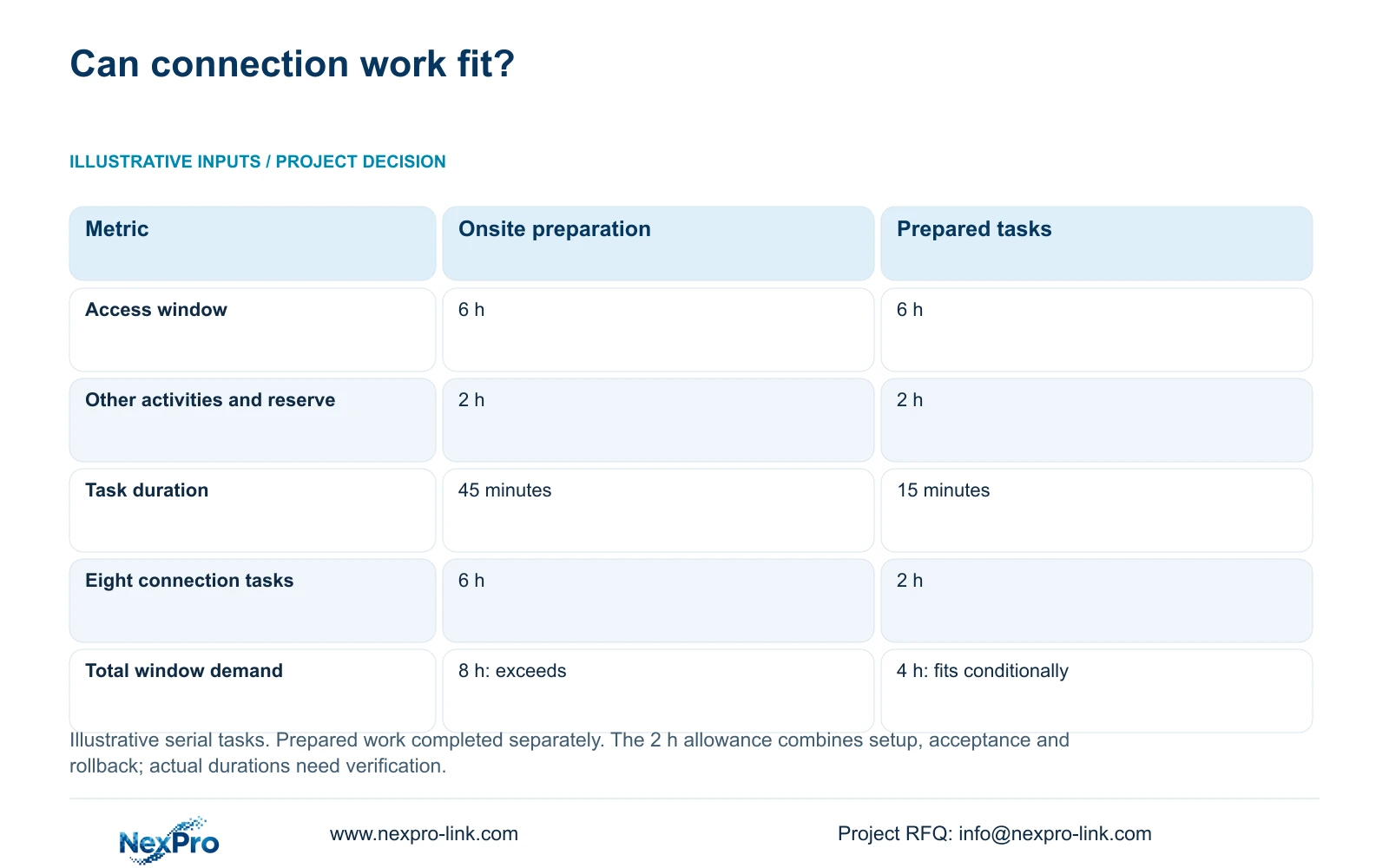
The illustrative exercise allows six hours total, with two hours reserved collectively for authorized setup, acceptance and rollback allowance. Available connection time is 6−2 = 4 hours. For eight serial connection tasks, onsite_task_hours = 8×minutes_per_task/60. Option A assumes 45 minutes per task; Option B assumes 15 minutes after suitable preparation has been completed separately.
Option A needs 8×45/60 = 6 connection hours and eight hours including the reserved activities. It exceeds the approved window by two hours. Option B needs 8×15/60 = 2 connection hours and four hours total, leaving two hours unallocated under the stated assumptions. The decisive difference is the amount of connection work remaining on site, not a change in acceptance requirements.
Treat the durations as estimates requiring rehearsal or contractor evidence. Off-site preparation has its own labor, equipment and compatibility scope. The two-hour combined allowance must also be checked against the actual restoration sequence; it is not a separately proven rollback duration. If the work cannot fit, reduce the cutover scope or obtain a longer window rather than removing isolation, validation or recovery tasks.
| Metric | Option A: onsite preparation | Option B: prepared tasks |
|---|---|---|
| Total access window | 6 h | 6 h |
| Setup, acceptance and rollback allowance | 2 h | 2 h |
| Assumed connection time per task | 45 minutes | 15 minutes |
| Eight connection tasks | 6 h | 2 h |
| Total in-window demand | 8 h | 4 h |
| Fits stated window | No | Yes, under assumptions |
Section 05
Choose a prepared cutover or reduce the scope
Prefer the prepared option when its configuration evidence, access permissions and measured task estimates are sufficient. Issue a go/no-go review before crew mobilization, listing unresolved dependencies and the person authorized to stop work. If retained-device testing remains incomplete or restoration takes longer than expected, move fewer work packages in the window or defer the recorder transfer.
Check power and data readiness independently. CASE09's recording-priority arrangement assumes 682.7407 W complete AC load and identifies SP1KR(S), rated 1kVA/900W, as a capacity candidate. Its 30-minute load-side energy is 341.3704 Wh. Neither figure proves installed UPS runtime. Verify the actual battery configuration and which sockets protect the recorder, switches and required link equipment at the destination.
Keep unnecessary additions out of the cutover's critical sequence. A new display layout, firmware change or optional viewing client can create further verification work. Include it only when required for the accepted operating task. Compare NexPro-Link and other supplier preparation offers using the same connection schedule, witnessed workflows and local responsibilities; fewer quoted site hours do not establish a lower complete project cost.
Section 06
Deliver equipment and records in cutover order
Organize the handover pack around the work sequence. Include the retained asset register, prepared channel map, connection schedule, backup inventory, witness sheet and restoration instructions. Match carton and equipment labels to location identifiers. Keep approved credentials outside public diagrams and ordinary packing labels, while ensuring the authorized installer can obtain them through the agreed secure process.
NexPro-Link's factory project and BOQ-support scopes can coordinate equipment matching, technical records and preparation requirements. Specify which bench checks are requested, which retained devices will be available for testing, and what evidence must accompany the supplied package. Factory preparation should hand the local crew a known configuration state; the local installer remains responsible for site connection and verification.
After acceptance, record the installed configuration, unresolved defects and the disposition of retained equipment. Revoke temporary access where appropriate and transfer ongoing administration to the owner's nominated team. Confirm that playback and export remain available after normal operation resumes. This closes the migration record and gives maintenance staff a usable starting point for later fault investigation.
Section 07
Buyer questions
Can we migrate before every new camera is installed? Yes, if the owner accepts a clearly defined phase and the recorder can support both the initial and final arrangements. Identify unavailable views, interim coverage and the later commissioning tasks. Do not describe partial acceptance as completion of the full camera schedule.
Does preconfiguration require sending passwords to the supplier? Agree a secure provisioning method with the owner. The preparation scope may use controlled temporary credentials followed by an approved site handover and change. Confirm the supported procedure for the actual devices; do not place credentials in ordinary quotation or packing documents.
Should the cutover include a firmware upgrade? Include it when needed for the accepted configuration and tested before the move where possible. Otherwise, schedule it separately. An additional firmware change expands the verification and recovery scope and should not be inserted into the weekend plan without approval.
Section 08
Prepare the weekend readiness package
Send your asset and firmware list, approved access window, connection-task schedule and required witness tests to info@nexpro-link.com. NexPro-Link can discuss equipment preparation and handover records aligned with your local contractor's cutover plan.
Engineering references
These sources support the general planning principles. Always use the selected product's current datasheet and applicable project standards for final design.