Map the owner's event-discovery delay, investigation interval and preservation action separately. Ask which events could be discovered after the proposed rolling window closes.
Section 01
Choose the period from the review window
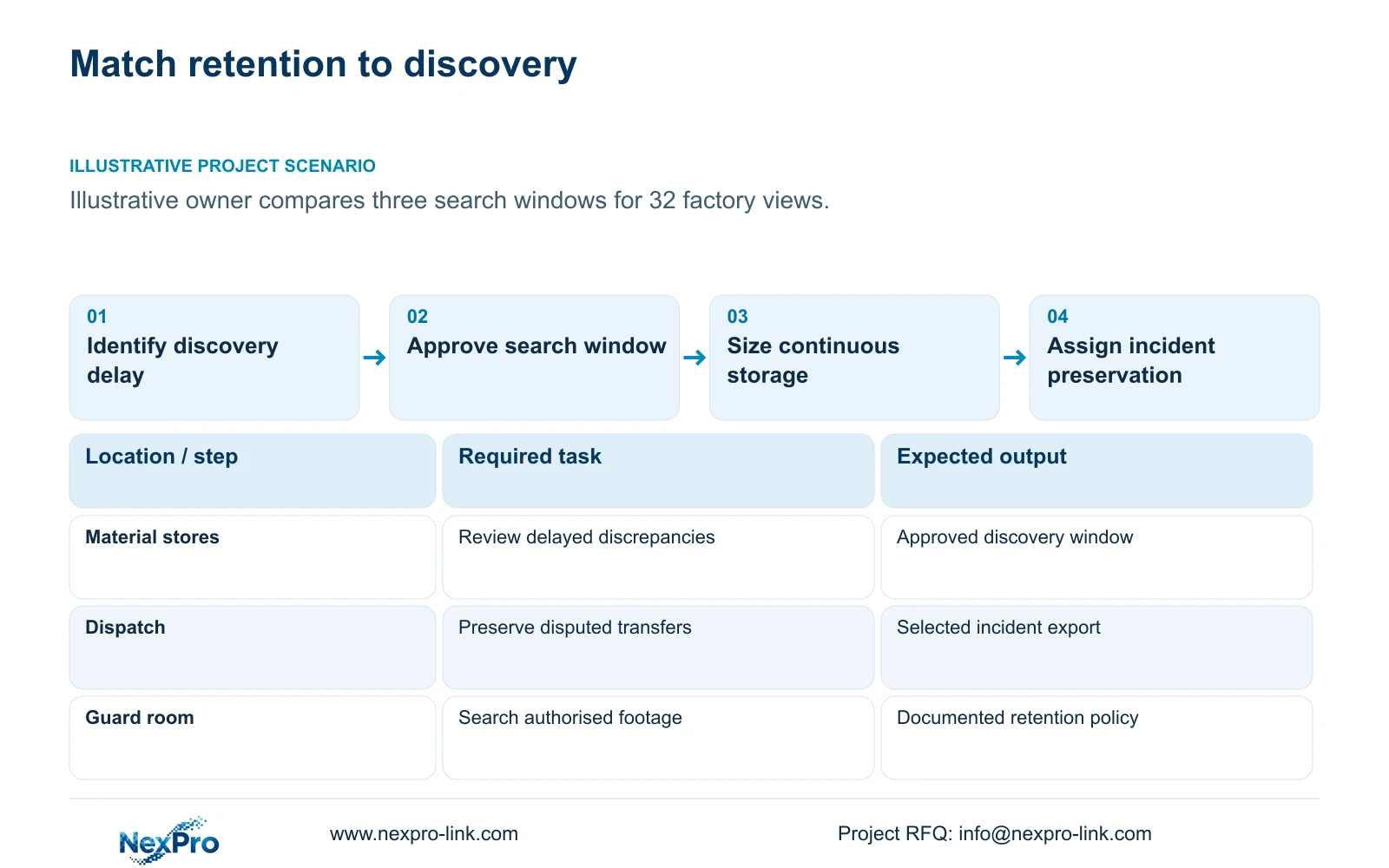
Map the owner's event-discovery delay, investigation interval and preservation action separately. Ask which events could be discovered after the proposed rolling window closes. Resolve those requirements before pricing longer retention; selected incident copies cannot preserve an event that nobody identified before its original recording was overwritten.
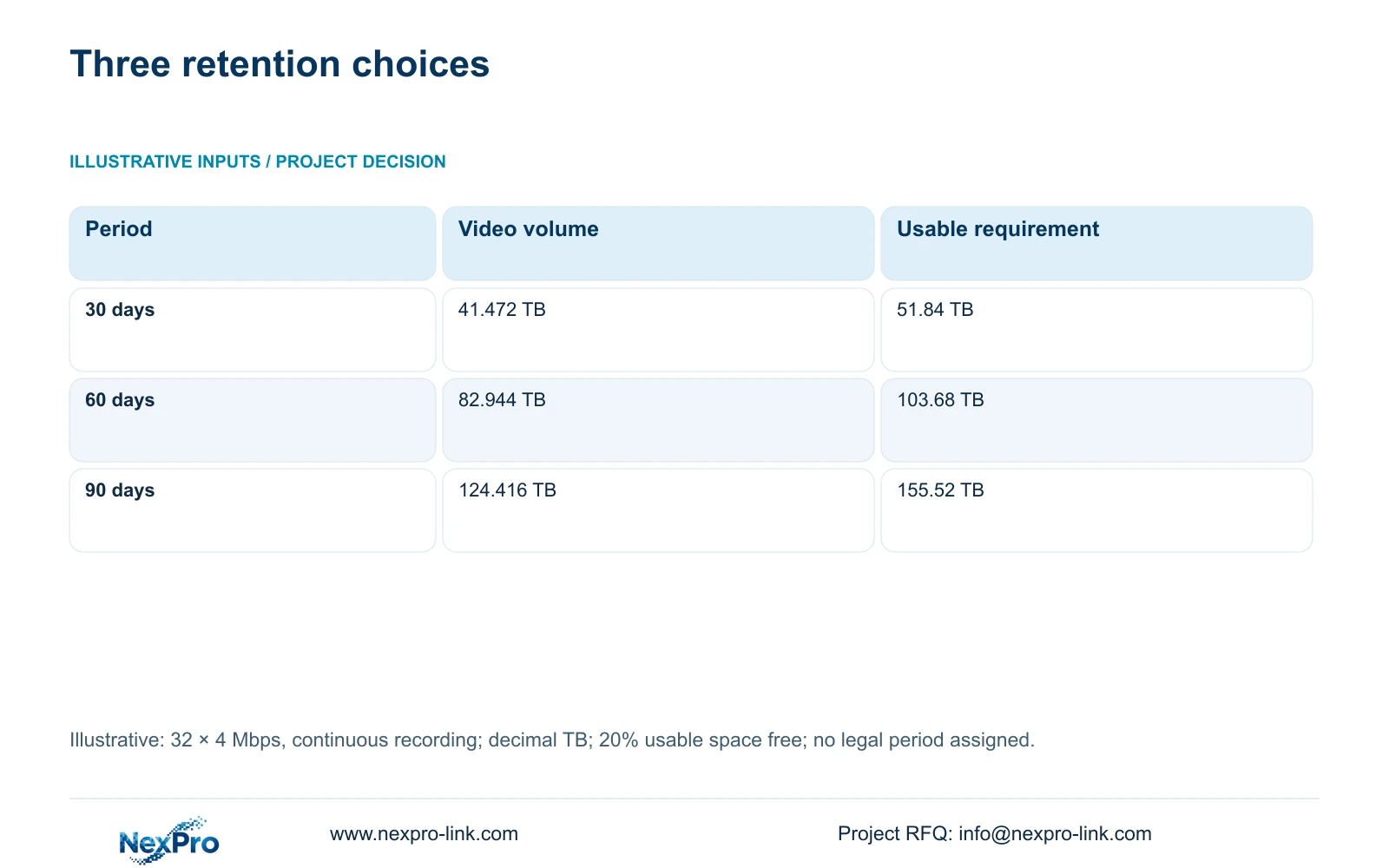
Choose 30, 60 or 90 days by identifying how long the owner needs to discover, investigate and preserve an event, then calculate storage at unchanged recording quality. In the supplied 32-camera example, these periods require 41.472, 82.944 and 124.416 TB of video respectively. A factory label alone provides no project-specific reason to select one period.
Illustrative project scenario: The owner is choosing a retention period without a mandated universal number. The reference CNC factory has 32 ordinary security views covering gates, stores, permitted transfers, dispatch and shared access routes. Assume the owner wants to assess whether delayed stock discrepancies require a longer search window than routine gate reviews. That review purpose is a planning assumption, not a reported customer policy.
Ask each authorised department when an issue normally becomes visible and who can initiate preservation. Record the purpose, camera groups and maximum discovery delay. The owner should verify applicable local requirements before approving the policy. No legal retention period is assigned by this example, and operational preference should remain distinguishable from a verified external requirement.
Section 02
Hold the stream schedule constant across options
Use 32 cameras averaging 4 Mbps each, recording 24 hours per day, for all three options. The aggregate assumed recording input is 128 Mbps regardless of retention length. Extending the period increases accumulated data; it does not by itself increase the live incoming bitrate. This distinction helps the engineer separate disk expansion from network changes.
The illustrative formula is video_TB = 0.0108 × 32 × 4 × days. The coefficient converts one Mbps recorded continuously for one day into decimal TB. Required usable capacity = video_TB ÷ 0.8 when 20% of usable space must remain free. Keep audio and additional metadata outside this video-only calculation until their actual demand is established.
If a bidder offers 90 days using a lower bitrate or shorter schedule, show that as a separate technical option. It cannot be compared directly with 30-day full-quality continuous recording. Where variable bitrate is enabled, replace the assumed average with representative observations while preserving the agreed image settings and evidence task.
Section 03
Give preserved incidents their own retention plan
Rolling retention answers how far back an operator can search ordinary footage. An incident archive answers what happens after relevant footage has been identified. The owner may need an exported sequence to remain available after the recorder overwrites its source. Extending every camera's rolling period does not establish a controlled archive process.
Define who selects the event, which cameras and time ranges are included, where the export is stored and who checks playback. For a disputed dispatch movement, a practical archive package might include gate, loading and route views with a shared time reference. This is a proposed method; the actual selection follows the incident and authorised access rules.
Assign archive capacity separately from the NVR recording allowance. Include context before and after the event, supporting identifiers and the export's retention decision. A 30-day rolling system with prompt, reliable preservation may meet one owner's purpose, while another owner may need 60 days because discovery is slower. Neither arrangement should be offered without a named preservation responsibility.
Section 04
Translate the three periods into physical capacity
The table shows a linear increase because the streams and hours are unchanged. Sixty days needs twice the 30-day video amount; 90 days needs three times as much. The usable-capacity figures already account for the 20% free-space policy. They still precede conversion into raw disks and any capacity consumed by a supported protection arrangement.
Under CASE01's separate 95% usable-capacity assumption, four 16 TB disks provide 60.8 TB usable and a 48.64 TB video allowance. That meets the 30-day example. The NexPro-NVR4449-4K's four bays, even populated with four 18 TB drives, provide only 54.72 TB of illustrative video allowance, which falls short of 60 days.
The NexPro-NVR8864-4K provides an eight-bay reference, up to 18 TB per bay. At eight 18 TB disks, the same assumptions yield 136.8 TB usable and 109.44 TB for video. That fits the 60-day volume but remains below the 124.416 TB needed for 90 days. The 90-day choice therefore needs a different supported storage architecture or an explicitly revised recording scope.
| Metric | 30 days | 60 days | 90 days |
|---|---|---|---|
| Video volume | 41.472 TB | 82.944 TB | 124.416 TB |
| Required usable capacity | 51.84 TB | 103.68 TB | 155.52 TB |
| Relative video amount | 1 | 2 | 3 |
| Assumed recording input | 128 Mbps | 128 Mbps | 128 Mbps |
Section 05
Select the shortest period that meets the purpose
Retain 30 days as the reference baseline only if the owner's documented discovery and review window fits within it and local requirements have been checked. Choose 60 days when the authorised purpose needs a longer searchable history. Approve 90 days only with a defined reason and a configuration that actually provides the required capacity.
Consider different periods for clearly defined camera groups if the owner permits them. Longer retention for stores or dispatch can be evaluated independently from other views, but that becomes a new group calculation rather than the uniform table shown here. Confirm the selected recorder supports the intended policy and that operators understand the different search horizons.
For commercial comparison, require each supplier to identify the equipment and service changes caused by the chosen period. More bays, disks, archive provision and configuration work belong in visible line items. A higher raw TB offer is not necessarily a compliant longer-retention offer, and no price conclusion is justified until the competing designs meet the same accepted task.
Section 06
Hand over a retention policy with a verification method
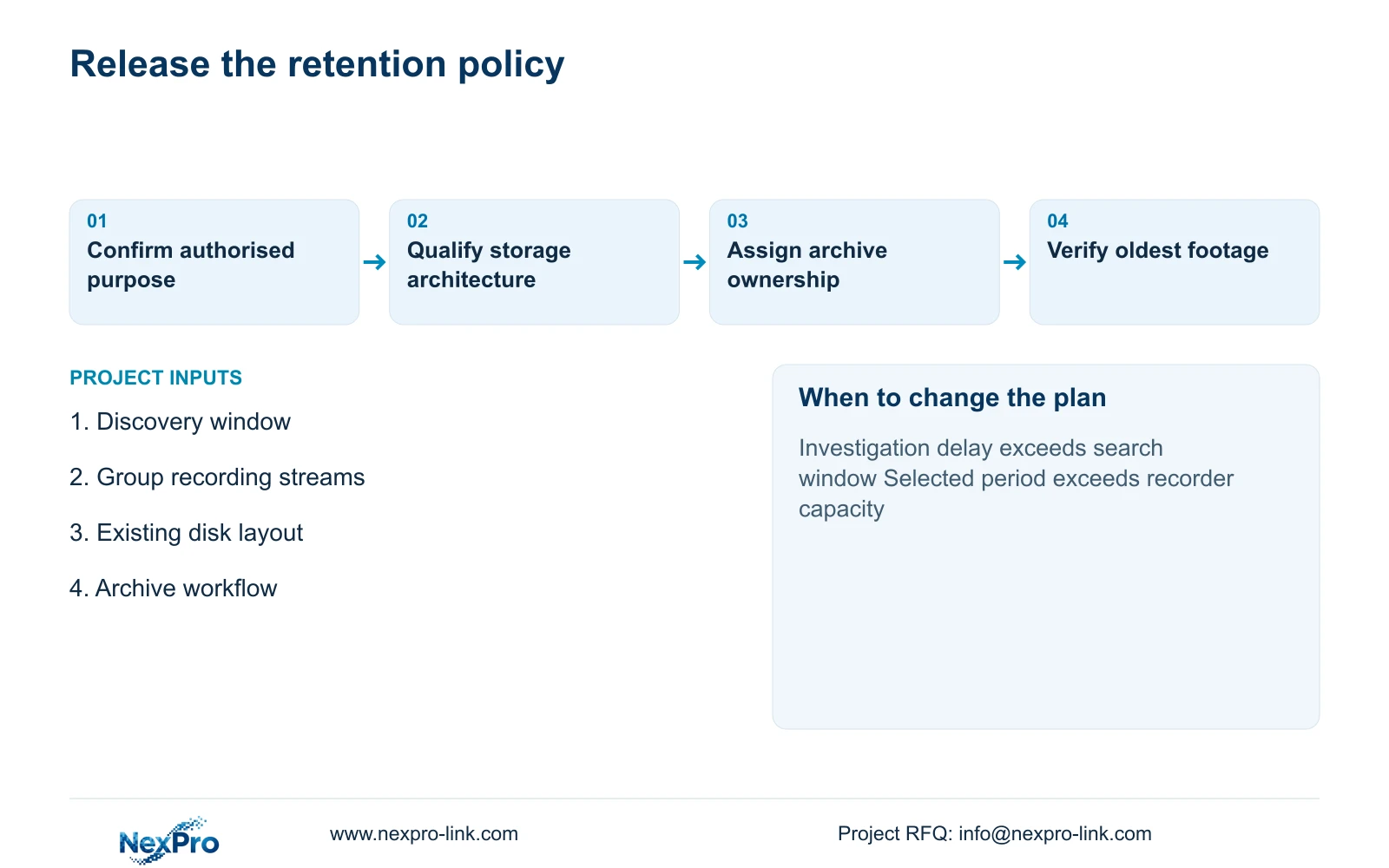
The issue-for-quotation package should contain the owner's purpose statement, camera-group policy, stream assumptions and storage layout. Distinguish supplied recorder storage, retained equipment and separately provided archive services. NexPro-Link's BOQ and Tender Support scope can support model matching and documented deviations, while the owner retains responsibility for policy approval.
Commissioning should establish recording continuity and observed storage consumption at the approved settings. Handover should also explain how operators identify the oldest available footage and preserve a selected incident. A configuration screen showing a requested number of days is insufficient if the installed capacity and actual bitrate cannot sustain it.
Set a review trigger for changes in camera quantity, image settings, operating hours or discovery delays. Keep the previous approved policy with the revised calculation so procurement can identify the actual variation. This avoids expanding storage merely because a longer period sounds safer, or shortening retention without telling the people who depend on later investigation.
Section 07
Buyer questions
Does longer retention require a faster network? Not when camera streams and concurrent viewing remain unchanged. It increases accumulated storage. A revised architecture may introduce new traffic paths, so check those separately rather than multiplying network demand by retention days.
Can an archive replace longer continuous retention? Only where incidents are identified before rolling footage is overwritten and authorised staff can preserve them reliably. An archive cannot recover an event that was never selected and has already been overwritten.
Should all departments approve one common period? The owner should coordinate the decision, but departments can have different review purposes. Document those purposes before deciding whether one common period or supported group-specific policies are appropriate.
Section 08
Compare retention options against your review needs
Send your required investigation window, camera-group bitrate schedule, current disk layout and incident archive workflow to info@nexpro-link.com. NexPro-Link can discuss capacity-qualified options for the retention period your owner approves.
Engineering references
These sources support the general planning principles. Always use the selected product's current datasheet and applicable project standards for final design.