Give each engineer comment its source tag, proposed response and resulting document revision. Keep comments requiring a site input distinct from supplier-document corrections.
Section 01
Make each drawing tag lead to a specific engineering answer
Give each engineer comment its source tag, proposed response and resulting document revision. Keep comments requiring a site input distinct from supplier-document corrections. Before release, check that the accepted condition appears in the order schedule, not only the response email. A closed comment must remain traceable to the actual supplied configuration.
Prepare a factory security technical submittal as a mapped engineering response: drawing tag, schedule row, exact model, relevant source field, calculation and interface owner. Put a concise index ahead of the attachments. The engineer should be able to verify the proposed camera, recorder and power arrangement without searching a large unindexed catalogue or guessing which variant the quotation intends.
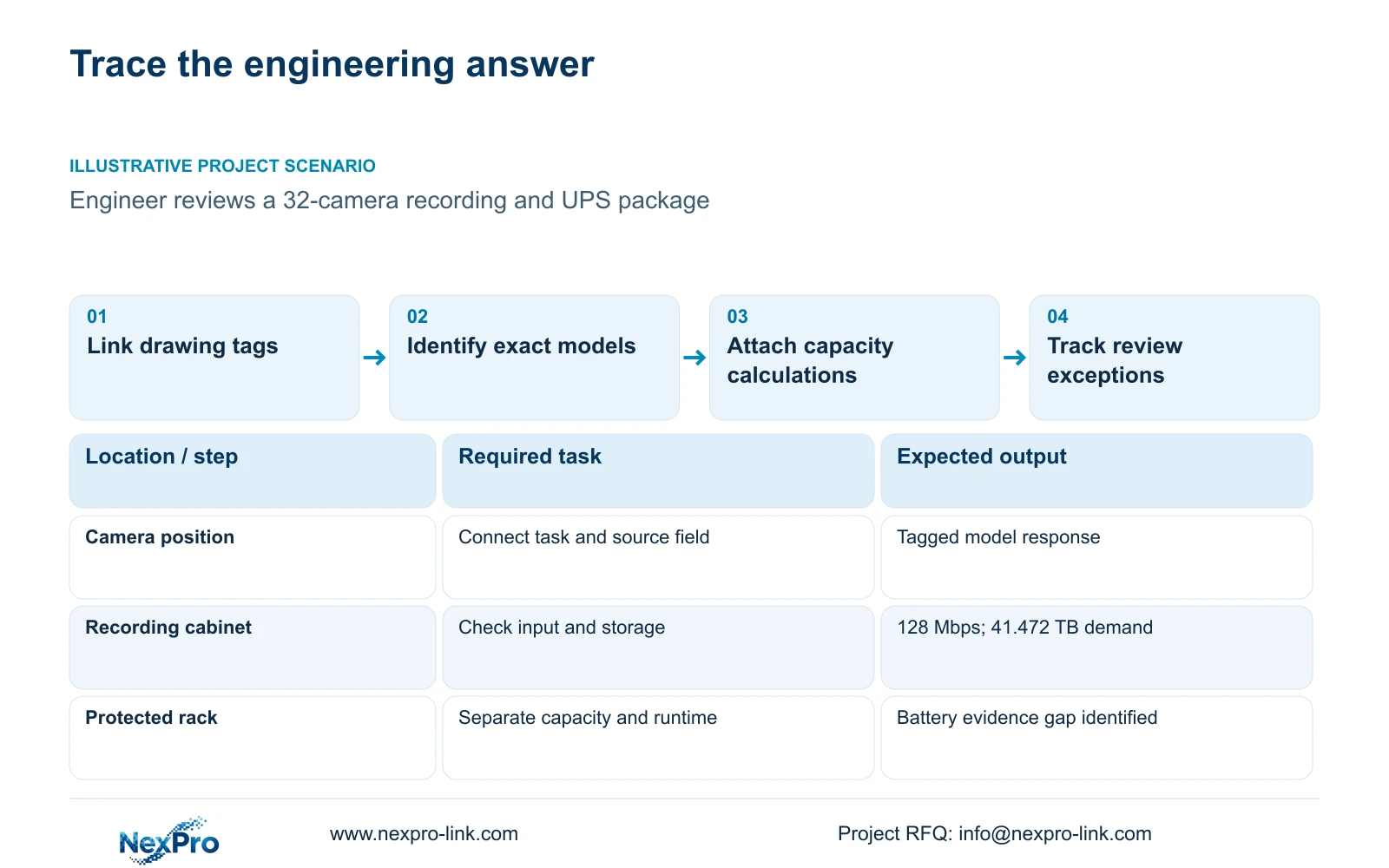
Illustrative project scenario: A design engineer needs to review a proposed camera, NVR and UPS combination efficiently. Use the supplied 32-camera CNC reference, with one recording node and four access-switch groups, as the planning example. The aim is authorised access and material-transfer review. No actual project drawing, field measurement or accepted submittal is claimed.
Retain the original BOQ identifiers and specification clauses in the equipment schedule. Camera tags should connect to their zone task and served network node. The recorder and UPS should connect to the groups they support. Include the drawing and schedule revision on the cover index so the reviewer is assessing one configuration rather than several loosely related documents.
Section 02
Show demand and published capacity as separate evidence
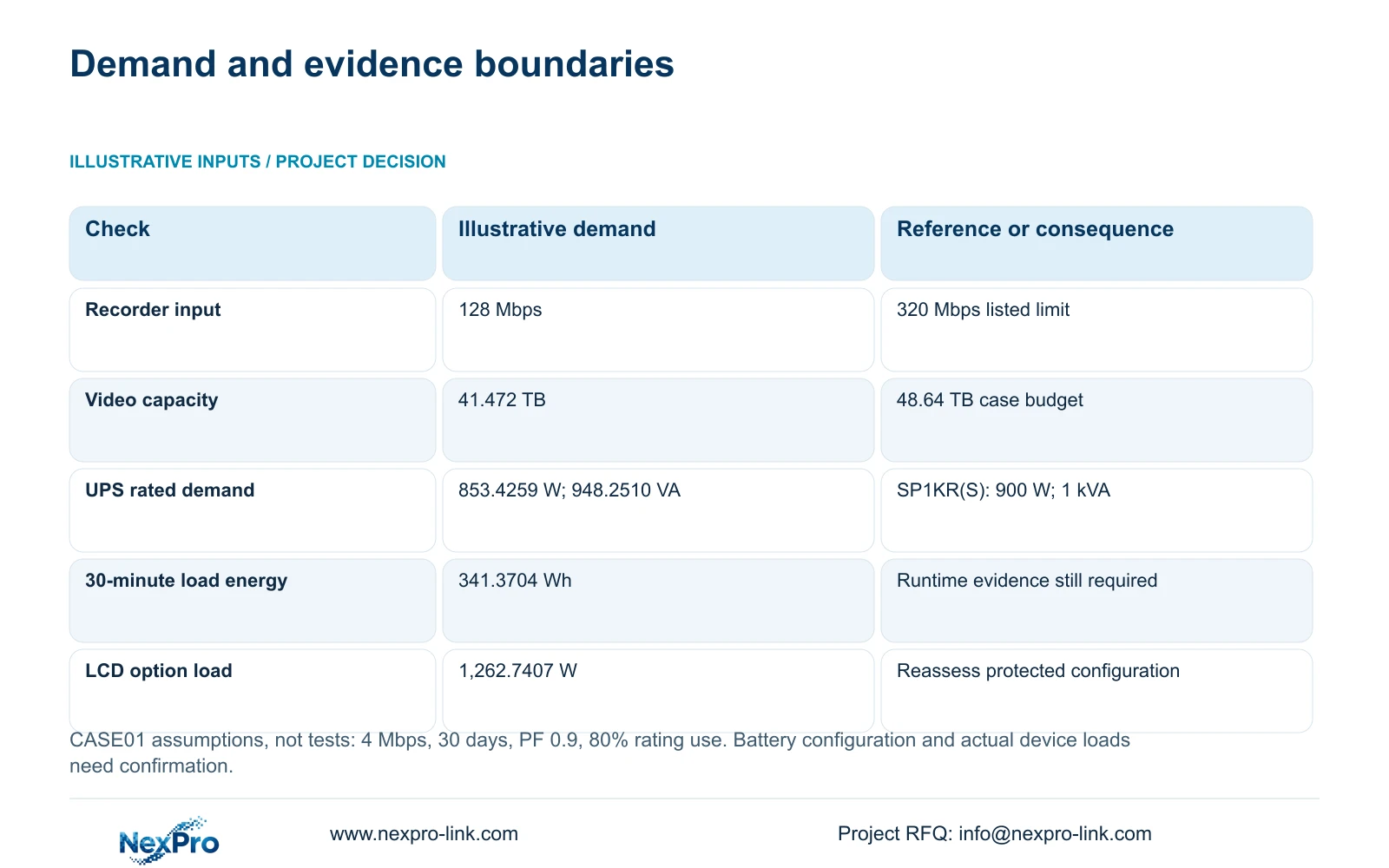
For recording, show the case assumptions beside the source limits. Thirty-two cameras at an illustrative average 4 Mbps give 32 × 4 = 128 Mbps input. The NexPro-NVR4449-4K lists 320 Mbps input and four SATA bays, but its summary distinguishes 49×5MP from 9×4K. CASE01 assumes streams within supported 5MP-class modes. Recording throughput, supported mode and decoding remain separate checks.
For storage, video_TB = 32 × 4 × 10^6 × 86400 × 30 / 8 / 10^12 = 41.472 TB for 30 days of continuous recording. Four 16 TB disks give 64 TB raw. The case's video budget is 64 × 0.95 × 0.80 = 48.64 TB. Compare demand directly with that budget, which already contains the assumed formatting factor and 20% reserve.
For UPS capacity, the recording-first load is an assumed 682.7407 W. At 80% rating utilisation and assumed power factor 0.9, required rated W ≥ 682.7407 / 0.8 = 853.4259 W, and required rated VA ≥ 682.7407 / (0.9 × 0.8) = 948.2510 VA. SP1KR(S) is a listed 1 kVA/900 W capacity candidate; its exact battery and runtime evidence remain separate.
Section 03
Keep unresolved fields beside the calculation they affect
Show whether each input is a published model rating, a design assumption or a value requiring confirmation. Camera peak demand is absent from the supplied ordinary-camera specifications, so CASE01's 12 W device-side input must remain labelled assumed. The engineer needs the final demand and selected switch budget before confirming the power arrangement. Do not present arithmetic precision as measurement certainty.
The case's 30-minute load energy is 682.7407 × 0.5 = 341.3704 Wh. It is not proof of UPS runtime. Attach the exact selected battery configuration and applicable runtime evidence when available. Do not transfer a webpage's default battery-energy field across SP1KR(S), SP2KR(S) and SP3KR(S) variants.
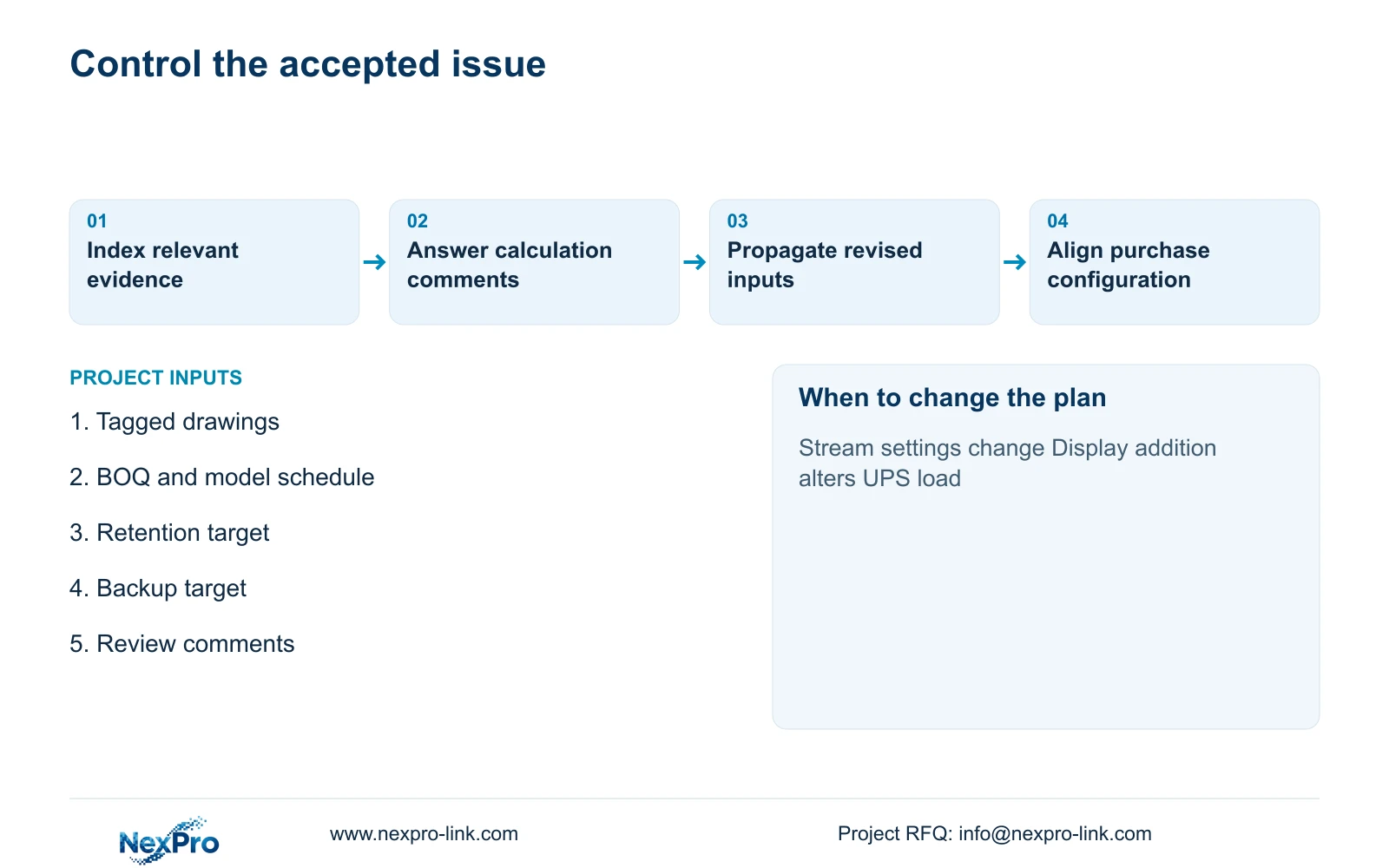
A revision log should state the changed input, affected tags and updated calculation. If the owner adds display equipment, update the load list; if a camera stream changes, update storage and recorder checks. Keep supplied, retained, installer-provided and optional statuses visible, with one named owner for each unresolved interface.
Section 04
Submit additions as an attached scope with their own dependencies
The base package should be complete enough to record and retrieve the required footage. Add management or integration only against a defined task. The supplied scope matrix is useful here because it keeps the observation outcome constant while exposing additional hardware, software and protected-power resources. The reviewer can evaluate the core chain and the added workflow separately.
The decisive difference is evidence for the added dependency, not a longer equipment list. A display wall needs its actual source layout, output arrangement and supported concurrent decoding. An external platform connection needs feature-specific evidence and a responsible integrator. A model name alone does not prove every codec, window or high-resolution combination requested by the engineer.
CASE01's optional display arrangement retains the original retrieval display and adds four LCD panels plus decoding equipment. Its assumed load rises to 1,262.7407 W. The panels are LCD, not direct-view LED, and the assumed 120 W per panel and 100 W decoder demand are calculation inputs. Place that option under a separate revision so it cannot silently change the base UPS assessment.
| Review item | Core recording package | Added workflow package |
|---|---|---|
| Recording outcome | 32 views; 30-day planning basis | Same views and retention |
| Model mapping | Tags linked to exact source fields | Same plus interface model evidence |
| Power basis | 682.7407 W assumed base load | 1,262.7407 W with case LCD option |
| Software and access | Required retrieval roles and export | Additional named workflow demonstrated |
| Responsibility | Core supply and installer split | Added interface owner and work scope |
Section 05
Order the review around the decisions that can block procurement
Recommend a review sequence that starts with mandatory conditions, then follows the camera-to-recording and power chains. Confirm the observation task and permitted environment before debating optional equipment. Review recorder mode, storage and export next; check the protected load and runtime configuration separately. The quantity surveyor can then compare a technically defined scope.
For camera evidence, preserve the source's listed fields. The supplied BL2812M 5MP specification includes 2880x1620 output and a 2.8 to 12 mm motorized lens. Those fields help identify the candidate, but final view suitability still depends on placement and accepted scene detail. They do not prove a recognition distance, machine-vision capability or a supplied maximum wattage.
If a mandatory platform or specialist requirement changes the package, revise the recommendation rather than expanding ordinary catalogue claims. ONVIF profile evidence should be attached only where it addresses the exact device and client requirement. Company registration, brand acceptance and technical equipment approval remain distinct records within the procurement process.
Section 06
Close comments without losing the accepted configuration
Return review comments with their original references, responses and changed-document identifiers. A corrected calculation should point to the revised schedule and drawing, not sit in an isolated email attachment. Retain open exceptions and approval conditions on the cover register. The final accepted issue should identify what was reviewed and which site demonstrations remain required.
NexPro-Link's BOQ & Tender Support scope can support exact model matching, technical documents, deviations and quotation coordination. Project preparation and packing can then follow the accepted equipment and location tags. The local team retains the agreed installation, electrical and specialist responsibilities; document support does not imply a signed local construction design.
Before purchase release, check that the quotation, equipment schedule and submittal index carry the same selected option. Include the exact disk and battery configuration when confirmed. This final reconciliation prevents a technically accepted base package from being ordered with an unreviewed display addition or a different component variant.
Section 07
Buyer questions
Should the submittal include every catalogue page? Include the documents that answer the offered models and relevant requirements. A concise evidence index with targeted attachments is more useful than unrelated product pages.
Can calculations be submitted before final power measurements? Yes, as a clearly labelled design basis. Identify the assumed inputs and the confirmation needed before approval or order release; do not describe the result as measured performance.
What should happen when the reviewer accepts a model subject to a test? Carry the test condition into the acceptance register and supply instruction. State the configuration, task and evidence needed to close it rather than removing the condition from later revisions.
Section 08
Prepare a traceable factory security submittal
Send your tagged drawings, BOQ and model schedule, recording and backup targets, and outstanding review comments to info@nexpro-link.com for a mapped technical response and focused evidence-gap list.
Engineering references
These sources support the general planning principles. Always use the selected product's current datasheet and applicable project standards for final design.