Turn an accepted recorder package into a repeat-order reference while keeping site-specific settings, branding changes and support obligations visible for each release.
Section 01
Make the accepted recorder package the next order's reference
Repeat NVR supply should begin with an accepted equipment package whose model, firmware, settings, branding and support responsibilities are recorded together. Reuse that reference for the next quotation, then identify the new site's differences before release. A saved configuration does not include old footage or establish compatibility with another model. Matching artwork also does not prove matching hardware. For an integrator supplying offices and hotels, retain the accepted recording and retrieval workflow while reviewing each site's camera schedule, retention and access requirements. This turns previous project feedback into specific release decisions without assuming permanent product availability, identical site conditions or automatic approval for a wider purchasing category.
Define the first package through its camera or equipment schedule, recording and playback tasks, retention target, relevant power and network arrangement and delivery destination. State the supply boundary so the reference shows what was included and what the installation team still had to complete.
Section 02
Keep the accepted settings tied to model and firmware
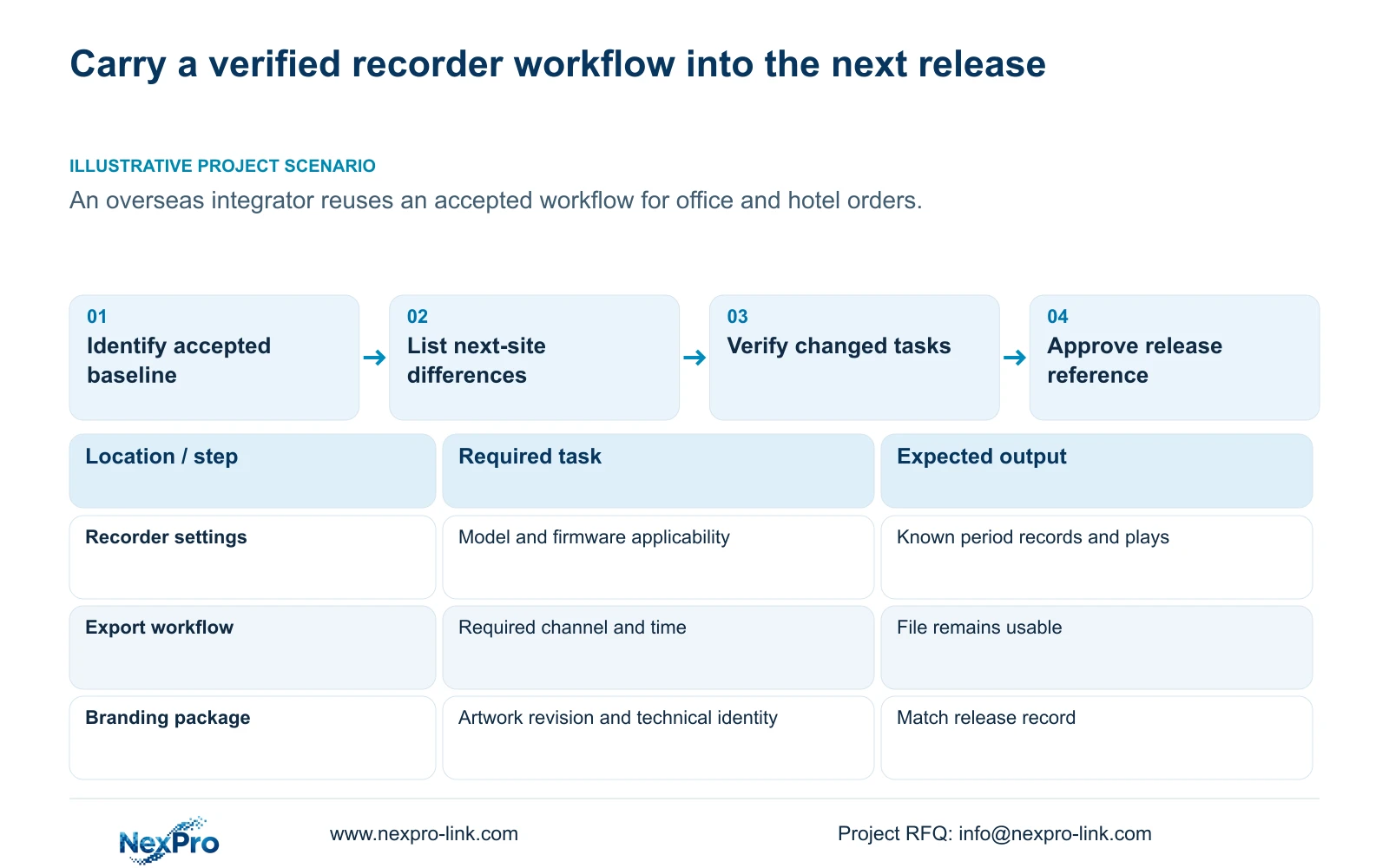
Record the exact technical identity and accepted operating configuration. Store the configuration export with a readable reference to the source recorder and version. Keep logs and video exports separately named and located so a future technician knows what each file contains.
The operating source is the private NVR4.0 user manual CH_V2.4.doc, whose body identifies V2.2. Section 4.12.18 covers configuration export, and section 4.11.4 covers video backup. The manual does not establish universal cross-model settings import. Section references take priority over page numbers.
For a repeat order, compare the target model and firmware with the accepted reference before reusing settings. Site-specific channel identities and access arrangements still need review. If import applicability is unresolved, retain the baseline as a description of the intended task and obtain the supported preparation method for the new recorder.
Keep the status of each reference visible: accepted, changed or awaiting confirmation. A file stored after an unsuccessful test should not silently replace the last accepted baseline.
Section 03
Freeze artwork separately from technical configuration
Record approved housing logo, label and packaging references independently of the hardware and software records. Preserve the real model and serial identity beneath any customer-facing naming scheme. A repeat box or front-panel logo should help staff recognize the equipment while leaving its service identity accessible.
Section 1.2 mentions tools for boot logos, channel backgrounds and shutdown imagery, and separately mentions channel expansion. It supplies no universal tool procedure or authorization route. Any requested local interface artwork needs confirmation for the selected configuration. It does not establish permission to rename a third-party client or additional recording resources.
If the next order changes only packaging, record that limited change. If firmware changes too, review the local artwork and operating tasks affected by it. Keeping these revisions separate prevents an unchanged visual appearance from hiding a technical substitution.
Section 04
Turn site feedback into a controlled release change
A useful issue record names the recorder identity, affected channel, symptom time and task that failed. Separate the observed outcome from a suspected cause. Convert the finding into a proposed change with an expected result, then record whether the check supports that result.
After a configuration or firmware change, verify live view, correct time, newly produced footage, relevant older footage, export, intended accounts and required events. Sections 4.11 and 4.12.17 through 4.12.20 support the underlying workflows. This is an engineering regression check, not proof supplied by a new version label.
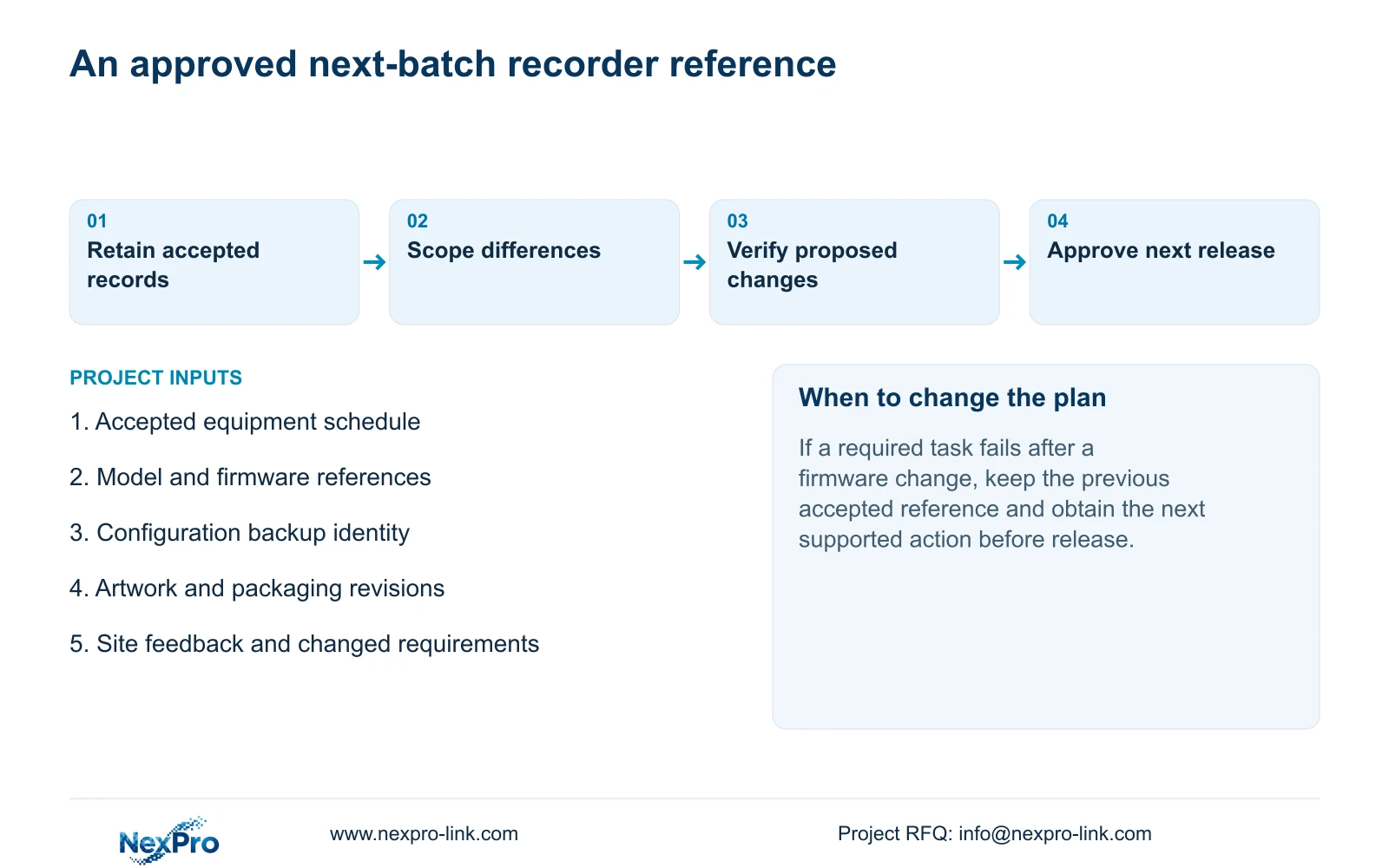
A firmware upgrade requires authority, preservation of relevant data and an agreed maintenance interruption where needed. If a required task fails after the change, record the changed variable and obtain the next supported action. Do not assume every recorder has an automatic rollback mechanism.
Transfer confirmed improvements into the next release record. Keep unresolved observations outside the accepted baseline so later orders do not inherit an unverified correction.
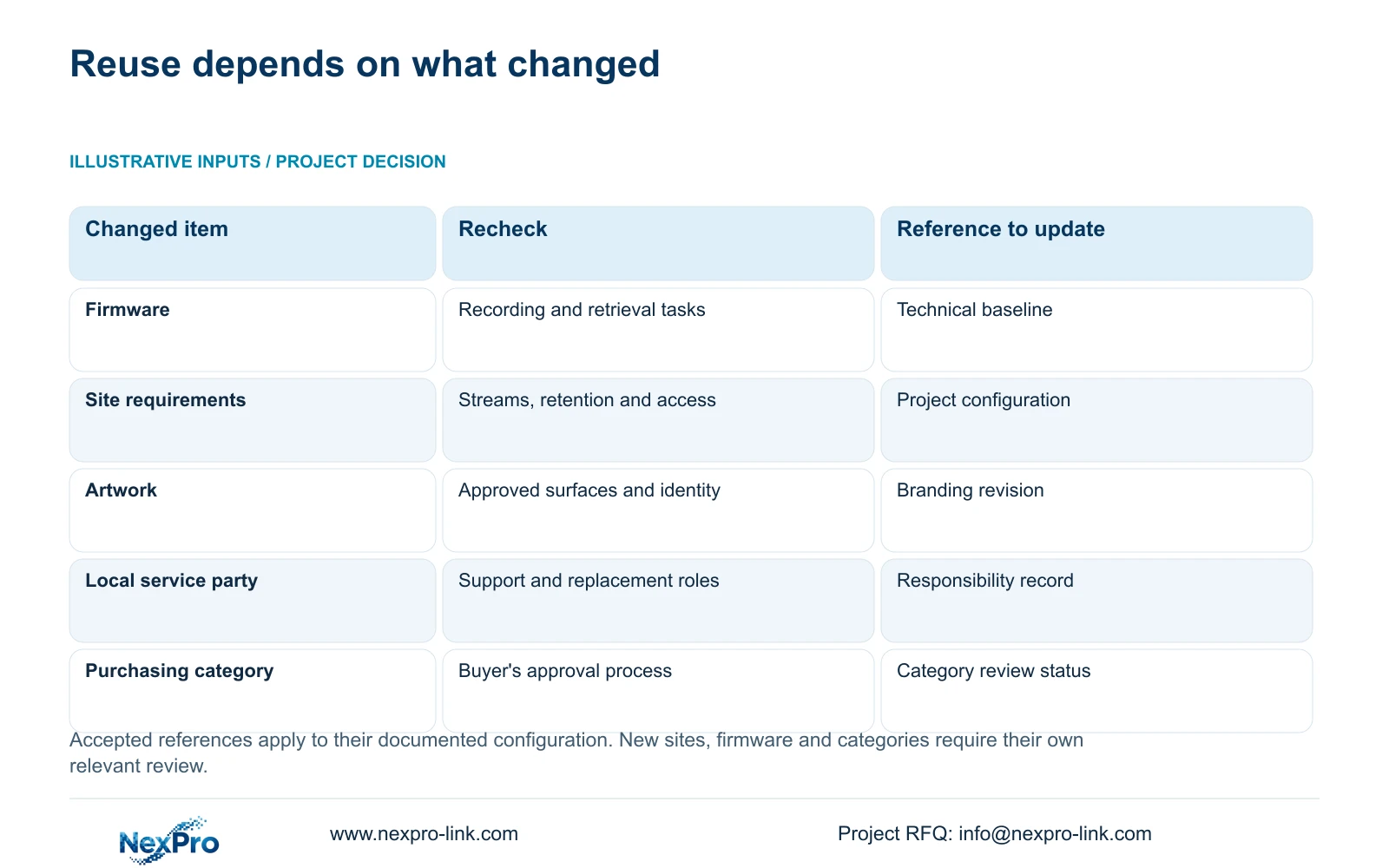
| Repeat-order difference | Required review | Release decision |
|---|---|---|
| Same technical model and firmware | Confirm settings applicability and new-site requirements | Reuse qualified references with site-specific review |
| New firmware | Check recording, retrieval, accounts and required events | Accept only after relevant checks pass |
| New logo or packaging revision | Review artwork and technical identity visibility | Update the material reference separately |
| Different disk or service arrangement | Review retention provision and responsibility split | Revise the scoped equipment and support record |
| New purchasing category | Follow the buyer's category and project approval process | Do not inherit unrelated approval |
Section 05
Maintain a support and replacement scope for each package
Keep the responsible parties for recorder hardware, disks, adapters, site wiring and third-party services in the release record. Use applicable written order terms and the warranty policy for coverage. The manual does not establish warranty duration, local labor or recovery of recorded data.
Review the replacement route when hardware or firmware changes. A substitute should preserve the required operating task and have a confirmed preparation method. Avoid treating a similar housing or matching artwork as sufficient evidence.
Record who handles initial diagnosis, physical removal, transport and local reinstatement. Carry these responsibilities into the next order explicitly; an earlier project's local subcontractor may not serve the new destination.
Section 06
Expand cooperation within the buyer's process
Use the accepted package and actual findings to propose the next defined scope. Supplier registration, purchasing-category approval, brand acceptance and project configuration acceptance remain different decisions. Retain the buyer's existing forms and describe the category being added.
A successful recorder workflow can support discussion of another suitable project. It does not establish that every future package has the same interfaces, retention requirement or service arrangement. Review exceptions before placing them under the repeat-order reference.
NexPro-Link's BOQ and tender support route can help connect the new equipment schedule to the accepted baseline. Branding discussion belongs to the separately defined OEM scope. Neither route replaces site acceptance or the contractor's approval process.
Section 07
Carry the workflow from an office order to a hotel order
Illustrative project scenario: An overseas integrator wants the next office and hotel orders to reuse an accepted recorder workflow. The integrator retains the technical and artwork references, then checks the new camera schedule, recording policy and local support arrangement. Site feedback becomes a documented change only after the relevant task is verified. The intended outcome is a controlled repeat release, not a claim that both projects require identical settings.
Section 08
Can every repeat order use the same configuration export?
Only after confirming target-model and version applicability. The manual gives no universal cross-model import guarantee, and new-site settings require review.
Section 09
Is online status enough to accept a firmware change?
No. Recheck recording and retrieval, usable export, relevant historical footage, intended accounts and required events before updating the accepted baseline.
Section 10
Compare the next order with the accepted package
Send the accepted equipment reference and the next project's changed recording or delivery requirements to info@nexpro-link.com.
Engineering references
These sources support the general planning principles. Always use the selected product's current datasheet and applicable project standards for final design.